Author: Nick Peers

  • Keep your passwords secure with Dashlane for Windows, Mac and Android

    Dashlane, Inc has launched Dashlane 2.0 for desktop and Dashlane for Android 2.0.1, major new updates of its secure password management tool that allows users to securely store sensitive personal details such as online passwords and credit card information via free desktop and mobile apps.

    Both builds gain a complete new user interface, the promise of a “massive jump” in product quality and support for two-factor authentication via Google Authenticator. In addition the desktop build gains a new Security Dashboard feature, while the Android version expands support for tablets and adds in-app browsing.

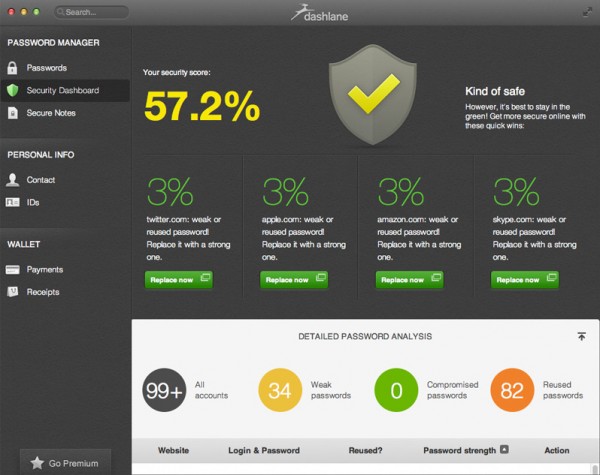
    The Dashlane 2.0 app for Windows and Mac opens with a brand new redesign with new color schemes and contrast levels designed to improve readability as well as the app’s overall look. It also comes with a brand new Security Dashboard feature offering a Security Score, which rates the user’s overall security based on the strength and variety of passwords used. Users also gain a simple list of steps to follow in order to improve the quality of their passwords to boost this Security Score.

    Version 2.0 also promises much more intuitive use through support for two-step and three-field login screens as well as improving the overall auto-login and autofill process. In addition to these features, the desktop also adds another optional layer of security with support for Google Authenticator, allowing users to add two-factor authentication when logging into Dashlane to retrieve sensitive personal information.

    Sadly there are still issues with version 2.0, most notably when attempting to import passwords from other sources, such as browser password managers and competing services such as LastPass and KeePass. These issues have been long a source of frustration for users, and in our experience have yet to be properly resolved as we struggled to migrate our LastPass passwords into Dashlane, eventually succeeding only by using Firefox as an intermediary using the Mac desktop app.

    In the meantime, Dashlane for Android 2.0.1 introduces a number of major improvements and new features. It includes an in-app browser for the first time, allowing users to benefit from the same auto-login and autofill feature set found when using Dashlane on the desktop platform.

    The app also adds full support for tablets and all screen sizes from a single universal app, while the UI has been completely overhauled using the Android Holo Interface. Support for two-factor authentication via Google Authenticator has also been implemented, which requires setting up via the desktop version before it can be used in the Android app.

    All product features are completely free to use, but additional benefits, including support for auto-synchronization between devices, web access to logins and passwords, plus unlimited backup of encrypted data, can be purchased via a Premium license, which costs $19.99 annually.

    Dashlane 2.0 is available as a freeware download for Windows and Mac, while Dashlane for Android 2.0.1 is also available free for phones and tablets running Android 2.3.3 or later. Also available is Dashlane 2.3.1 for iPhone.

  • Feedly lets your RSS feeds live on after Google Reader’s death

    It’s common knowledge that Google is closing its Google Reader service, and that July 1 deadline is creeping ever closer. Now is the perfect time to switch to an alternative service and become acclimatized to a slightly different way of working, and the good news is that you can make the switch in minutes without having to perform any convoluted tricks, thanks to Feedly.com.

    There are two ways to access Feedly — if you’re on a desktop or laptop, you’ll need to install the Feedly for Firefox, Chrome and Safari plug-in, and if you’ve an Android or iOS mobile, you’ll want to install Feedly 15.0.1 instead (or in addition to) in order to access the service.

    Once that’s done, the hard part of migrating your feeds from Google Reader to Feedly is already over. It’s a simple case of browsing to feedly.com in your desktop web browser or opening the mobile app and signing in with your Google account. From here Feedly will seamlessly transfer all your feeds — including their organizational structure — across to its service.

    One of the reasons Feedly does this so effortlessly is because until now it too relied on the Google Reader service, but with that on the way out it’s moved quickly to set up its own backend so its seven million users — three million of which have switched since Google first announced it was dumping Google Reader — will enjoy top-notch RSS aggregation come Reader’s demise on July 1.

    To keep things as simple as possible, Feedly has introduced a new basic list view for your aggregated feeds, to closely match the basic, but simple, approach of Google Reader. You don’t have to stick with that though, as it also provides three more enhanced views for browsing your folders, including one that provides a newspaper or magazine style multi-columned layout with photos, headlines and straplines.

    Navigation is simple via the pop-out list from the left-hand side of the screen, and the mobile and web versions are designed to work in a similar way to make it easy to use Feedly across all your devices — yes, updating your feeds on one updates them on all. The web add-ins also provide a small bookmarklet that shows up in the bottom right-hand corner of screens making it easy to add new feeds, plus share stories via social media and mark them for reading later via Feedly’s own Saved for Later list.

    Even if you don’t plan to stick with Feedly, switching now is a good idea to give you more breathing space after Google Reader closes its doors, but we reckon you might find it difficult to tear yourself away once you’ve worked out all its ins and outs.

    Both Feedly for Firefox, Chrome and Safari, and Feedly 15.0.1 for iPad, iPhone and Android, are available now as a freeware downloads.

    No word yet as to the likely emergence of a Feedly add-on for Internet Explorer, one surprising omission on Feedly’s part.

    Photo Credit: Fer Gregory/Shutterstock

  • Make your Firefox private browsing sessions even more private

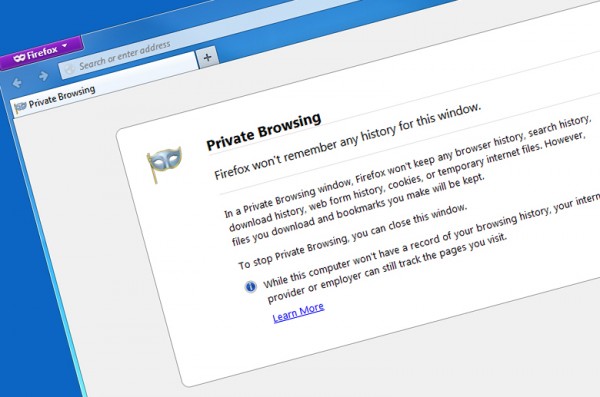
    These days, the ability to browse the web anonymously is built into most web browsers. Firefox has a special Private Browsing mode where no trace of your history — including searches, downloads, web forms and cookies — is kept, although any downloaded files and bookmarks will remain as evidence of your secret browsing session.

    It’s certainly more robust than a general browsing session, but it’s not as secure as it might be. That explains the reasoning behind Private Browsing by PortableApps.com 3.0, a free add-on for Firefox Portable Edition for Windows.

    Firefox Portable Edition is — as its name implies — a standalone version of Firefox for Windows PCs that can be run directly without installation, making it perfect for portable use on a USB drive. It too has the Private Browsing mode offered in the regular Firefox build, but install the Private Browsing add-on and you can go further.

    The add-on is launched separately from Firefox Portable, but then loads the parent application with its own customized profile in place. This sets things up in the same way a regular Private Browsing window would, with privacy risks such as cookies, download history and so on switched off, but it goes further.

    Private Browsing comes with the Flashblock add-in to block Flash-based cookies, which aren’t covered by Firefox, and AdBlock Plus (and a subscription to EasyPrivacy) to block tracking scripts and sites. It maintains its own separate list of bookmarks, allowing you to bookmark sites without them showing up in your regular list. All other Firefox add-ons are disabled too, so they can’t record any compromising information during your private browsing session.

    It’s not perfect — the authors themselves point out that it’ll only protect the data stored on your own PC, and that you’re still at risk from network admins and other snoopers if you’re using an insecure network to transmit and receive data. But as a step up from Firefox’s own Private Browsing mode, it’s well worth considering.

    Private Browsing by PortableApps.com 3.0 is available, along with Firefox Portable 21.0, as free, open-source downloads for Windows PCs.

  • EaseUS Todo Backup adds support for selective file recovery from disk images

    EaseUS Software has released EaseUS Todo Backup 6.0 Free and EaseUS Todo Backup 6.0 Workstation, major new versions of its image- and file-based backup tool. Version 6.0 adds support for recovering individual files from partitions, while WorkStation users also gain tools for simplifying migration between physical and virtual machines.

    The major new feature affecting all users is support for recovering selected files from image-based backups. Previously users could only recover entire partitions or disks, but now users can either recover individual files using the Recovery wizard, or mount the image as a virtual drive for browsing and extracting files.

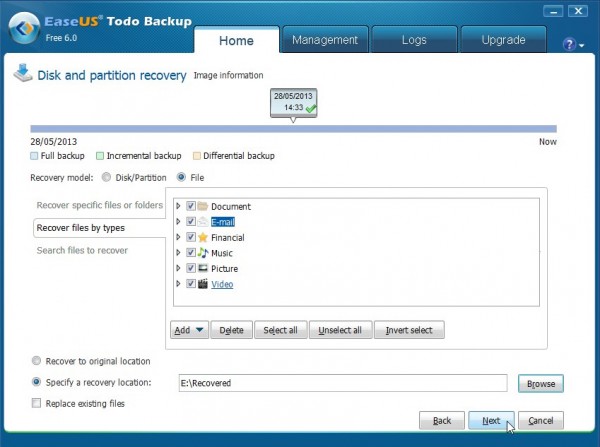
    To recover selected files from a drive image, users should select Recovery and choose File recovery. A list of all backups should be shown — select the appropriate disk and partition backup from the list and click Next. From here, users can opt to recover specific files or folders, search for files to recover or recover files by type using the categories and file types specified.

    Then it’s a choice of either recovering files to their original location – copies will be created where necessary unless “Replace existing files” is ticked — or by choosing a specific folder or drive to recover data to. Users can also mount images via the Tools menu to access them as read-only virtual drives using Explorer itself.

    EaseUS Todo Backup 6.0 Workstation also introduces P2V copy and P2V recovery functions for those operating with virtual environments. These two features make it possible for users to migrate physical hard drives — including operating systems — to a virtual machine with the minimum of fuss.

    EaseUS Todo Backup 6.0 Free is available now as a free-for-personal-use download for PCs running Windows XP or later. Users can purchase the Home version with more features for $29. EaseUS Todo Backup 6.0 Workstation is also available as a free trial download for PCs running Windows XP or later — including Windows Server editions — with the full version currently available for $39. Upgrades from previous versions are also available.

    Photo Credit: Andy Harbin/Shutterstock

  • Opera browser takes a radical left turn with Opera Next 15

    Opera Software has unveiled Opera Next 15, the first look at a major new direction for its cross-platform web browser. Opera Next 15 — which installs alongside the existing stable version, Opera 12.15 — sees the browser jump not one, but three version numbers, such is the radical nature of the new release.

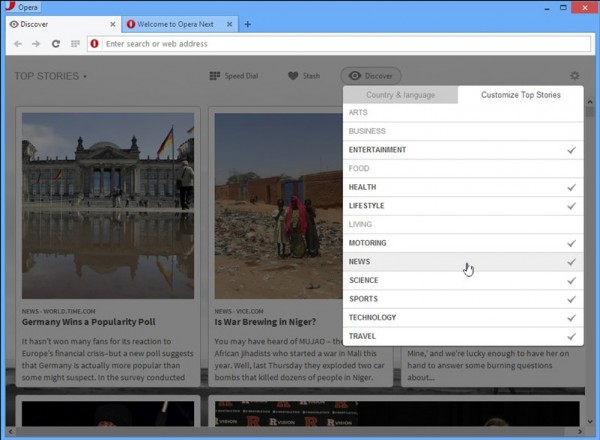
    The major news surrounding Opera Next 15 is the switch from its own Presto proprietary web rendering engine to Google’s open-source Chromium engine. But other changes include a revamped user interface, overhauled Speed Dial page, new Discover and Stash features, plus the dropping of all integrated email features, which will be available as a separate product, Opera Mail, also available in pre-release form.

    Fire up Opera Next for the first time, and it’s apparent that major changes are afoot. The user interface has been rebuilt from the ground up, designed to integrate more deeply with the OS it’s running and provides a more modern, sleek look compared to previous Opera builds.

    Another visible change is the implementation of a unified address and search bar, echoing that found in Chrome and Safari as opposed to the separate bars still used by Firefox.

    The Speed Dial page has also been improved, with users now able to file shortcuts into folders (simply drag one on top of another to create a folder). A new search field also provides users with a quick and easy way to filter Speed Dial entries. The move could be interpreted as signaling the possible integration of Speed Dial shortcuts and bookmarks into a single entity.

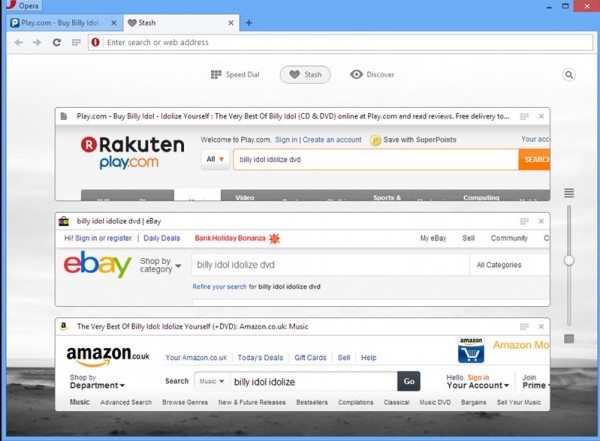
    Two new features added to Opera Next 15 are Discover and Stash. Discover provides users with a place where they can set localization and other preferences in order to be fed relevant content — including news — from a single place. Meanwhile, Stash is designed to make comparing websites easier by allowing users to press a heart button in order to collect together a group of related sites for comparing. Users scan quickly scan the Stash via a resizable page preview, or search all sites within the Stash using keywords.

    At the present time, a number of features are missing from this version — including the Opera Link bookmarks/Speed Dial sync tool, bookmarks themselves and the Opera Sidebar — an acknowledgement that porting features across to the new build is an ongoing process. The Opera Next changelog states “As Opera has recreated its desktop browser, the Next builds will introduce features selectively and iteratively”.

    A New Engine

    Opera’s “engine swap” was announced in February when the company announced it would be dropping support and development of its own Presto engine in favor of Google’s open-source Chromium engine. In April Google announced it was forking development on this engine — more commonly known as WebKit — in favor of building a new engine called Blink. Opera previously confirmed it would be following Google down the Blink path, and it’s the Blink engine that’s been implemented in this release.

    Aside from providing a “standards-compliant and high-performance” browser, the switch also sees Opera revamp its Opera Turbo mode for loading web pages quickly over slow connections. Retitled, “Opera Off-Road”, the feature gains support for the SPDY protocol and promises even faster loading of webpages over slow networks.

    The move was made to free up resources to allow Opera to develop more new features and build new products. It’s already made good on both of these promises with the radical revamp of Opera Next here, plus the launch of Opera Mail as a standalone product.

    Opera Mail basically mirrors the functionality found in the integrated tool from previous versions of Opera, but adds new labeling, filtering, threads and multiple tab support to go with the promise of a fast, sleek “lightweight” mail client.

    Both features are still very much in preview mode, but experienced users impatient to see what’s coming in Opera’s future can download both now. Opera Next 15.00 and Opera Mail 1.0.1033 are both available as freeware downloads for Windows and Mac. Linux versions are in development, but not yet available.

  • Mailbox on iOS is a major improvement over the official Gmail client

    The default Mail app for the iPhone and iPad is capable enough, but sometimes you find yourself craving more. Google Mail users could opt for the official Gmail app, but despite some improvements over Mail, there’s still a bit of clunkiness in there, particularly when it comes to handling larger mailboxes. But there’s another alternative, one that has just been updated to run natively on the iPad as well as the iPhone. That app is also free, and it’s called Mailbox 1.3.

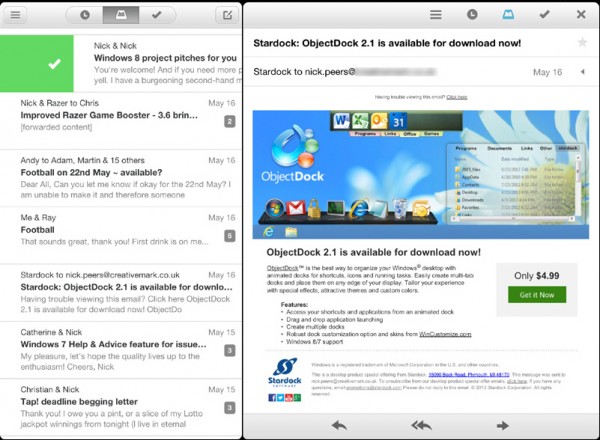
    Mailbox takes a different approach to handling your email, providing you with five separate zones in which to work. Mail lands in your inbox and you simply swipe it in the direction of a specific zone to deal with it in a particular way. It allows you to quickly and easily bring order to even the most disorganized mailbox.

    When it comes to swiping your messages to deal with them, here are the obvious choices: mark it as read, archive it or go the whole hog and delete it completely. You can also quickly organize messages into lists, but the most intriguing option of all is “snooze”. If you’re too busy to deal with an email right now, you can “snooze” individual messages, setting a more convenient time when you’d like them to reappear in your mailbox.

    The focus of the app is very much on letting you power through your messages, hence the use of single swipe gestures rather than the usual select-and-tap approach of other clients. So a quick, short swipe to the right archives your messages (look for the green tick) while a slower, longer swipe to the right produces the red cross that will delete your message if you complete it (just swipe back to undo unwanted actions).

    Similarly, a quick swipe to the left places the message in the Snooze list. You’ll be given a choice of how long to hide the message for, from later in the day or the evening to a month’s time or the vague “Someday”. You can also pick a specific date, but we’re a little disappointed that you can set up a custom time of your choosing too. Something for a future update perhaps? In the meantime, snoozed messages are easily available should you find the time to deal with them — just tap the clock icon, which is basically a shortcut to a special “Later” folder created by Mailbox where these messages are stored.

    When it comes to arranging your mailbox into lists, a long swipe to the left will bring up the options you need — by default, three are set up (to buy, to read, to watch), but you can add your own. These lists are again accessible from other Gmail clients or your web browser via the specially created Lists folder.

    We found these controls simple and easy to use, and powered through a disorganized mailbox with over 400 messages in minutes, finally getting a job done we’d put off for ages. But Mailbox is more than just a tool for organizing your mail, it’s a fully featured mail client in its own right, and we particularly love the way messages are automatically grouped into conversation view, making it easy to keep track of where you are in a particular chat. With the elegant design beautifully upscaled to take full advantage of the iPad’s extra real-estate, we think Mailbox could be a winner, which is why — for now at least — it’s replaced Gmail as our mail client of choice.

    Mailbox 1.3 is available now for free for iPhone, iPod touch and iPad.

    Photo credit: Gina Sanders/Shutterstock

  • Evernote Reminders are a welcome addition

    Over the course of the past week, Evernote Corporation has been updating its flagship Evernote client across all supported platforms. As with most Evernote updates, however, the changes implemented have not been equal, with users of Evernote for Mac 5.1.1 and Evernote for iPhone and iPad 5.2.3 getting the best deal.

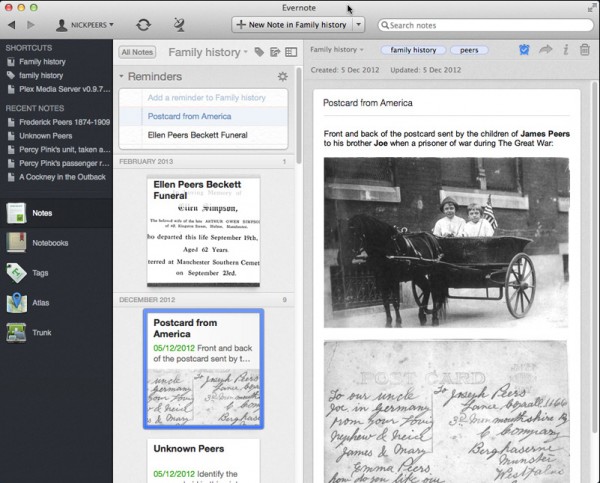
    The big news for Evernote users is the addition of support for reminders — initially on Mac, iOS and the web-based platform. These can be triggered as email or in-app alarms, and are easily set via the small timer button at the top of a note.

    Once the small timer button has been clicked, users are prompted that the reminder has been added. Once a reminder has been set, the note is automatically pinned at the top of the user’s list in a new Reminders section, and notes can be repositioned in the Reminders list simply by drag and drop.

    Users can also configure a reminder with a date and time, leading to an in-app alarm of email reminding the user of a deadline attached to the note in question, which can now also be marked as “Done” when completed.

    Reminders are associated with notebooks, allowing them to be shared with other users too, making it possible to create a hierarchical series of notes for highlighting important entries over others. Shared users can also take advantage of the alarms feature, subscribing to be notified when notes become due.

    While the feature has been universally welcomed, improvements have already been suggested, such as adding scheduled alarms for recurring deadlines. The Evernote team have also confirmed that the feature should be migrating to Windows and Android platforms “soon” (it’s already being tested in a version 5.1 beta for Android devices).

    Other changes to the Mac build include a redesigned vertical list to show more notes on-screen, next superscript and subscript text styles and the ability to edit saved searches.

    Windows users got a minor update last week — Evernote 4.6.6 promised nothing more than unspecified bug fixes. Also updated was Evernote for Android 5.0.5, again a minor update consisting mainly of bug fixes and improvements to the Page Camera mode, which allows Android users to digitize photos of documents and pages. It did add support for the new Evernote Smart Notebook by Moleskine, however.

    Evernote for Mac 5.1.1, Evernote for iPhone and iPad 5.2.3, Evernote for Windows 4.6.6 and Evernote for Android 5.0.5 are all available as a freeware downloads. Users require a free or Premium Evernote account to use them.

  • Chrome for Android 27 introduces fullscreen on phones, tab history on tablets

    Google has released Chrome for Android 27, a major update to its open-source browser for Android smartphones and tablets. Version 27 boasts several key new features, including full-screen support on smartphones and the ability to access a history of previously opened tabs on tablet machines.

    A key improvement on all platforms is the simplified searching tool. When using the omnibox to search the net, it will remain visible when displaying search results, making it easier to both view and edit searches.

    Chrome for Android 27 also introduces client-side certificate support. This means users can now access sites that require certificates, selecting an installed certificate using the browser when applicable.

    Of the platform-specific improvements, smartphone users can now switch to full-screen mode to maximise screen real estate simply by scrolling down the page — the toolbar will disappear, reappearing only when users scroll back to the top of the page again. Tablet users gain access to tab history in turn — simply tap and hold the browser’s back button and the history will appear for easy retrieval.

    The update is rounded off with what Google describes as “a ton” of stability and performance fixes. The update follows hot on the heels of Google Chrome 27 FINAL for desktop, which promises faster web page loading times and improved spell correction among other changes.

    Google Chrome 27.0.1453.90 is available now as a free, open-source download for Android-powered smartphones and tablets.

  • Xara Photo & Graphic Designer 9 introduces a wealth of new features

    Veteran UK developer Xara has released a brand new version of its acclaimed creative design tool, Xara Photo and Graphics Designer 9.1.0. Version 9 concentrates on revamping the package’s photo tools, with the introduction of Photo Healing, Background Erase and new masking tools and photo FX plug-ins.

    Version 9 also adds other new features including a Shape Painter tool, support for graphical bulleting and numbers, and improved font support, with multi-weight fonts now accessible from the Fonts menu and direct support for Google Fonts implemented.

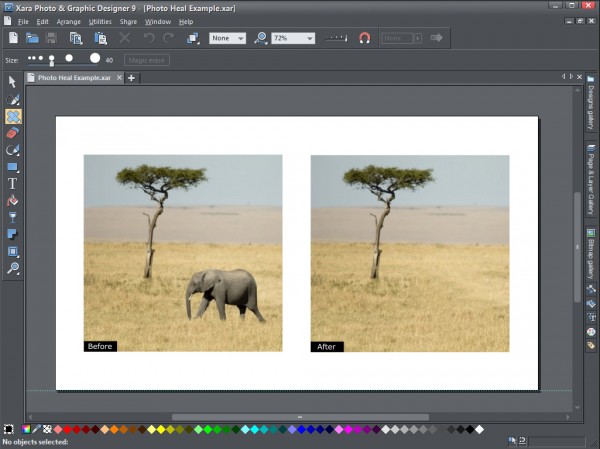
    Xara Photo and Graphics Designer 9’s new photo tools are designed to be both easy to use and effective. The new Photo Healing tool — like those in other packages — is designed to quickly erase spots, scratches and other unwanted blemishes from photos, but is also designed to be used in conjunction with the program’s magic erase feature, making it possible to eradicate large unwanted parts of images with the promise of “amazingly seamless results”.

    The Background Erase tool, meanwhile, is designed to allow users to quickly cut complex images out of photos for placing on alternative backgrounds, while the new masking tools are designed to simplify the task of selecting parts of an image for applying selected effects too. These include both region painter and mask painter tools for selecting or protecting parts of the image from alterations.

    Version 9 also debuts 11 new Photo FX plug-ins. These are used for creating striking effects, such as simulating the effect of High Dynamic Range images with the Fake HDR tool, or marking specific parts of an image as color before rendering the rest of the image in black and white.

    Non-photo improvements
    Away from the photo-editing component, Photo and Graphics Designer 9 also implements a new and easier way to recolor elements in complex grouped objects such as clipart or buttons. Users can now simply drag and drop a color onto the group, then pick the color it’s intended to replace.

    Also added in version 9 is a new Shape Painter tool for painting on to an existing shape to enlarge it, add new areas or adjust its shape or outline — it’s designed to offer a simpler alternative to the existing Shape Editor tool.

    Font support has also been improved with support for selecting multi-weighted fonts in the program’s font menu joined by the implementation of direct support for Google Fonts, the free collection of fonts recently made available by the search engine giant. A new Google Font picker makes it easy to select from the entire collection — currently numbering over 600.

    The new build also sports some minor improvements: fly-out toolbars are now easier to use, JPEG/PNG conversion is now quicker and subtly better thanks to a new converter tool, while version 8 also adds compatibility with Windows 8 touch devices. Many of these subtle tweaks mirror those made to Xara’s Web Designer 9 tool, which was also recently released.

    Xara Photo and Graphic Designer 9.1.0 is available now as a free trial download for PCs running Windows XP or later. The full version retails for $89.99 plus VAT.

  • Instantbird update improves Twitter integration

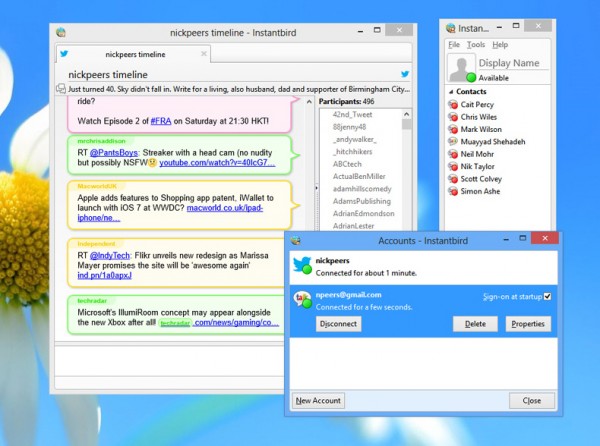
    Open-source multi-messaging client Instantbird 1.4 has been released for Windows, Mac and Linux. The latest version of Instantbird, which provides a central location for accessing multiple IM accounts including AIM, Yahoo, Twitter, Facebook and Google Talk, strengthens its Twitter integration by updating to the Twitter API v1.1, a necessary step to ensure it’s able to communicate with Twitter after June 11.

    Other Twitter changes include the timeline being updated to include all people the user is currently following in the Participants list, while the character counter has also been improved to take into account automatic link shortening, making retweets easier.

    Other changes in version 1.4 include improvements to the IRC authentication process, which now handles bouncers such as ZNC much better than previously. Users can now also easily override self-signed, invalid or out-of-date certificates for IRC servers.

    The log viewer has also been updated so conversations are now grouped by date, while each account now keeps debug logs that are easily accessible via the Account Manager — right-click the account in question, choose Copy Debug Logs and then paste the contents into a text window such as that of an email or a plain text editor.

    Instantbird is built upon the Firefox core, and version 1.4 is now built on Mozilla 20.0.1, and uses libpurple 2.10.7. One side-effect of this change is that it is no longer compatible with Macs running OS X 10.5 or earlier.

    The update is rounded off by a large number of bug fixes, which are detailed in the program’s change logs for interested parties. Instantbird 1.4 is available now as a free, open-source download.

  • Gmail Notifier Pro 5 adds Exchange, SkyDrive support, introduces new RSS server

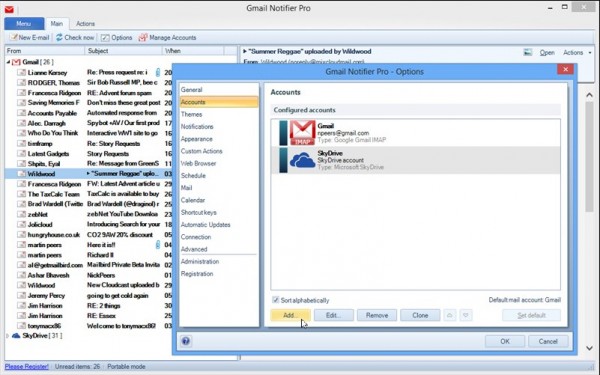
    IntelliBreeze Software has released Gmail Notifier Pro 5.0, a major update of its Windows tool for monitoring various online accounts via the Taskbar Notification area. The tool, which allows personal users to monitor up to two supported accounts without registration, offers more than simple Google Mail notifications, and version 5.0 extends this support further by adding Microsoft Exchange and SkyDrive notifications to its feature list.

    Version 5.0 also adds a built-in local RSS feed server, allowing users to pipe notifications from the program into RSS readers on other platforms, including smartphones as well as computers.

    Gmail Notifier Pro 5.0 also promises better customization options, allowing users to define Notification themes using rules, so context-sensitive notifications can be sent depending on the content of the message. Also supported in this new build is the ability to define custom actions for message operations where multiple operations can be combined.

    Other improvements in Gmail Notifier Pro 5.0 include the ability of the program to monitor the user’s Facebook message inbox as part of their wider Facebook profile, a switch to the new Google Drive SPI and better folder support for IMAP.

    Users also get to choose their own custom encryption key for securing their Gmail Notifier Pro accounts, additional settings appearing in the Options dialogue box and a number of bug fixes, including one that boosts overall IMAP stability.

    Users are also warned about the loss of the Google Reader service from July 1, but the option to use Google Reader accounts remains in the new release.

    Gmail Notifier Pro 5.0 is available now as a free download for PCs running Windows XP or later with the Microsoft .NET Framework 3.5 or later installed in XP or Vista. The free, unregistered version is limited to personal use and supports just two accounts; users can purchase single-user Personal Licenses for $12.95+VAT and single-user Commercial Licenses for $19.95 plus VAT.

  • HandBrake update makes it easier to convert videos into any format

    Popular cross-platform, open-source video transcoder HandBrake 0.9.9 has been released, and despite the version number increment is actually a major update. HandBrake allows users to convert video from a wide variety of formats — including DVD and Blu-ray — into MP4 or MKV files with support for .H264 and FFmpeg codecs.

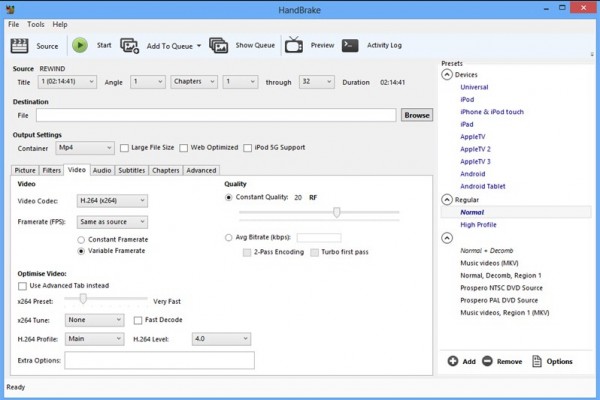
    Highlights in the latest release include support for the .H264 codec’s preset, tune and profile options, Blu-ray (PGS) subtitle support, additional video framerates and filter modes, improved audio remix and an updated user interface.

    Core improvements include the addition of support for Blu-ray (PGS) subtitles, which can be burned in, passed through to MKV (but not MP4) and are capable of working with Foreign Audio Search.

    The deinterlace and decomb filters both gain an additional option — “bob”, which doubles the framerate to reduce artefacts — and users gain four additional framerate settings: 30, 50, 59.94 and 60 fps.

    Audio remix support has also been improved, with additional mixdowns including 6.1 and two 7.1 settings. Users can now also upmix “better-than-Stereo” sources to 5.1 surround sound, and gain the option of discarding one channel from stereo sources to create a single mono source based on left or right only.

    Version 0.9.9 also allows the select of higher audio bitrates as well as lower audio samplerates where appropriate, plus supports audio dithering (TPDF) when converting to 16-bit FLAC. DTS audio decoding is now handled by libavcodec, which adds support for DTS-ES 6.1 Discrete.

    The graphical interface has also been overhauled — the Windows build has now been rewritten in WPF (Windows Presentation Foundation) to work more consistently across a range of devices, and users will notice that new fonts have been implemented along with a subtle redesign. All builds gain new Retina-friendly icons and an updated program icon.

    The program has introduced support for the x264 codec’s preset, tune and profile options. These can be found on the Video tab, but users preferring the greater flexibility offered in earlier versions can restore this by “Use Advanced Tab instead”. In conjunction with this change, the built-in presets have also been updated to take advantage of the new option, with “increasingly suboptimal and irrelevant Legacy presets” being dropped.

    We discovered that one side-effect of the new build is that custom presets lost certain settings, specifically those on the Filter tab. We recommend users make a careful note of existing settings before installing the update.

    Platform-specific changes include HandBrake 0.9.9 preventing Mountain Lion from going to sleep during encoding and scanning, plus users can now drag and drop files into the main window or on to the program’s dock icon to scan them. It also updates Growl support to version 2.0.1, so HandBrake can now use the Notification Center when Growl is not installed.

    Also updated to take advantage of HandBrake 0.9.9 is VidCoder 1.4.20, which takes the HandBrake core and overlays a more user-friendly front end. The latest version of this Windows-only software — also available in 64-bit — takes the latest HandBrake 0.9.9 core, but also adds tweaks of its own, including support for a new portable build and support for adding a custom video player. The full release notes can be read here.

    HandBrake 0.9.9 is available now as a free, open-source download for Windows, Linux and Mac. Recommend system requirements include a 64-bit Intel Mac running OS X 10.6 or later, or Windows Vista, 7 or 8 with Microsoft .NET Framework 4 installed.

  • SteganPEG lets you hide personal data in plain sight

    While it’s unlikely that the fate of your nation depends on it, there may be times when being able to pass on sensitive files to other people is a necessity. The obvious example is to encrypt those files in some way, either by storing them in a password-protected location or by encrypting them on the fly before passing them on.

    The problem with this approach is that it’s rather visible. Your encrypted files by their very nature advertise the fact they contain some form of sensitive data, attracting unwanted attention. So what can you do about it? The answer lies with steganography, and a free tool for Windows called SteganPEG 1.0.

    Steganography has a long history, dating back to Ancient Greek times when it was the process of writing hidden messages in such a way as only the sender and intended recipient would know they existed. With the rise of computers, steganography has taken on a different slant, whereby information — typically entire files — are hidden away inside other files.

    The key to making steganography effective is by drawing no attention whatsoever to the existence of the hidden file. That means the host file must appear to function completely normally, so opening it arouses no suspicion. One of the best ways of doing this is by hiding your files inside images, which open up like any other image, betraying no evidence of the files stashed away inside.

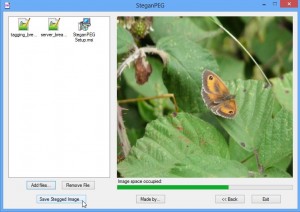
    This is how SteganPEG functions — once installed, fire up the program and you’ll immediately see it’s required for both creating the stenographic file and extracting the hidden files from it later, so your recipient will need their own copy. You also assign a password to your file, which is required in order to unlock its contents. It’s unlikely encryption is involved here, but as the key thing is to simply hide away the file, it’s not necessarily important, unless you’re peddling state secrets, of course.

    Once assigned, pick your chosen JPEG image. When picking an image, make sure it’s not just large enough to store the files you wish to hide away inside, but also not too compressed. SteganPEG works by recompressing the original image to free up enough space for your files to reside in without increasing the size of the original image. This ensures it doesn’t stick out like a sore thumb, but it does mean you may have to try different images before you find one that has enough flexibility for hiding your chosen file or files.

    You can add multiple files to a single JPEG image so long as they won’t increase the size of the original file — a progress bar handily tells you how much space you’ve got left to play with. Once complete, click the Save Stegged Image button to save a copy of the file.

    You can open this file like any other, then send it on to its intended recipient, who fires up their copy of SteganPEG, chooses “Read files from a JPEG image”, supplies the password and then loads the file in. If all is well, they can then save the original files out of the image, all without hopefully arousing any suspicion whatsoever.

    SteganPEG 1.0.0 is available now as a free, open-source download for PCs running Windows XP or later. XP and Vista users will also need .NET Framework 3.5 or later installed.

  • Microsoft improves Skype on the Mac

    Microsoft has launched Skype for Mac 6.4, a major update of its Skype chat platform for OS X users. Version 6.4 is focused on improving Skype’s instant messaging features for better usability, while also introducing support for Simplified Chinese.

    Version 6.4 adds infinite chat scrolling, a feature already present in the Windows build. This allows users to load historical conversations simply by scrolling upwards. This action simply loads messages from the chat history stored on the user’s computer.

    If users find this too tedious, they can pick a point in history to jump back to, simply by right-clicking or [Ctrl]-clicking anywhere in the chat window and selecting Jump Back followed by the period they wish to skip back to, with incremental choices from one day to a whole year all available.

    To help make the chat history easier to navigate, Skype for Mac 6.4 also separates dates from timestamps, and will index all the chat history when first logged in, which enables it to consume less resources once indexing completes.

    Version 6.4 also sees the find function redesigned to display results in the main chat window as opposed to opening a separate one, with the total number of matches highlighted. Recent search terms are stored for easy retrieval, and users can now search using “Starts with” and “Contains” as search parameters.

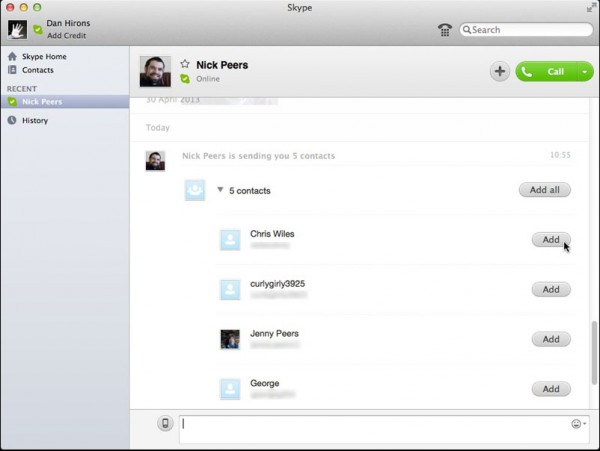
    Other enhancements include improved file transfer, allowing users to reaccept a file when receiving, leaving the file transfer active until the sender cancels it. Contacts are now sent and received differently too, allowing multiple contacts to be received in a block, or accepted one by one. Any existing or blocked contacts in the list are also clearly marked.

    Version 6.4 has removed the Custom Chat Styles feature to promote consistency with other platforms, but users are encouraged to choose Preferences > Messaging > Use Compact Chat Style if the default layout is too large. It also drops support for OS X 10.5 (Leopard).

    Skype for Mac 6.4 is available now as a freeware download for Macs running OS X 10.6 (Snow Leopard) or later. Other available builds include Skype for iPhone 4.6, Skype for iPad 4.6 and Skype for Desktop for Windows users.

  • Firefox 22 Beta improves display scaling in Windows, strengthens privacy

    Hot on the heels of the release of Firefox 21 FINAL, Mozilla has released Firefox 22.0 Beta 1, giving adventurous users a glimpse into possible new features and improvements that may land in the next stable release just six weeks from now. Version 21 includes a number of minor new features and improvements, including better protection against unauthorized third-party cookies.

    There are also platform-specific improvements for both Windows and Mac builds, plus the usual round of tweaks and performance enhancements to round off the update.

    The extra protection against cookies takes another step towards final release, despite stirring up opposition from some ad agencies unhappy with the way it helps counter targeted advertising. By default, all third-party cookies are blocked in Firefox 22 Beta, but users can relax the settings to allow third-party cookies from sites previously visited.

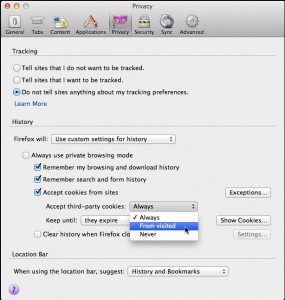
    To switch on this feature, which mirrors that already present in Apple’s Safari web browser, visit Firefox’s Preferences or Options dialog, switch to the Privacy tab and select “Use custom settings for history” before choosing “From visited” under “Accept third-party cookies”.

    Elsewhere, the Windows build implements one major improvement for owners of higher resolution displays by following the display scaling options set in Windows. As a result, when users increase their display scaling, Firefox will automatically display larger text to follow suit.

    One Mac-only enhancement in Firefox 22 is the addition of a download progress bar to the dock icon, allowing users to keep an eye on downloads without having to open the main window. The final new feature sees the Firefox 5 HTML5 audio/video player gain a new Play Speed option, allowing users to slow down or speed up playback.

    Another confirmed change is that plain text files now wrap within the Firefox window, making them easier to read. Developers can now also reveal which fonts are being used on a page thanks to the built-in font inspector (select Fonts in the right-hand pane to access it). One feature that doesn’t appear to have (yet) migrated across from Firefox 22 Aurora, however, is support for using the Pointer Lock API outside of full-screen mode.

    Firefox 22.0 Beta 1 is available now as a free, open-source download for Windows, Mac and Linux. Users can also download Firefox 21.0 FINAL too. Note that Firefox Beta installs over existing Firefox FINAL installations.

  • Process Lasso intelligently manages your system processes

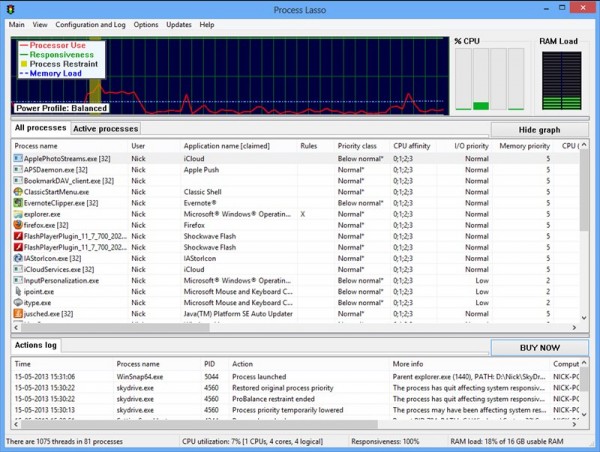
    Tennessee software developer Bitsum has released Process Lasso 6.5 and Process Lasso 6.5 (64-bit), a major update of its performance tool for keeping PCs running smoothly by intelligently managing system processes.

    Version 6.5 represents a major overhaul for the software, with Bitsum promising that it’s been “considerably optimized, profiled, tested and polished”. The latest build also features a smattering of new features and improvements.

    The overhauled code has resulted in Process Lasso reducing its memory footprint and process utilization even further than before, with the promise of improved performance as a result. Another performance tweak sees logging performance optimized thanks to the introduction of a new “flat file” log format.

    This change has been accompanied by new log file rotation, which allows old log files to be archived, improves the “pruning” of existing log files and results in a reduction of the current log’s file size, resulting in faster loading when accessed via the program’s graphical front end.

    One minor GUI tweaks sees a new option added to the View menu allowing users manage the columns shown under the Active Processes tab (users can also right-click the tab itself to select these). The GUI also now shows hard page faults by default, and reports these in the Page Faults column, which now ignores soft page faults.

    The update also includes numerous minor tweaks, fixes and changes to the program core as well as the GUI — a full list can be found in the program’s release notes, which also reveal that compatibility with Windows 2000 and XP pre-SP2 machines has been restored in the 32-bit build thanks to a shift to the VC9 platform toolset.

    Process Lasso 6.5 and Process Lasso 6.5 (64-bit) are both available as free downloads for PCs running Windows 2000 or later. The program functions in trial version mode for the fully featured Pro version before reverting to a cut-down Free build for personal and non-commercial use.

  • Xara Web Designer 9 Premium review

    Not everyone is a web-coding whizz, or wants to learn the intricacies of HTML, CSS, PHP or other web-based programming languages. Xara Web Designer 9 is aimed squarely at those who prefer to design websites using desktop publishing tools, where what you see on-screen is what you expect to see with the finished design. Over recent years, Web Designer has built into a powerful, user-friendly tool that — a few quirks aside — makes designing websites as simple as putting together magazines, newsletters or brochures.

    At first glance it looks beginner-friendly: pick a template, import your text and graphics, and build your site page-by-page at a time. But that does Web Designer a disservice, because if you delve deeper, you’ll find it has all the tools you need to design more complex sites that are attractive to look at, easy to navigate and bursting with support for all the latest technologies, from Flash-based animations to interactive widgets.

    First steps

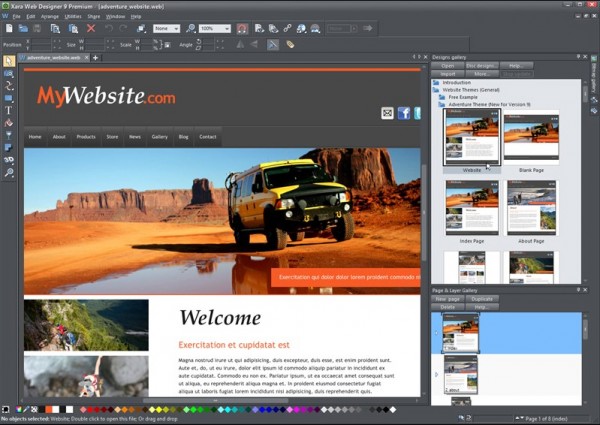
    Fire up Web Designer and you’re presented with the option of creating a page from scratch or using one of the design templates. While it’s tempting to opt for the latter, doing so creates a set of web pages based on the different page designs available within that template — up to 15 are provided with each template. A better option is to create a new, blank site, open the Designs Gallery, pick a template and then drag in individual pages to get started with.

    There are dozens of templates provided — over 20 have been added to version 9 — covering general, and web-presentation themes, all of which can be customized to your own tastes should — for example — you like the design, but detest the color scheme. You’ll also find a new Business-specific templates section, but sadly these don’t come free, costing $15 a pop, although by upgrading to Web Designer 9 Premium you’re given a voucher that lets you download one for free.

    From here, everything is drag and drop and anyone with experience with desktop publishing packages will soon discover just how powerful and versatile the tool is. You can simply replace existing page elements with your own text and graphics, or start crafting pages to your own more demanding specifications.

    It’s when you venture beyond the basics of taking a template and populating it with your own content that you start to appreciate just how clever Web Designer is. Drop in page elements from the various galleries (Web Designer is smart enough to match these to the overall design of the site — if you want it too, of course), then fine-tune them without ever having to type in any HTML or CSS code. This really is a designer’s web-building tool.

    And you’re not restricted to basic building blocks, either. Web Designer makes it easy to add all kinds of whizz-bang-pop elements like YouTube video, PayPal options and social-networking buttons to your site. There are tools for fine-tuning any images you import, plus all manner of shapes, shadows and other clever effects that can be applied to your pages, and all with just a few clicks of the mouse.

    Frustrations

    Web Designer is so good — on the whole — at making page design so straightforward that when it fails to support seemingly logical behavior, the frustration is acute. Why can’t you resize a photo within a frame, for example, or alternatively crop a photo and then apply a simple photo frame border to the cropped image?

    Then there are your attempts to duplicate existing objects in order to extend a page with new content using the existing layout. However we tried duplicating those objects — copy and paste, clone or duplicate, the end result was the same: an exact replica of the original objects, content and all. Change the images or text in one object, and the duplicate’s content changed to match. That’s fine for generating content that repeats over several pages, but where’s the simple option to just duplicate the basic frame, allowing you to change its content independently of the original? Alternatively, how about letting you create your own custom widgets and page elements for dragging and dropping into place?

    And that leads on to another issue: Xara Web Designer is very much a tool for building page-by-page websites, where the content on each page is individually put together. These days, more and more people are discovering the benefits of using Content Management Systems to separate design and content — if only Xara had such capabilities built-in, it would become irresistible. As it is, sadly, its appeal is limited to those whose demands don’t involve populating lots of similar content across a basic set of design templates.

    What’s new?

    If you’re a happy Web Designer MX 8 user, you may be wondering if upgrading is worth your time and money: the simple answer is yes, particularly if your PC has more than 4GB RAM and is running a 64-bit version of Windows. Xara Web Designer 9 Premium is the first build to ship with a dedicated 64-bit version that will take full advantage of any extra memory you can throw at it, helping boost performance.

    You’ll also want to upgrade if you’re looking to provide a site that looks gorgeous on Retina displays. Web Designer 9 automatically generates the high-resolution graphics required to make your sites shine on Apple’s high-res displays — helped immeasurably by its vastly improved compatibility with all the latest HTML5 standards. This ensures graphics load more quickly and scale better when required — your site even knows when to load Retina-friendly graphics and when to stick with the standard-resolution versions to boost page-loading times.
    Web Authoring improvements include direct support for Google Fonts — including a Google Font picker, which can be embedded in your site should the web standard options not appeal. A new “pull” option extends the automatic sizing of pages (and subsequent positioning of page elements) upwards as well as down, while we also love support for drag-and-drop navbar replacement.

    Creating web presentations is also more intuitive and quicker thanks to improvements that are overdue in hindsight: steps aren’t automatically deleted until the site is saved or exported, the current step is shown in the presentation bar (all steps above it are now hidden by default) and adding a new step automatically makes it the current one. Still, better late than never.

    Other new features include a new Google Analytics tab under the Web Properties screen, plus handy new widgets making it easy to embed Google Ads, Google+ buttons and basic tables into your site. Then there are minor — but notable improvements — the fly-out toolbar is less frustrating to navigate now it doesn’t disappear so readily, while JPEG and PNG images are handled just that little bit better too.

    There’s also compatibility with Windows 8 touch, but this will only benefit users with all-in-one PCs or multi-touch monitors as the version of Windows 8 (Windows RT) shipped with tablets can’t actually run any desktop applications, which includes Web Designer 9.

    Verdict

    It’s hard not to like Xara Web Designer 9 Premium. If you’re looking for a DTP-friendly approach to building page-driven websites then it’s got pretty much everything you need to design attractive, yet easy-to-navigate and quick-to-load websites. There are some niggles you may have to circumvent, and the lack of CMS-friendly tools will make it an impractical solution for more content-driven sites, but if your needs match its capabilities then this latest build is well worth taking for a spin.


  • Firefox 21 improves performance and privacy

    Mozilla has released Firefox 21.0 FINAL, a major new version of its cross-platform, open-source web browser for Windows, Mac and Linux. Version 21 gives users more control over their tracking cookie preferences, extends the social API to support four new providers and implements support for tools to help with troubleshooting and performance issues.

    Although Firefox 21 doesn’t have quite the impact version 20 did with its new panel-based downloader, per-window private browsing and ability to close hanging plugins without crashing the entire browser, it still throws in some useful features, all of which have smoothly migrated from the Beta version.

    Version 21 builds on Firefox’s Do Not Track feature to provide users with three options via the Privacy tab of Firefox’s Options dialog. The existing “user says nothing” and “user says don’t track” have now been joined by a “Tell sites that I want to be tracked” option for those who actively wish to be tracked in order to see more personally relevant advertising.

    Firefox 21 also sees the Social API extended to support new providers. Users can now add Asian social providers Mixi and Weibo, plus news aggregators msnNOW and Cliqz. Once installed, users switch between providers by clicking the main button and selecting the chosen provider from the list.

    Also implemented in the latest version is the Firefox Health Report, a tool that provides information designed to improve browser performance while also sharing data with Mozilla regarding the stability and health of the browser installation. The feature is switched on by default, but can be disabled via Firefox’s Options dialog — select Advanced > Data Choices tab to do so.

    At the present time, only preliminary support has been implemented — users can see information about their own browser stats by selecting Firefox Help Report from the Help menu, but in future this should also allow them to compare their configuration with other Firefox users.

    Users also gain an option for restoring removed thumbnails from the New Tab page — one deleting a thumbnail, a small message briefly appears at the top of the screen allowing the user to undo the action or restore all thumbnails removed previously.

    Another improvement sees Firefox monitoring browser start-up times and alerting the user via a Notification bar at the bottom of the screen if startup seems particularly slow — users can then click a button to visit a web page offering advice for reducing start-up times.

    The update also comes with the promise of improved graphics performance, the implementation of Remote Profiling for developers and the removal of support for certain depreciated History APIs as part of Firefox’s drive towards asynchronous History and Bookmarks.

    Firefox 21.0 FINAL is available now as a free, open-source download for Windows, Mac and Linux. Beta, Aurora and Nightly channels should be updated later this week.

  • Vuze 5 makes torrents easier to find and manage

    Azureus Software has released Vuze 5.0, a major update of its open-source, cross-platform BitTorrent client. Version 5.0’s improvements and changes have been focused on its “core functionality”, making the locating, adding and downloading of torrents much easier with this release.

    This has been achieved by tweaking the user interface, Sidebar and Library views to make these features more visible, and are joined by other changes, including better tools for accessing Vuze remotely and a new tagging system for managing torrents.

    Vuze 5.0’s most visible change is found with the new Toolbar Split feature. Toolbar buttons have been moved from the top of the screen to individual view screens, so only relevant options are displayed. In their place go a new search bar and Open Torrents button for adding and finding torrents.

    The Sidebar has also been tweaked, with the Files section now described as My Torrents and moved to the top of the Sidebar view. A new view — Content Discovery — has also been added, into which all sections used for locating content, including RSS subscriptions and the Vuze HD Network, can be found.

    The new Tags feature sits alongside Vuze’s existing Categories feature, and allow users to assign multiple tags to individual torrents. Azureus admits that Tags will eventually replace Categories altogether, but in this release the two sit side-by-side. Tags can be found in the My Torrents section of the Sidebar.

    Vuze 5.0 also adds Torrent Details to the bottom of the library view, saving users the bother of right-clicking a torrent and choosing Show Details to view them. The available tabs including Sources, Peers, Swarm, Pieces and Speed. The Speed view provides a graph allowing users to monitor the performance of a torrent’s upload and download speed over time. A new set of country flags have also been added to make peer locations easy to identify.

    The Vuze Remote UI, a separate web-based app for remotely managing torrents via mobile device as well as remote computer, has also been updated for the first time in over two years. Changes include Torrent Info, new Peers and Tracker views, Files View with Priority Setting, and Meta Search on newer iPhones.

    Vuze 5.0.0.0 is available now as a free, open-source download for Windows, Mac and Linux.

    Photo Credit: Novelo/Shutterstock

  • FileZilla 3.7.0 improves FTP performance

    Open-source FTP client FileZilla 3.7.0 and FileZilla Portable 3.7.0 have both been released. The new build now allows users to view the total transfer speed as a tooltip over the transfer indicators, and replaces the depreciated term SSL with TLS. The update also promises better performance over secure FTP connections and subtle tweaks to the user interface to make the program easier to use.

    Users can now view the total transfer speed by hovering the mouse over the transfer indicators in the bottom right-hand corner of the FileZilla window. Similarly, hovering the mouse over the Host box in the Quickconnect bar now reveals a list of supported protocols: FTP, FTP over SSH, FTP over TLS (implicit), and FTP over TLS (explicit).

    This tooltip also reveals that FileZilla has dropped the use of the depreciated term SSL (Secure Sockets Layer) in favor of the correct TLS (Transport Layer Security) term — TLS is an upgraded form of SSL.

    The user interface has also been improved with this release — users selecting Updates from the Settings dialog box will now see a drop-down menu allowing them to specifically search for stable versions only or include beta versions too. Users do, however, lose flexibility when choosing how often to search for updates — previous versions allowed a specific number of days to be entered between each check, but version 3.7.0 merely offers weekly, every two weeks or once a month checks in addition to the “Never” option.

    Other more subtle tweaks include reworded text when the saving of passwords has been disabled to avoid referring to “kiosk mode”, while navigation has been made simpler by highlighting the former child directory when moving back to the parent folder.

    When users edit files from directly within FileZilla, the new build now uses high priority for transferring the changes back to the server. Version 3.7.0 is also smarter in ignoring attempts to drag and drop files where the source and target are identical.

    A new “Ignore” item has been added to the context menu that appears when right-clicking multiple items, while the program now displays TLS version and key exchange algorithm in both certificate and encryption details dialogs when connecting via FTP over TLS. Version 3.7.0 also fixes a number of bugs, including a memory leak that occurred in the host key verification dialog for SFTP as well as improving handling of legacy DDE file associations.

    FileZilla 3.7.0 is available now as a free, open-source download for Windows, Mac and Linux. Windows users can also download the free FileZilla Portable 3.7.0.

    Photo Credit: Annkozar/Shutterstock