Author: Wayne Williams

  • Clean Master frees up space and resources on your Android device

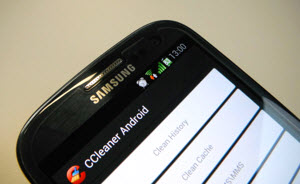
    Piriform’s CCleaner is on its way to Android smartphones, but there are powerful all-in-one cleaning apps already available on Google Play, such as Clean Master.

    The app, which has just received an update, can clean the cache, removing unused files, residual files, and clear search history. The app can also kill running tasks to free up more RAM, and let you uninstall any apps you rarely (if ever) use.

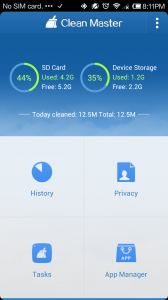
    The main screen shows how much space — used and free — you have on your SD card and in your device’s on board storage. From here you can also access the History cleaner, Privacy cleaner, Tasks, and App Manager options.

    Tap on History and you can view and clear the cache contents (which includes content stored by the likes of Gmail, Facebook, and your web browser). Some items can be selected and cleaned individually, but most can’t. You can also select and remove individual residual files, such as temporary files and very large items, like video clips (make sure you back these up before deleting of course).

    The Privacy section lets you clear individual SMS/MMS conversations and messages, as well as call logs, search history, and content from Gmail, Facebook, YouTube, Google+ and your browser.

    The Task option lets you add a list of tasks and stop and clean any of them, while the App Manager lets you uninstall or backup your apps.

    The new version adds two extra features which can be accessed through Settings on the front screen. There’s a Scheduled Cache Cleaner which lets you set a reminder and specify a frequency (clean every day, every three days, every week, or every 15 days), and cache size target (50MB, 100MB, 300MB, 500MB). The Auto Kill option will clean background tasks automatically and go to work when your device is idle (when the screen is off).

    If a tidy Android device, with the maximum free space and minimum  clutter is important to you, Clean Master is definitely worth an install, especially as it’s free and doesn’t come with any annoying adverts.

    Photo Credit:  ARNICA/Shutterstock

  • ‘NotCompatible’ Android malware now being spread through spam

    Security firm Lookout reports that it has a seen a staggering increase in the number of NotCompatible detections this week. While not a new threat (it first appeared last May), the remote proxy malware has moved on from infecting Android devices through hacked websites and is now spreading via email spam.

    Once installed, NotCompatible turns the infected phone into a proxy which is used to commit online fraud, such as through the purchase of concert tickets.

    In the past five days alone Lookout says it has detected more than 70,000 infections, peaking at almost 20,000 detections per day between Sunday and Monday, with 95 percent of them located in the US.

    The threat is currently being spread from hacked email accounts. It tricks unwary users into clicking a link on their phones which redirects the browser to an “Android Security site” that then attempts to download and install the malware. The emails to avoid mostly have the subject line “Hot News”, although I received one from a friend’s hacked account yesterday that was headed simply “Hey!”

    If you open the link on a computer or iOS device, as I did (in a controlled experiment), you’ll be taken to a fake Fox News article on weight loss.

    To avoid becoming infected, just employ the same commonsense you would when opening an email on your computer. Don’t click any unfamiliar links and don’t open any downloaded files unless you know exactly what they are. You can of course install an antimalware tool on your mobile if you want to be extra safe.

    Photo credit: Lookout

  • Bitrix24 launches free collaborative CRM with integrated project management

    Bitrix24 offers social intranet for enterprises and small to medium businesses, but with a twist — the firm’s cloud-based service is entirely free for organizations with 12 or fewer users and includes 5GB of online storage space and essential tools, such as CRM (Customer Relationship Management), project management, and instant messaging.

    We’ve covered the firm’s service previously, but Bitrix24 has just rolled out a new version of its CRM platform that comes with project management fully integrated. Tasks, calendars and other similar tools are now available from within the CRM module and documents can be stored inside the CRM, attached to entries, and shared with employees (with different rights levels controlling access).

    Explaining the update, Bitrix President Dmitry Valyanov said: “Some CRM vendors now offer integration with third party project management tools and vice-versa. CRM users are no longer satisfied with what’s essentially a database with client information — they want a CRM that allows them to plan, to collaborate with co-workers and to increase personal productivity. SalesForce, for example, has spent almost a billion dollars in the last two years in acquisitions, trying to make their CRM more collaborative. But Bitrix24 is the first vendor that offers free a CRM fully fused with project management”.

    Speaking of the Russian firm’s rapid growth (it only launched last May) Valyanov added: “The decision to make Bitrix24 absolutely free for companies with 12 employees or less had an enormous impact on service popularity. In several Eastern European markets we are now the second most popular cloud CRM, despite being less than one year old. I am confident that this release will boost our visibility in North America as well”.

    Bitrix24 comes with free desktop apps for Windows and Mac OS X, and there are native apps available for iOS and Android devices.

    Photo Credit: T. L. Furrer/Shutterstock

  • Google Translate now lets you build your own phrasebook

    Before you go abroad, or meet someone from another country who speaks a different language, it can be useful to come up with some handy phrases to use. Even if it’s just “how are you?” and “nice to meet you”.

    You can probably memorize the basics quite quickly, but for more involved phrases you may require a bit of help to recall them, which is where Phrasebook for Google Translate comes in.

    The new addition lets you save the most useful phrases for easy reference later on, hopefully also helping you commit them to memory. To use it, just translate something, then click the star icon under the translated text to add it to your phrasebook.

    You can view all of the stored translations by clicking the new Phrasebook icon. If you’re translating phrases into more than one language a drop down menu will let you filter your list by language pair (English > Spanish, English > French, French > English and so on).

    Hovering your mouse over a phrase will display a text-to-speech option and you’ll be able to listen to how a native speaker says it.

    Photo Credit: Lightspring/Shutterstock

  • Average broadband speed in UK homes now in double figures

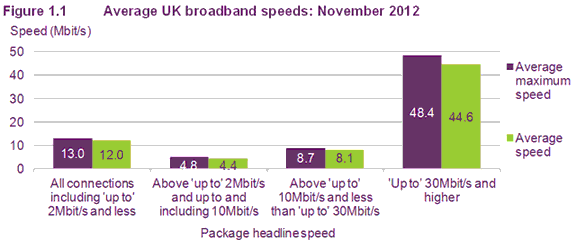
    Regulator Ofcom reports that in November 2012 the average speed of home broadband in the UK hit 12Mbps, up from 9Mbps in May of the same year. As someone with 100Mbps broadband, that still seems very slow to me, but of course there are various factors behind lower speeds — cost and location mainly, plus many people simply don’t need superfast connections (or think they don’t).

    In the report, Ofcom noted that UK broadband speeds have trebled in the past four years, a trend that is set to continue, and likely accelerate, as services offering 30Mbps or above reach more rural areas and become more affordable.

    Ofcom says that 13 percent of all broadband connections are now what it classes as “superfast”, up from 5 percent the year before. The average speed of those superfast connections is now 44.6Mbps, up from 35.8Mbps in May.

    The average upload speeds also increased considerably last year, rising from an 0.3Mbps average in May 2012, to 1.4Mbps in November.

    Ofcom’s chief executive Ed Richards said: “Our research shows that UK consumers are adopting faster broadband packages to cater for their increasing use of bandwidth-heavy services such as video streaming. The increase in the average number of connected devices in UK homes is also driving the need for speed”.

  • Think your broadband is too expensive? It costs $1,753 a month in Cuba

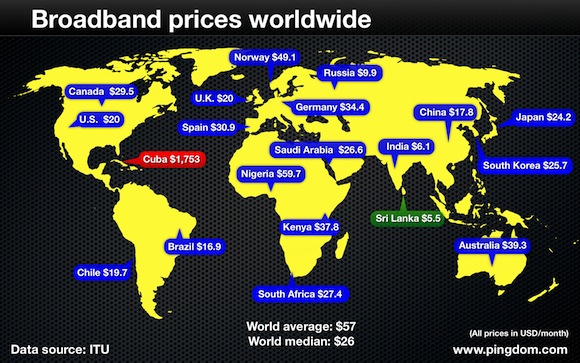
    Uptime monitoring firm Pingdom analyzed the latest report from the International Telecommunication Union (ITU) to discover how much the world is paying for its broadband, and its findings show some incredible variations in global broadband costs.

    While broadband in most of the world’s countries is generally available for between $5 and $60 per month, in Cuba it’s an eye watering $1,753 (the country additionally has no mobile-broadband services available). In Swaziland, the next most expensive country in the list, it’s a lot cheaper, but still comes in at a very hefty $875 per month.

    On the other side of the coin, if you’re looking for cheap broadband your best bet (albeit a rather extreme option) would be to move to Sri Lanka, where fixed broadband costs just $5.50 per month. It’s $6.10 in India, and a further ten other nations pay under $10 a month.

    The low cost of broadband in countries like India and the Russian Federation is mostly down to a high level of competition among the suppliers and the wish of the governments to keep the prices down.

    Pingdom is keen to point out that the prices listed by the ITU do “not necessarily reflect what a customer in the respective country would be paying for their broadband service. It’s instead a value intended to make comparisons between countries easier”. ITU’s figures are based on an entry-level broadband service.

    In the US and the UK, the price of broadband is $20, while in Canada and Australia it’s $29.50 and $39.30 respectively.

  • Twitter launches an official app for Windows 8 and RT

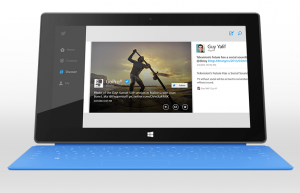
    The lack of official apps for Windows 8 led to me describing the Windows Store as being like a Bangkok night market — full of cheap knock offs. Well today Microsoft’s new OS got at least one big official app, with Twitter arriving for Windows 8 and RT.

    It’s similar in design to Twitter’s web interface, and easy to use with Home, Connect, Discover, and Me tabs down the left hand side. Photos appear nice and large, and you can swipe to view multiple pictures. As you’d expect the app has a live tile, so you can see who’s replied to you, as well as view notifications for replies and direct messages.

    It integrates quite smartly with Windows, allowing you to use also use the Search charm to find Twitter users to follow, and hashtags of interest, and you can share photos or content from another app (such as Internet Explorer) on Twitter via the Share charm.

    If you like to keep an eye on Twitter while getting on with something else, you can snap the app to either the left or right hand side of the screen.

    It’s all nicely done, even if it did take nearly five months to arrive…

  • Outlook.com comes out in support of same-sex marriage — or is it just a marketing ploy?

    I watched an advert for Microsoft’s new webmail service yesterday. It starts by showing a man changing his job from Deliveryman to Stuntman on the website. Next up, there’s a pretty young woman getting married and locking lips with her partner. Afterwards she uses Outlook.com to change her name from Sarah Jones, to Sarah Jones-Brown, and a female friend emails to congratulate her. The advert ends with a voiceover saying “Get email that keeps your friends information up to date automatically”.

    I thought it was a decent, if unspectacular, ad that gets its message across well. Then I scrolled down to the comments. And oh my, the bigots were out in force. Because, you see, the woman in the video was getting married to — shock horror — another woman!

    The homophobes and trolls were, as you’d expect, outraged by the inclusion of a lesbian couple in the clip and the vitriol and ignorance was flowing.

    There is, in truth, absolutely nothing in the video for anyone to be offended by, but of course same-sex marriage is a big deal for a lot of people, and it gets many straight Americans (in particular) very angry and opinionated. My personal view is if someone wants to get married to the love of their life, they should be allowed to, irrespective of little things like gender and race. This is the 21st century after all.

    When I was growing up, I knew people who thought interracial marriage should be outlawed. Times have moved on, and now it’s same-sex marriage in the crosshairs. Homosexuality is no longer the “love that dare not speak its name” but it’s still a challenge, and in a lot of places a complete impossibility, for gay couples who want to show their commitment to one another to get hitched. (As an aside, I do wonder how many of the men who are firmly against same-sex marriage enjoy lesbian porn? Two women getting it on, well that’s fine, but two women in a loving relationship? That’s an abomination!)

    A lot of tech firms stand up for same-sex marriage. Last month 278 companies, including Apple, Google, Facebook, Intel, Cisco, and Amazon, told the US Supreme Court that federal same-sex marriage restrictions hurt their businesses, affected employee morale, and forced them to betray their company principles. Many employees of tech firms like Google have contributed videos to the excellent and very worthy It Gets Better Project.

    The Tide Turns

    This morning, returning to the video, I see the comments under the advert are now mostly positive. The homophobes and trolls have been shown short shrift and the majority of the negative remarks from yesterday have been removed by their shamed authors. The top comment, from SilverAnicore, now says:

    I love it when well-known companies make such a public and natural statement against homophobia and bigotry – by focussing on the thing they support, love, not the things they hate.

    Love the ad.

    The second most popular comment, from RetroishDude asks:

    Why couldn’t someone be happy for a couple that has just gotten married? Weird.

    Big businesses do sadly have to play it carefully when it comes to promoting or supporting homosexuality, in the same way they have to be careful when stepping into any political minefield. Last year the century-old creme-filled cookie brand Oreo created an advert showing a rainbow-layered cookie in time for LGBT Pride month, captioned it with “Proudly support love!” and faced an instant backlash. But for all the negative comments Oreo received, it got a lot more overwhelming support and positive press in the end, and that is likely what Microsoft was hoping for, and now seems to be getting.

    Has the advert generated a lot of interest? Undoubtedly so. If it had shown a man and a woman getting spliced a lot less people would have watched it, or cared, or commented about it. I wouldn’t have mentioned it.

    Was Microsoft brave to feature a lesbian couple getting married? Yes, I suppose it was, in some small way, and regardless of whether it was done to show support for same-sex relations, or to get people talking about the advert, or more likely a bit of both, the software giant deserves to be applauded for its decision.

    I do wonder, though, if there wasn’t a degree of calculation in this advert. If someone at Microsoft decided that lesbians might be less offensive than gay men to their target audience. Though maybe I’m overthinking it, because really, ultimately, it’s just an ad showing two people in love getting married and using Outlook.com to announce a name change.

    There’s a lot to be annoyed at Microsoft’s webmail service for — still letting damn spam into my inbox for starters — but showing same-sex marriage in an advert? Not so much.

  • Soluto: Our vision has always been to let people do more with their technology [Q&A]

    I’ve been a user, and a fan, of Soluto since the Tel Aviv-based PC management service launched back in 2010. It helped me reduce my boot time by a few seconds, but more importantly it halved the boot time of my in-laws’ PC. A move to the cloud means the service now lets me remotely solve issues on several PCs belonging to less tech-savvy friends and family, and I’d definitely recommend it.

    Soluto offers various useful features — it can cut boot times and de-clutter browsers; it will let you remotely manage system security, and even add a Start menu to Windows 8. By collecting anonymous user data, Soluto also offers a fascinating insight into PC use around the globe. Did you know, for example, that in Vietnam the average PC takes a minute less to boot up than PCs in the US and UK? I chatted to Tomer Dvir, Co-founder and CEO of Soluto, about the service, and he told me how it’s evolved and how the Soluto community is actively working to find solutions to the system and software crashes that plague PC users everywhere.

    BN: For the benefit of any readers not familiar with Soluto, can you tell me about the service and what it does?

    TD: Soluto is a service for managing multiple PCs, designed for the small business IT person or just anyone who’s helping friends and family with their PCs.

    Soluto makes it simple to support PCs — it gives visibility into the managed PCs from any browser, wherever you are.

    It helps you solve PC issues and undertake standard maintenance work (such as installing and updating apps, shortening boot time, monitoring PC hardware) without the need for using remote access. In addition, it allows you to keep the PCs you manage in top shape from anywhere even when they’re off without disrupting people’s ongoing work.

    Most importantly — Soluto notifies you by email when there is an important task on an individual PC that requires your immediate attention, thereby avoiding the need to constantly check the PCs.

    BN: Soluto used to be a desktop program for speeding up Windows boot then it switched to the cloud, and added the ability to remotely manage/fix other people’s PC. Why the change?

    TD: Our vision has always been to let people do more with their technology.

    When we started building our first product, we focused on bringing the best out of a single PC. As we progressed, we wanted to let people manage more than one PC and let them do that from anywhere, which naturally led us to build a web-based service with remote access capabilities.

    BN: You launched at TechCrunch Disrupt and won the competition. How did that affect the business?

    TD: Launching Soluto at TechCrunch Disrupt and winning the competition was an awesome experience and a huge surprise for us (we launched a PC management service in a room full of 2,000+ Macs).

    The immediate effect was a boost in downloads, and seven weeks following the competition Soluto had more than 500,000 downloads in over 150 countries. We didn’t expect something that crazy and weren’t ready to scale up so fast. We had to improve our solution so we could expand quickly; therefore, we decided to move to the cloud.

    In addition to the technical aspect, the user scale we reached generated huge amounts of feedback that was really eye-opening with respect to the direction people wanted Soluto to take. We quickly moved to the next phase and started working on a service which helps people manage multiple PCs.

    Beyond that, there were the obvious memorable media moments, like being featured in the NY Times or being picked as Top Windows Software at Lifehacker in 2010.

    If you’re an Internet entrepreneur, especially if you’re building a consumer service, we strongly recommend checking out TechCrunch Disrupt as a launch platform.

    BN: Soluto has an option to allow Windows 8 users to switch to classic desktop mode and bypass the Start screen. What made you decide to add that as a feature?

    TD: We were lucky to be one of the companies that had an opportunity to review Windows 8 before it was launched and quickly realized that some people might prefer to keep using the old Start menu and desktop (as many people just don’t feel comfortable with changes). We’ve decided to let those people work the way they like.

    Even among Soluto’s employees, some love the new Start screen, while others prefer to keep using the old Start menu.

    BN: You’ve recorded PC boot times across the world, what countries are the fastest and what are the slowest?

    TD: We’ve recently released some interesting stats regarding boot time. One of the analyses we did was average boot time per different countries. The fastest countries are Vietnam (2:28 min), Brazil (3:06 min) and Germany (3:00 min), while the slowest countries are the UK (03:27 min), the USA (03:26 min) and Japan (03:20 min). In addition to the country stats, you can find some really cool facts there, for example — the average person spends no less than 1.6 hours a month watching his PCs start up.

    BN: What type of PC data do you collect and how do you use it?

    TD: The PC data collected from our users is technical information required to help them perform standard maintenance for the PCs they support and solve PC issues. We never keep any personal Information — only technical info such as hardware and software installed, PC crashes and non-responsive apps events, usage of browsers and installed toolbars.

    Based on this data, we provide our users with better visibility into their network and the PCs they manage. In addition, reports are being produced so that users can better measure and monitor their PCs — how much storage PCs are consuming, how much time is being wasted on boots and crashes, average power cost and power consumption, to name but a few examples.

    In addition, we aggregate all of this data anonymously and provide our users with recommendations about what other people do to help them make decisions on boot items, toolbars, apps they’re using etc.
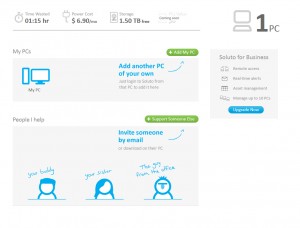
    BN: When programs crash Soluto tries to find a solution, but in my case never does. Does Soluto find solutions for a lot of problems?

    TD: Helping users solve crashes was always part of our vision. In a typical week, more than 300,000 crashes are detected by Soluto and in respect of every crash we collect a lot of technical information about the crashing application and other processes running during the crash. This information can help our users learn more about the crash they’ve experienced. For our community users, this information is very helpful when trying to solve a crash. Our community already helped in solving part of the crashes detected and today every time there is a crash on one of the PCs you manage, which we have a solution for, you get an email with the full solution and details on what to do next.

    Unfortunately, not all crashes have solutions yet, and there is still a lot of work to be done in that area. We encourage our users to join the community and contribute from their experience and knowledge.

    BN: How does Soluto make money?

    TD: Soluto has different pricing plans for both home users and IT businesses to accommodate the needs of our diverse user base.

    Home users can upgrade their account and enjoy features like remote access. They can also use Soluto for free up to a limited number of PCs.

    IT businesses can choose the package that works for them depending on the nature and size of their business by going here http://www.soluto.com/business.

    BN: What makes Soluto worth paying for as an IT solution?

    TD: Soluto gives IT professionals a different experience from any other tool out there today. It’s an offline service which works even if the PCs you’re supporting are off or in a different location. You don’t have to constantly check in and see what’s going on with your PCs as the service is proactive — it will notify you when there’s something important to do in clear actionable emails. In addition, Soluto helps you measure yourself and your network by providing visibility to stuff like asset management, power consumption and PCs performance. For business users it also includes a remote access feature.

    And most importantly, Soluto is designed for people. We believe IT is all about people who happen to also use PCs. That’s why the service communicates with both sides of the relationship — the IT person and the supported person. We have also added features like QuickQuestion, which lets the people you support communicate with you and ask you questions when they need your help.

    IT people using Soluto can really stand out as IT professionals — the people they support will understand what they’ve done to help them with their PC, and they’ll appreciate them for it.

    Photo Credit: fotoscool/Shutterstock

  • Nokia Lumia 720 and 520 available for pre-order in the UK

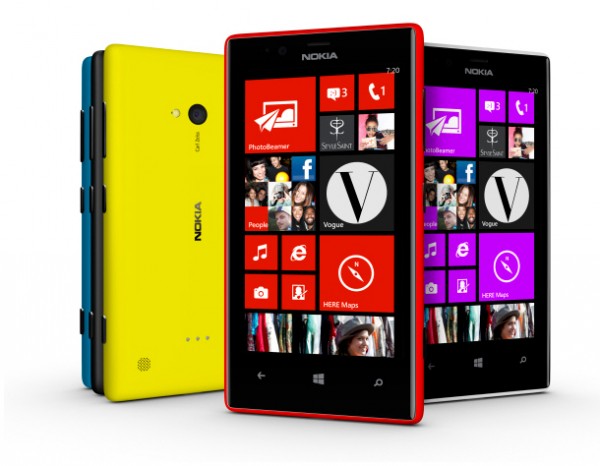
    Finnish phone manufacturer Nokia’s latest Window Phone 8 handsets, the mid-range Lumia 720 and the entry-level Lumia 520, will go on sale in the UK from the 1 April, but would-be purchasers can pre-order the devices now.

    Contract-free prices will vary slightly depending on the retailer (naturally). Clove will be selling the Lumia 520 for £169.99, while the Lumia 720 is priced at £299.99. Unlocked Mobiles has the Lumia 520 for £159.98 and the Lumia 720 for £294.98. For comparison, in the US the Lumia 520 costs $185 and the Lumia 720 $338, both before taxes.

    Both handsets were launched at the Mobile World Congress in Barcelona. The Lumia 520 boasts a 4-inch display, at a resolution of 800 by 480, and is powered by a 1GHz dual-core Snapdragon processor. It comes with 512MB of RAM and 8GB of internal storage.

    The 720 has a 4.3-inch display at 800 by 480 with a ClearBlack filter for better outdoors viewing. It has the same specs as its sibling, but boasts a rear 6.7-megapixel camera and a front-facing shooter with a 1.3-megapixel HD wide angle lens for taking better group shots.

    When Nokia announced the Lumia 720 it said the smartphone would initially only be available in the Asia Pacific market, so it’s good to see it coming to the UK so swiftly.

  • Is there anything more annoying than a pair of talking shoes? Probably not

    Art, Copy & Code has partnered with artist Zach Lieberman, Google, and interactive collective YesYesNo to create what it calls a smart talking sneaker with personality.

    The Talking Shoe, which Google has been showing at the South by Southwest (SXSW) tech conference in Austin, Texas, includes an accelerometer, gyroscope, Bluetooth and other everyday technologies, that combine to “translate the wearer’s movements into funny, motivating and timely commentary”. In the video that shows off the sneakers, example phrases include “This is super boring” (when you’re just sitting around), “I love the feeling of wind in my laces”, “Are you a statue? Let’s do this already” and “Call 911 because you’re on fire”.

    Apparently what the shoes say can be posted to Google+ by the user, sent to real-time ad units, or broadcast to the world via onboard speakers.

    The shoes are a very early prototype (the design, which includes a fat speaker and a circuit board on the tongue, wouldn’t look out of place in Back to the Future), and it’s not something that’s intended to actually ever make it to market — at least not in its current incarnation — but as with Google Glass they hint at a future filled with wearable technology.

    Obviously, no one would ever want to own a pair of sneakers that shout embarrassing things like “You’ve made a very proud shoe” when you take them off, but we can all see the possibilities offered by Google Glass and there’s been a lot of buzz about Apple’s rumored iWatch.

    What do you think about the idea of wearable tech? Inevitable and the next step forward, or a ridiculous idea that you would rather avoid altogether. Comments below please.

  • CCleaner is coming to Android ‘soon’

    Although there are many free system cleaners available for Windows and Mac OS X, CCleaner is one of the most popular, and for good reason. It’s thorough, trustworthy and very easy to use. It’s among the first programs I always install on a new system.

    The good news for Android owners is developer Piriform is working on a new version of its cleanup tool specifically for the mobile platform that will offer one-click cleaning to “help keep your Android devices running like new”.

    Unfortunately there’s no word on when it will be available. Piriform says only that the app is currently a “work in progress” and there’s no firm release date yet. However, the Android cleaner is undergoing internal testing at the moment and the developer says “we’re very happy with how it’s looking” so that sounds promising.

    Will you be installing it on your Android when it becomes available, or are you of the mindset that it’s not really something that’s needed on mobile devices?

  • Average UK adult spends 3.9 years of their entire life using a mobile phone. At a guess

    There are surveys covering all manner of topics, many of which have been commissioned purely by companies hoping to grab some headlines for their products and services. Take this new survey from MobileInsurance, some UK mobile phone insurer I’ve never heard of (since I’ve never insured a phone in my life — that’s partly what my home contents insurance is for).
    The firm apparently asked 2,314 mobile phone users aged 18 or over from around the UK just how long they spend on their phones every day. That’s phoning people, sending texts, using apps and playing games. And they received an answer of 90 minutes a day, which works out to 32,850 minutes a year, or 22.8 days, or — if you want the ultimate figure — 3.9 years of your entire average adult lifespan. That’s a lot of time spent playing with your phone. And all complete rubbish of course.

    For starters, do you know how long you spend on your phone? No. You could guess a figure, which I suspect is what pretty much all of the responders have done. I personally have no idea, at all, how long I spend on my phone on average. Since I also use an iPod touch for notifications, and an iPad for other tasks, it makes it very hard to say exactly how much time I spend looking at all the different screens combined, let alone what the figure is broken down by device. So that estimate of 90 minutes a day might be right, it could be entirely wrong. You don’t need to survey over 2,000 people to get that figure, you could just make it up yourself.

    It depends on the day, on your situation, on your age, on your device — even on your provider. I once spent over an hour just trying to access a website from a place with hardly any signal. I know it’s an average figure they’re claiming, but I’m not sure I could actually even begin to guess that with any degree of accuracy. It could be anything. 90 minutes, 180 minutes, 30 minutes. No clue.

    Jason Brockman, Director of MobileInsurance.co.uk, said: “I was amazed to see how much we use our mobile phones over the course of a year and even our whole adult lifetime. To see that we text, call, browse the net, use apps, take pictures and more for almost 4 years in our lifetime is astounding”.

    No it isn’t Jason. You do anything for any length of time — like eating, sleeping, having sex, watching TV — it all adds up. If you spend five minutes a week looking for lost car keys that alone totals 11 days of your life wasted.

    The survey did bring up some marginally more interesting results though. When asked what they most used their phones for, the recipients stated the following:

    • Browsing the internet — 24%
    • Sending texts — 21%
    • Making phone calls — 17%
    • Using apps — 15%
    • Emails — 13%
    • Taking pictures — 6%
    • Other — 4%

    If anything I’m surprised that making phone calls rated so highly. I’d have thought apps would be higher too, but it depends on what type of phones the people surveyed actually own.

    Do you know how long you spend on your phone on a daily basis, and what do you mostly use it for?

    Photo Credit: Adam Radosavljevic/

  • Kindle Paperwhite is my new favorite gadget [Review]

    When I wrote Why I Love Kindle back in February I said I was intending to upgrade to a Kindle Paperwhite soon. Three weeks later, timed so I can buy a Kindle copy of my own book (my publisher only supplies free paperbacks), and that’s exactly what I’ve done.

    The Kindle is one of those very rare devices that you don’t really need to upgrade. New features, an improved screen, touch support – it’s all well and good, but when you’re reading something you’re pretty oblivious to anything other than the words on the page. Or rather the screen. That said, moving to the Paperwhite from a second generation Kindle is a huge leap forward.

    The big difference of course is the Paperwhite comes with a frontlit, high-res capacitive touchscreen. A frontlit screen means exactly what it says. It’s lit from the front. So instead of a light shining into your eyes, it shines on the screen. This means you can read the Kindle comfortably at night without the need for a torch or reading light. It also has another benefit. It brightens up the screen, so instead of a grey-ish display you get one that’s white. Paperwhite in fact.

    Because it’s touchscreen, there are no actual buttons to worry about, except the on switch at the bottom of the device. Moving around is just a case of touching the left and right sides of the screen to turn pages, and tapping the top of the display to access the menu. If you want to look up a word you just press and hold it for a bit, then let go and the definition pops up. You can share and highlight text or add notes in the same way.

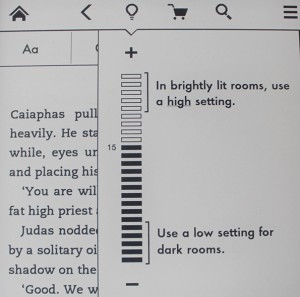
    The Paperwhite lets you access books stored on the device or, if you prefer, in the cloud, and the top menu lets you adjust the screen brightness (turn it up for brightly lit rooms, or dim it for darker locations), go shopping for new books on Amazon, and access the options. You can switch between list and cover view, sort your books by creating collections, sync and check for items and launch the experimental browser. The settings screen lets you turn Aeroplane Mode on or off, configure Wi-Fi, and access device and reading options.

    Compared with my second generation Kindle, the Paperwhite is tiny. It’s smaller all round, thinner and lighter but with a slightly taller screen. Of course my old Kindle had a large keyboard on the bottom so that’s part of the reason for the difference in size.

    The text is sharper (the PPI has risen to 212 from 169), which combined with the frontlight makes reading more pleasurable. Well depending on what you’re reading of course. You still get the ghosting, as well as the E Ink flicker when the screen refreshes itself but it’s faster and so less noticeable.

    A friend who owns a Paperwhite said she struggled a bit with the device because she found it a little awkward to hold one handed without accidentally touching the screen and calling up menus or flipping pages. I haven’t experienced that problem, but that might be just how I hold it, or down to the fact I’ve shelled out on a case that makes the device easier to grasp.

    Although Amazon was having a sale on third-party cases when I purchased my Paperwhite, I ignored those in favor of buying Amazon’s official Leather Cover in Ink Blue. This only fits the Kindle Paperwhite and automatically turns the e-reader on when you open it (so you need never use the one physical button if you don’t want to). A lot like the Smart Case on my Apple iPad.

    Just one more chapter…

    There are two features new to me that I quite like. Time to Read is very clever and analyses the speed you read at and gives you an estimate of how long it will take you to read the next chapter, or the entire book. If you’re wondering if you have enough time to read the next chapter before turning in for the night, it can tell you with reasonable accuracy.

    The other feature is X-Ray. This shows you information about the important characters in the book or on the page. It requires the book you’re reading to have this feature enabled, and a lot of books won’t (my new novel doesn’t for example). That said, although I’ve tried X-Ray out and think it’s quite clever, I don’t imagine I’ll be using it much, if at all.

    I’ve only had my Paperwhite for a short while, but already I’m loving it. I’ll be keeping my second generation Kindle because I like the physical keyboard and will use it for making notes on my next novel, but for day-to-day reading, I’ll be permanently attached to the new device, and as I do a lot of reading at night, the combination of the frontlight and Time to Read means I’m already powering through my current choice of book.

    If you own a non-Paperwhite Kindle, or another eBook reader, do you have any plans to upgrade, or are you happy to stick with what you’ve got? Comments below please.

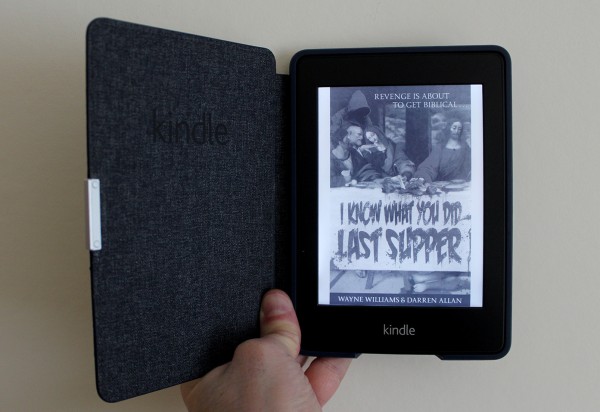
    If you’d like to buy a copy of my novel — I Know What You Did Last Supper — I believe Amazon might just have it in stock. You can also read an extract here.

  • Android Ice Cream Sandwich encryption broken with the aid of a freezer

    When Google released Android 4.0 (Ice Cream Sandwich) back in 2011, it introduced a new data scrambling system designed to protect sensitive user information from snoopers who successfully managed to bypass the lock screen.

    It’s strong security, but a team of German researchers have managed to crack the encryption by freezing a Galaxy Nexus and using a toolset called FROST (Forensic Recovery Of Scrambled Telephones) to retrieve contact lists, browser histories, and photos (basically everything you’d want to keep private).

    The process, detailed here, involved firstly unlocking the bootloader and then packing the Galaxy Nexus into a freezer bag and putting the device inside a 15 degree Celsius freezer for an hour until the phone temperature was below 10 degrees. Once cold, they turned the phone on to check it was working, dismantled it, reassembled it, and put it into fastboot mode.

    From there (still acting quickly) they connected it to a Linux PC via USB and flashed the pre-compiled, frost.img recovery image file and were able to use the software to decrypt the user partition.

    There’s something amusing about breaking Ice Cream Sandwich encryption using a freezer (perhaps they tried Gingerbread with a cup of tea initially) but the method works because cooling the RAM chips slows down the speed that data fades from them, giving the crackers more time to access the phone’s contents.

    Having cracked the Galaxy Nexus, the researchers say they plan to try out their system on other Android devices.

    If you have a Galaxy Nexus and fancy trying it for yourself — and are prepared to accept the risks involved with sticking your phone in a freezer — you can download the FROST recovery image and everything else you’ll need from the website.

  • Running out of space in your Google Apps Gmail account? FreeSpace offers the perfect solution

    When Google first introduced the world to Gmail back in 2004, its 1GB of free storage space for messages seemed unbelievably generous. How times change. Since then of course, it’s upped the figure to 10GB, but for a lot of people that’s nowhere near enough. Businesses get a much more substantial 25GB through Google Apps, but even that can be restrictive — especially if you have to send, receive and store a lot of large attachments.

    Cloud-to-cloud backup and recovery firm Backupify can’t do anything about the lack of space for consumers, but it is offering a new free solution for firms. FreeSpace actively monitors the amount of space available in Google Apps Gmail accounts and makes it easy to free up as much space as you need, whenever you need it.

    Currently if you hit the 25GB ceiling, you have to manually go through your inbox deleting messages to be able to continue sending and receiving emails from your choked account. If you’ve ever had to do this, you’ll know it’s a frustrating and incredibly time consuming process.

    FreeSpace avoids that situation by automatically identifying large attachments and giving you the chance to download or delete them, freeing up space instantly and with the minimum of effort. It only targets the attachments, not the conversations themselves.

    Explaining the reason for FreeSpace, Rob May, CEO of Backupify said: “As a backup provider for Google Apps we have seen first-hand the incredible data accumulation within our customers’ domains. We built FreeSpace to ease the burden of managing these growing accounts while still being able to preserve the valuable company data that they contain”.

    Google Apps users interested in trying FreeSpace can sign up to the service here. Once you’ve chosen the account to use (specifying if you’re an admin or a user) the service will scan your account and display a list of attachments, including their size of course, for you to select and do with as you will. I’ve been using FreeSpace for a while, and frankly it’s incredibly handy and definitely something I’d recommend.

    I just wish it was available for my close-to-bursting personal Gmail account.

    Photo Credit: Marko Tomicic/Shutterstock

  • Microsoft fined $731m after a ‘technical error’ led to it breaking its EU antitrust promise

    Wow. You don’t mess with the EU antitrust regulators. This is something Microsoft has discovered to its cost after being landed with a 561 million euros ($731 million) fine for failing to promote a range of other browsers to Windows users in the European Union (EU).

    As part of a settlement that followed an EU antitrust investigation back in 2009, Microsoft agreed to offer a Browser Choice Screen pop-up to European customers which would allow them to choose which browser they wanted to use — rather than simply just forcing Internet Explorer on them. This followed an investigation triggered when Norwegian browser maker Opera complained that by bundling IE with Windows Microsoft was effectively killing the competition.

    The screen, which first appeared in March 2010, provided logos and links for Firefox, Maxthon, Opera, Chrome, and Internet Explorer (presented in a random order). It was supposed to run until at least 2014, but the Windows 7 Service Pack 1 release in February 2011 removed the feature. It has since been reinstated, 14 months later, but that’s not good enough for the EU watchdog.

    “Legally binding commitments reached in antitrust decisions play a very important role in our enforcement policy because they allow for rapid solutions to competition problems,” Joaquin Almunia, the Competition Commissioner said. “Of course, such decisions require strict compliance. A failure to comply is a very serious infringement that must be sanctioned accordingly”.

    As huge as the fine is, it could have been much, much worse for Microsoft. The EU antitrust regulators could theoretically have fined the Redmond, Wash.-based technology giant up to 10 percent of its global annual revenue. Which would have amounted to a staggering $7.4bn.

    Of course the watchdog would never have actually done that — it’s not in anyone’s interests to level that degree of fine on a major corporation — but it’s sobering to know the EU regulators actually have that degree of power.
    The $731m figure was arrived at because Microsoft fully co-operated with the watchdog at every stage of the second investigation set up to determine what had happened.

    “I hope this will make companies think twice before they ever think of breaching their international obligations,” commissioner Almunia said in a statement. Or rather an understatement.

    While Microsoft blames a “technical error” on the reason for the Browser Choice screen’s disappearance, it’s the fact that it remained MIA for 14 months that was the company’s ultimate undoing.

    In a statement released this morning, Microsoft said: “We take full responsibility for the technical error that caused this problem and have apologized for it. We provided the Commission with a complete and candid assessment of the situation, and we have taken steps to strengthen our software development and other processes to help avoid this mistake — or anything similar — in the future”.

    Photo Credit: zimmytws/Shutterstock

  • Google Play gift cards now available in UK supermarkets

    Apple has offered its iTunes gift cards through various UK high street retailers and supermarkets  for years now. It’s taken a long while, but Google is finally following suit.
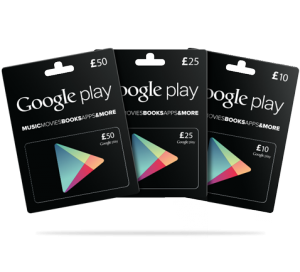
    Google Play gift cards, in £10, £25 and £50 denominations will be available from today in Tesco and Morrisons stores. The roll out is happening slowly so they might take a few weeks to reach every location.

    The gift cards can be used to purchase apps, music, books, and movies — but not app subscriptions, magazine subscriptions, or hardware or accessories — and they can be redeemed on the Google Play site, or directly on your Android device.

    Google Play gift cards originally launched in the US last summer where they are available to purchase through the likes of Target, Walmart, Staples, and RadioShack.

  • BBC bringing iPlayer to Windows Phone ‘soon’

    The BBC’s excellent on-demand and catchup TV service iPlayer is available for both iOS and Android devices, although owners of phones and tablets running Google’s mobile OS remaining slightly short-changed when it comes to features compared to their Apple OS counterparts.

    Windows Phone users must feel perpetually short-changed at the moment I’m sure, but they too will soon be able to get iPlayer. There’s just one catch.

    Instead of releasing a dedicated app for Microsoft’s mobile OS, the BBC will be rolling out a shortcut application that will give users with a Windows Phone 7.5 or Windows Phone 8 handset access to the BBC iPlayer website via a live tile.

    According to Cyrus Saihan, Head of Business Development, BBC Future Media, “This shortcut will wrap the BBC iPlayer mobile website together with our media player. Hopefully these and other developments will help to expand our online reach further. Our latest figures show that over 650 different device types can access BBC iPlayer”.

    A shortcut application is hardly the same as a dedicated app, but it’s the best that Windows Phone owners can hope for. The BBC says it has no plans to create a special version of iPlayer for Microsoft’s platform.

  • Green Throttle turns the Kindle Fire HD into a games console, Samsung Galaxy S III next

    This year is certainly going to be a big one for games consoles, with a new PlayStation and a new Xbox (rumored) to be arriving before Christmas. But it’s Android-based gaming systems that’s the big trend at the moment, with the likes of OUYA and GameStick grabbing their fair share of the headlines.
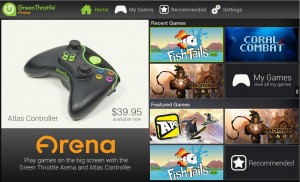
    Green Throttle is another Android games system, but it’s one that doesn’t require you to make space for a dedicated console under the TV. Instead you just need to buy one or more Green Throttle Atlas controllers, download the free Green Throttle Arena app from the Amazon Appstore, and hook up your Android tablet to a TV using a micro HDMI cable.

    At the moment the system only works with Amazon’s Kindle Fire HD, but support for additional devices is coming, and not just tablets. One of the next devices to be supported will be the Samsung Galaxy S III. Provided your device is capable of displaying 1080p at 60fps, it should, in time, be compatible with Green Throttle.

    The controllers connect to your tablet via Bluetooth, and cost $39.95 each, or $89.99 for a two player bundle which also includes a micro HDMI-to-HDMI cable and a micro USB charger. The setup supports up to four controllers, so you can enjoy multi-player games with friends.

    At the moment there aren’t many games available for Green Throttle, but the ones currently on offer are free, and of course there are more in development.

    Does Green Throttle sound like something of interest, or are you more excited by the likes of OUYA, or Microsoft and Sony’s new consoles? Comments below.