Author: Wayne Williams

  • Anyone can mine for bitcoins, even you

    Although the decentralized digital currency first appeared in 2009, Bitcoin’s popularity has really taken off in recent weeks and the value of the coins has skyrocketed since January. The world’s largest Bitcoin exchange, Mt. Gox, currently has the currency listed as being worth $209 per coin.

    Although you can purchase bitcoins, the real way to get your hands on some is to mine for them using a computer. The process involves solving a complex mathematical algorithm and it becomes harder to find blocks of bitcoins as time goes on because there’s only a set number of them in the system (the total number of bitcoins in existence will never exceed 21 million).

    Anyone can mine for bitcoins, although attempting to find coins on your own is now very difficult because so many people have jumped onboard the digital gold rush in recent weeks. Check out the Bitcoin mining profitability calculator to see the average generation time for a solo block.

    You can however, increase your chances of making money by joining forces with others and mining in a pool.

    The trouble is, although it seems everyone is talking about Bitcoin at the moment, understanding what it is, and how to get started may seem a bit confusing to first timers. I’d recommend you read this article on Business Insider, browse the official FAQ and watch this excellent video from Duncan Elms which will tell you everything you need to know about the digital currency.

    To join in on the Bitcoin craze you’ll need a wallet, and a miner. Launch GUIMiner and go to File, New Miner. Choose the type you want, and then give your miner a name. Select a server and go to the website to create an account and then create a worker or copy the details of the one created for you. Log into GUIMiner using the worker details, and then click the Start Mining button.

    50Miner is also very good.

    Are you a bitcoin miner? And if so what has your experience been like? Have you made any real money from it?

    Photo credit: ppart/Shutterstock

  • EE to double the speed of its 4G network in the UK

    EE has announced plans to double the speed of its 4G network in 10 British cities, increasing the maximum theoretical speed to 130Mbps, or around 80Mbps in the real world. The mobile operator will also be doubling the average speeds for 4GEE customers to more than 20Mbps.

    Double-speed 4G, as the improved offering will be known, will be rolling out to Birmingham, Bristol, Cardiff, Edinburgh, Glasgow, Leeds, Liverpool, London, Manchester, and Sheffield by the summer.

    Olaf Swantee, Chief Executive Officer, EE, said of the move: “We are ensuring that the UK remains at the forefront of the digital revolution. Having already pioneered 4G here, we’re now advancing the country’s infrastructure again with an even faster, even higher-capacity network, and at no extra cost to our customers”.

    According to EE, mobile data traffic is expected to grow by as much as 750 percent within three years, partially down to the speeds and possibilities offered by 4G.

    “Since we launched 4G, we’ve seen a huge shift in the way people are using mobile,” Swantee explains. “Video already accounts for 24 percent of all traffic on our 4G network — that’s significantly more than on 3G. Maps, mobile commerce, sat-nav tools and cloud services are all seeing a similar rise. Mobile users in the UK have a huge appetite for data-rich applications, and this will only grow as people become more familiar with and reliant upon next generation technologies and services. Our double speed 4G network will provide developers with the quality and speeds needed to develop the next wave of killer 4G apps. Whatever innovations they come up with, we’re ready”.

    By doubling the amount of the 1800MHz spectrum it currently allocates to its 4G network, EE’s UK mobile internet service will be one of the fastest in the world, bringing it line with Japan and placing it comfortably ahead of the US.

    EE has set itself a target of reaching one million 4G customers by the end of 2013. Rival mobile services O2, Vodafone and Three will be switching on their 4G services in the coming months.

    Photo credit: Digital Storm/Shutterstock

  • Support for Windows XP ends a year from now, should you care?

    In exactly 365 days Microsoft will stop offering support for its still widely used but venerable operating system. XP has certainly had a good run. Microsoft will have supported the OS for 12 years, which shows how incredibly popular it was (its success also perhaps speaks volumes about how much better than its successors it was perceived to be, I’m looking at you in particular Vista).

    But now Microsoft is dropping extended support for XP, so what does that actually mean for consumers and businesses who are still using the OS?

    Windows XP, like all new versions of Windows and Office products, received a minimum of ten years of support — five years Mainstream Support and five years Extended. Mainstream — or full — support, includes incident support, hotfixes, security updates and so on. For XP this ended in April 2009. Extended support is only available to commercial customers and consists purely of security updates.

    On 8 April 2014, Microsoft will stop providing any form of support to any customers and more importantly, it will stop issuing any security patches for XP.

    For consumers this likely won’t have too much of an impact — after 12 years of bug and security fixes, you’d hope Microsoft would have found and eliminated any major problems by now. For businesses it’s more of a concern, and in the case of larger organizations it’s already very late in the day to migrate to Windows 7 or 8. Microsoft says average enterprises can take 18 to 32 months to reach full deployment.

    Microsoft understandably wants firms to switch from Windows XP Professional to Windows 8 Pro (rather than Windows 7) and so is offering a 15 percent discount now through June 30 as part of its Get2Modern offer.

    I’m intrigued though — are you or your workplace still using XP, and if so do you have any plans to migrate to a newer operating system any time soon, and if so, which one?

  • Yes! Microsoft really does need to rethink Windows 8

    A fortnight ago I asked a simple question — Is it time for Microsoft to make big changes to Windows 8? BetaNews readers weighed in on the topic and as I’d hoped it made for some fascinating and insightful reading.

    Although plenty of people support Windows 8 and the Modern UI, a lot of readers feel that yes, Microsoft should seriously consider making changes to its divisive OS and accept that the “one size fits all” model isn’t working.

    Nvic sums it up for many:

    At this point, I’d say giving in and putting in a classic UI option would be their best first move. I’m one of thousands who refuses to use the OS due to it requiring third party modification to be usable on a PC. Their second option if they don’t want to do that: Stop selling to PC users and offer 7 again.

    If anything, forcing PC users isn’t making them get used to the new UI, it’s making them less productive and causing them to develop a hatred for the product. Making those users happy would be the smart first move. With them quieted, they can then focus on the tablet market this product was really meant for.

    WP7Mango agrees and thinks Microsoft should give buyers a clear choice:

    There is absolutely no need to change course IMHO. Microsoft already has a perfectly good operating system for traditional desktops — Windows 7.

    I’d go with your second option — stop selling Windows 8 on non-touch-screen devices and supply Windows 7 instead. Those who want to upgrade their PCs to Windows 8 can still do so — it’s then ultimately their choice. Once Windows 8 is updated so that it is easier to use without a touch-screen, then default to shipping with Windows 8 (or whatever updated version it’s called).

    But for touch-screen device, Windows 8 is absolutely the best option, and especially if it’s on high-end hybrid touch-screen devices equipped with a Wacom stylus.

    Cecile comments:

    It was a mistake to offer W8pro on regular computers. I added to my W7 and I regret it. W8 on a machine that is designed for touch is great, but piggy back to get the new interface was a BIG mistake. Some hands on advertising in person in stores would have been better. Microsoft never seems to LEARN a hard lesson.

    Froderik makes an interesting suggestion:

    MS should forget the failed one size fits all strategy and release platform specific Win9 beta editions for Desktop / Tablet / Server!

    Thom Frost thinks that might be going a little too far, observing:

    Well the underlying OS could be the same just a UI change is all that would be needed. What MS did wrong is force the same UI on everyone.

    It’s a statement that Antony Clark fully agrees with:

    Brilliant comment. The OS could indeed be the same with UI choice. Forcing the UI as they did is nothing more than an Apple-ish move. Force what you think is best on the consumer to sell new product because you feel you know best for all. It’s why I don’t buy Apple, and why I’m starting to not like MS either.

    That the debate over Windows 8 remains so lively and passionate clearly shows that Microsoft continues to have a problem on its hands with the new OS. There’s no question that Windows 8 works much better on touch screen devices than on the PC, and many customers are refusing to upgrade from Windows 7 purely because of the Modern UI.

    Maybe Microsoft needs to accept making a concession to the legions of non-touch consumers is necessary to drive Windows 8 adoption. There’s no shame in listening to your customers and admitting that Windows 8, as a concept, is ahead of its time. By making a slight course correction to the PC version (rather than a full U-turn), Microsoft could yet still change public opinion and give its troubled OS a second shot at glory.

    Photo Credit: Stuart Miles/Shutterstock

  • Switching from Google to Microsoft, part 3 — A positive Outlook.com

    As someone who switched from Hotmail to Gmail in 2004 and then never looked back, moving to Outlook.com has been quite a weird experience (setting it up was fun in its own right). Some people hate Gmail’s interface, but if you’re used to it, using anything else seems odd.

    That said, I’ve adapted to Outlook.com pretty quickly. It feels a bit like going back in time, using an interface similar to the ones I used in the past, but it doesn’t feel dated — quite the opposite actually — and I’ve grown to really like it in the short period of time I’ve been using it as my email service.

    There are some elements I miss about Gmail. Message previews for example. When a message arrives in Gmail, I can instantly tell if it’s worth opening or not because I can see the first lines of text. Some messages just say “OK” for example and I can get everything I need from the preview.

    I’m a big Labs user, so I make good use of features like Undo Send which lets me cancel sending when I realize I’ve made a mistake — failed to attach something or missed off a CC — but equally there are some elements of Outlook.com I really appreciate.

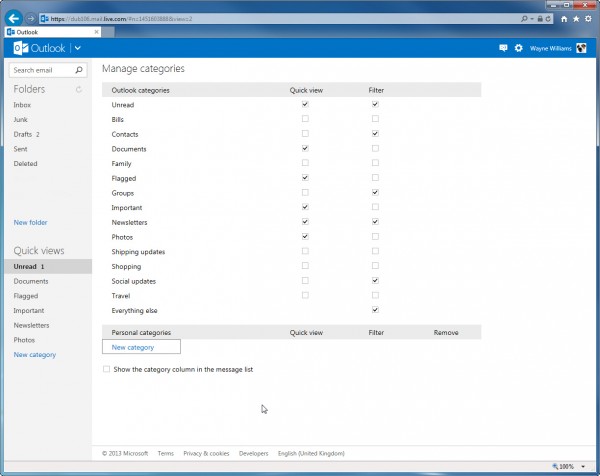
    The Quick Views in particular are really handy. I like that I can quickly view emails that have documents or photos attached, that I can see just view unread messages (as I can in Gmail) and that I can trawl through newsletters. Adding additional emails/senders to categories takes seconds via a drop down menu.

    I’ve got used to the message pane in Outlook.com. I couldn’t decide initially if I wanted to turn it on or not, but now it’s active I find it very handy. I can have the pane at the bottom or on the right — and as I have dual widescreen monitors, it makes sense to use the spare real estate and go for the latter option.

    In Gmail I can send exceptionally large files through Google Drive. Outlook.com lets me do the same using SkyDrive.

    The lack of IMAP support in Outlook.com is an annoyance, but there are ways around this and I rarely delete emails anyway (which is why my primary Gmail account is 82 percent full). Outlook.com offers unlimited space, which is great.

    Spam, Spam, Spam

    So far, so good. But now we get to the problem I have with Outlook.com, and it’s a problem I’ve had since I signed up for an account — spam. I get a lot of junk mail. In Gmail I never see it. It goes straight into my Spam folder and I never have to worry about it. Occasionally, and it’s very, very occasionally, some spam slips into my inbox, but it’s quickly dispatched and I never see it again. Sometimes, even less occasionally, real messages make it through into spam. I often miss these because Gmail is so good at filtering junk I rarely bother to look in my Spam folder.

    Despite the fact that Gmail removes any spam before forwarding on clean messages to Microsoft’s webmail service, I continue to get spam in my Outlook.com inbox that’s linked to either my Outlook.com address or the Hotmail account I had previously.

    I use the Sweep option to delete and block all future messages from the spam senders, but while this has had a huge impact on the amount of junk mail I receive, it hasn’t stopped it entirely. I know I can switch to the Exclusive junk email filter and optionally block content from unknown senders, but that all seems a bit extreme to me.

    On a related note, I went into my Junk folder after having previously just ignored it, as I do with Gmail, and found 20 or so messages — blatantly not spam — sitting there. Messages that Gmail knew were clean, but which Outlook.com had tagged as undesirable.

    It’s become clear in the couple of weeks that I’ve been using Outlook.com that I can’t trust the service to just handle spam, as I do with Gmail. I have to get much more hands on (managing safe and blocked senders myself, for example). It’s not a problem — and over time I think the issue will diminish to the point that I no longer even think about it — but at the moment it’s still slightly annoying to me.

    But I like how easy managing messages is in Outlook.com. The bar at the top makes it easy to do everything I need to with an email. I prefer the way Gmail lets me search for messages but that might be partially down to conditioning.

    On the mobile side of things, accessing Outlook.com through iOS is fine, the mobile version of the site is decent, and there’s a passable Android app too, so I’m fairly well covered. I have niggles about all of them, but I have niggles about Gmail on mobile too.

    The question I’ve asked myself a lot, and which I’ve yet to fully answer, is whether at the end of my trial period if I’m going to stick with Outlook.com or switch back to Gmail. I’ve settled into Outlook.com nicely and I don’t actually miss anything major about Gmail, with the exception of the message previews (I hadn’t realized how much I used to them to visually locate messages I was looking for until the preview lines were no longer available to me). Right now at least, I’m leaning towards making my switch to Outlook.com permanent…

    Provided I can just stop that last annoying bit of spam reaching my inbox.

    Anyone else here made the switch from Gmail to Outlook.com and what was your reason for doing so?

    Photo Credit: 3Dstock/Shutterstock

  • With its new video calling feature can Vonage Mobile really take on Skype? [Q&A]

    On Tuesday, Vonage introduced free video calling into its mobile app for iPhone and Android, rounding out a suite which already offers features like free app-to-app calls, texts, photo and location sharing, as well as international calling.

    I chatted to Nick Lazzaro, Vonage’s SVP Product Development, Information Technology and Managing Director Mobile Services, about the new addition, the company’s plans for the future, and what he thinks is next for the mobile industry.

    BN: Tell me more about the new video capability in Vonage Mobile.

    NL: We’ve launched Vonage Mobile with video calling as part of the ongoing expansion of our mobile platform. Vonage Mobile lets users make video calls to other app users with terrific image quality and high-definition voice. Video is available now for Android and iPhone devices and allows users to make free video calls over Wi-Fi and 3G/4G. The Vonage Mobile app is a free download from Google Play and the iTunes app store, and it’s easy to register, invite friends and start making free video calls immediately. To use the feature, users simply tap the “Video” button from within the app to connect their video call to another app user. If the person being called is not available, the caller is able to send a free text message letting them know they were trying to call.

    BN: Why add video calling to Vonage Mobile now?

    NL: Our goal is to continue to make Vonage Mobile the most comprehensive communication solution for voice, messaging and now video — and improve upon the user experiences already provided by other apps. Our first order of business was to deliver free app-to-app calling and messaging and, true to Vonage’s heritage, ultra-low international long-distance calling. With this foundation, video was our most logical next goal.

    BN: What are the features of video calling with Vonage Mobile?

    NL: We’ve worked to make Vonage Mobile video calling as seamless and flexible as possible, so while making video calls on 3G/4G or Wi-Fi, users can toggle between front and back cameras, switch between voice and video mid-call, mute the line and use the app with Bluetooth.

    BN: Skype has similar offerings. What are the difference between Vonage Mobile and Skype?

    There are several significant features that differentiate Vonage Mobile. First, Vonage Mobile allows you to access your existing contacts to build a global personal free calling and texting network. Users can invite multiple contacts via SMS to join their free calling and texting community, and for each friend who downloads and registers for Vonage Mobile, users will earn $1 of credit (up to $10) as part of the app’s Referral Program. The app also mirrors your mobile phone experience — and uses your existing mobile identity — to make a phone call or send a text message. Vonage Mobile also offers international long distance calling with per-minute rates that are, on average, 30 percent less than Skype and 70 percent less than major carriers.

    BN: Vonage became well known for home phone service via VoIP. What motivated the addition of mobile, and what are the company’s plans for the future?

    NL: Our Vonage home service continues to be very popular — especially with the unlimited international long distance calling offered by our flagship Vonage World plan. But with the explosion of mobile, our customers were asking for greater mobility and we’ve delivered that through Vonage Extensions and Vonage Mobile.

    Vonage Extensions lets our subscriber customers extend their home plan for free to a second phone line, including a mobile phone. Our Vonage Extensions app for iPhone and Android enables one-touch international calling anytime, anywhere over 3G/4G or Wi-Fi. Today, 28 percent of our customers have signed up for Vonage Extensions and one out of four Vonage international long-distance calls is originated from a mobile.

    Vonage Mobile gives any Android or iOS user the opportunity to tap Vonage’s global network to make ultra-low cost international calls, plus make free app-to-app voice calls, texts and now video calls. Our plan is to continue to deliver new innovations that solve today’s consumer calling problems — whether those are mobility, convenience, cost, flexibility or network.

    BN: This would seem to transform how Vonage defines itself to consumers, right?

    NL: We’ve been defined as a telco company or a VoIP provider, but we see ourselves today as a technology company. We apply our innovations in technology and software to solving communications problems for consumers, and that’s where we believe we provide the greatest value for consumers and the business marketplace as the communications world continues to converge and compress across the globe.

    BN: With the number of OTT (Over-The-Top) apps on the market, do you believe major carriers are beginning to see a need to integrate more OTT communications apps to stay competitive?

    NL: We’ve seen an increasing innovation in communications and it’s creating a compression in the pricing and a migration of communications to the lowest-cost networks. It’s great for consumers and I think carriers are taking notice of this trend. Some are developing their own OTT apps and many may look to partner with OTT providers who can help them more quickly participate in this growing global communications trend.

    BN: It seems the mobile industry is constantly evolving and pushing for the next best thing. What do you think is next for mobile? Where do you see the industry headed?

    NL: There is a great convergence in communications as more communications networks and devices proliferate in the consumer marketplace. Simplifying this experience for consumers and helping them manage their communications and their growing social graphs is going to drive a certain amount of innovation.

    There is also a great compression in international communications pricing for voice, messaging and roaming, which is fostering the migration of communications and data traffic to the lowest cost solutions.

    Consumers will play a role by demanding solutions that have superior user experiences and are easy to access and incorporate into their everyday lives.

    Companies like Vonage will continue to develop new innovations and solutions that simplify user experiences and facilitate the migration of traffic to cost-savings channels — for our subscriber customers and any consumer looking for easy, low cost solutions to communications. We believe communication should be like email — wherever and whenever you want it — and in a way that is easy, convenient and affordable.

    Understanding these key trends and how they play in mobility and the way people interact with mobile technology will continue to drive innovation in the industry.

    Photo Credit: Bevan Goldswain/Shutterstock

  • Backupify launches additional cloud-to-cloud backup tools for Google Apps

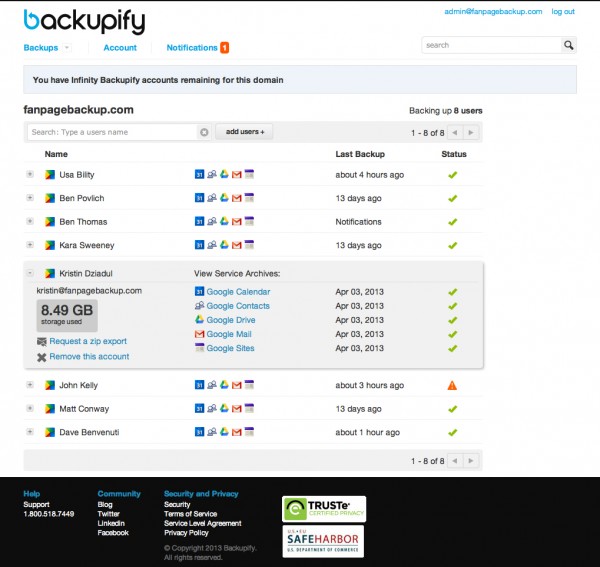
    Backupify is introducing an enhanced set of backup and recovery features designed to support its core offering for enterprise-level organizations on Google Apps. The “Spring Release for Google Apps” includes tools built to offer more efficient ways for administrators and end-users to manage their backups within larger organizations.

    The update, which builds on the Winter Release launched last December, adds the following advanced data recovery and admin controls:

    • Full Domain Export
    • Configurable Data Retention
    • Batch Import of Users
    • Restore and Export Folder Hierarchy
    • Google Sites Restore

    Backupify has also introduced unlimited storage to both its Professional and Enterprise plans.

    “Our updated Google Apps solution highlights Backupify’s focus and commitment to enterprise organizations in need of a complete backup solution that prevents loss of important business information stored on the cloud,” Rob May, CEO of Backupify explains. “Features like configurable data retention, advanced admin access control and domain export capabilities — functionality that’s critical for large companies — were all built as a result of listening to our customers’ ongoing needs”.

    Photo Credit: Andreas Weitzmann/Shutterstock

  • Amazon AutoRip now gives users free MP3 versions of past vinyl purchases

    Although it sounds like a slightly late April Fool’s joke, Amazon has today announced it will be giving customers who have purchased vinyl records from Amazon dating back to 1998, free copies in MP3 format.

    It forms part of the AutoRip service which automatically adds MP3s of past and present CD purchases to the shopper’s Cloud Player libraries.

    It’s actually a pretty good idea in my opinion, and Amazon says that “thousands of records, including titles from every major record label, are available for AutoRip”, with more titles being added all the time.

    What’s particularly great about the service is you don’t have to do anything. If you’ve purchased records which are AutoRip compatible, Amazon will rip them and make them available to you in 256Kbps quality. You’ll get an email alerting you once they’ve been added to your cloud library.

    According to Steve Boom, Vice President of Digital Music for Amazon, “AutoRip has been wildly popular with customers since it launched earlier this year. It’s a fun experience to suddenly find CDs you purchased just today — or 15 years ago — added automatically and free of charge to your digital library. We’re thrilled to extend this experience to vinyl records. Many of our music customers are vinyl fans and it’s traditionally been very difficult to make digital versions of vinyl records — now customers can enjoy the albums they buy wherever they are, not just when they have access to a record player”.

    So what’s next for the AutoRip service? I think it’s a safe bet we’ll be seeing cassettes added at some point before the year’s out.

    Photo Credit: Yuganov Konstantin/Shutterstock

  • Papa Sangre gets a sound engine upgrade, The Nightjar coming to the US soon

    If neither Papa Sangre nor The Nightjar mean anything to you, you’re missing out on some real iOS gaming greatness. Both are audio-only adventures for iOS from British developer Somethin’ Else. You don’t need any major gaming prowess to play them — just a good pair of headphones and the ability to listen (which a lot of women will say rules out most men then).

    The two very immersive games follow a similar style. You use the iPhone, iPod touch or iPad’s screen to walk forward, and swipe to turn left or right, listening for sound clues to ensure you’re headed in the correct direction — towards something to collect or an exit, or away from some form of nasty scurrying around in the darkness.

    Late last week Papa Sangre received a sound engine upgrade to make the 3D sound more effective, and a similarly updated version of The Nightjar will be rolling out shortly. The New Papa Engine, which uses binaural HRTF (Head Related Transfer Function) audio signal processing algorithms to be able to convincingly play mono sounds anywhere in a 3D space, is now available for developers to create their own apps too, so we can expect more similar audio games in the future, no doubt.

    The Nightjar is my favorite of the two games and stars the voice of Benedict Cumberbatch (BBC’s Sherlock, Smaug in The Hobbit, and John Harrison in Star Trek Into Darkness). It’s only ever been available in the UK, but Something’ Else will finally be making it available everywhere from the 23 April.

    And if you’re a fan of Papa Sangre, you’ll be pleased to hear that Somethin’ Else is going into full production on the follow up — called Papa Sangre 2 — next week, with a view to releasing it sometime this summer. There’s no real details about it yet, except that it’ll be shorter than the original, but longer than The Nightjar, and feature a new “Gyro Mode”.

  • BBC updates its news app

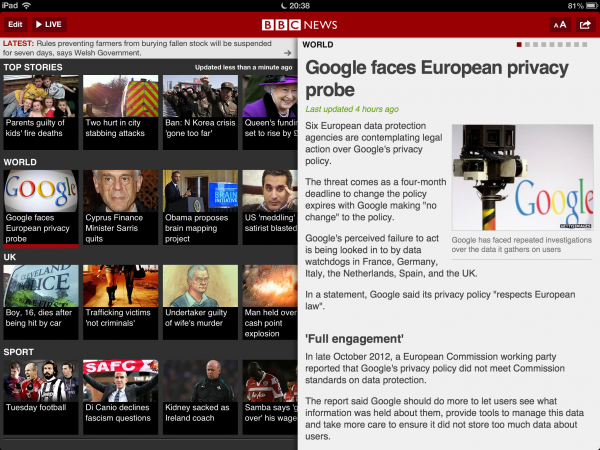
    The BBC News app for iOS is pretty good but it’s always been rather buggy. The BBC debuted version 2.0 of the app late last night, and as well as bug fixes and improved response times, there have been a few other welcome changes.

    Among the tweaks, the app now lets users copy story links to the clipboard, Twitter and Facebook integration has been improved, so it’s easier to share stories of interest, and pulling down on the screen refreshes the content.

    There are bigger images on the iPhone home screen, and much improved integration with VoiceOver.

    For iPad users, the portrait layout has been tweaked to show more headlines, and the BBC has added an extra font size to make for better viewing on the iPad mini.

    Although the changes are all fairly minor, the end result is a much more polished app that — so far at least — hasn’t crashed on me once.

    You can download the app from iTunes now.

  • Funny or Die releases a teaser trailer for iSteve, its Apple movie

    If I was casting a film about Steve Jobs’s life, a comic actor probably wouldn’t be my first choice for the title role. But clearly I know nothing about such things. Because first we had Two and a Half Men’s Ashton Kutcher playing the Machiavellian Apple co-founder in Jobs, and now we have the boyish Justin Long as the titular iSteve in Funny or Die’s forthcoming full length feature film.

    The teaser trailer for iSteve, which was released just now, doesn’t give much away, as it mostly consists of lines from the movie, but we do get a very brief look at Justin Long in the role at the very end.

    Does Justin look like Steve Jobs to you? No, but then he didn’t look much like a Mac during his time playing one in the long running Mac Vs. PC ad campaign either.

    The movie is described as a comedy, although there’s no sense of that in the trailer.

    iSteve is due to debut on 15 April on Funny or Die. What do you think about it? Are you looking forward to it, or is it something to avoid? Comments below.

  • Aye me hearties, Google now lets you search for treasure!

    Google really embraces 1 April and some of its fools are excellent. This year’s highlight, for me, is a new Treasure Hunting mode in Google Maps (I’m currently using Bing for all my mapping needs, but I had to switch back to Google just to try this).

    According to the search giant, “Treasure Maps is our Beta Maps technology and has certain system requirements. Your system may not be able to display at higher resolutions than paper print. Take care when unfolding the map to avoid ripping it”.

    Once activated, the view switches to a hand drawn map on parchment that features rivers, trees, cactus, and major landmarks. There are also treasure chests hidden around for you find. I’ve come across one so far (I tried searching for “treasure” in the search box, but to no avail), but I’ve also found a giant rabbit, a skull and crossbones, Psy doing Gangnam Style in Seoul, and other goodies

    In place of the usual Street View, there’s an amusing sepia “Telescope View” to peer through.

    Google has also created an amusing YouTube video to explain the reason for the new mapping mode.

    Something this good really needs to be kept for longer than one day. At the very least it should make a reappearance for International Talk Like A Pirate Day (19 Sept).

    Have you found anything good?

  • Try Windows Blue for yourself using VirtualBox

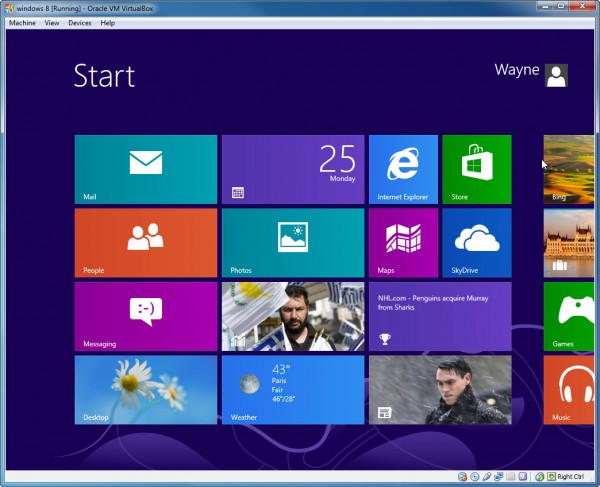
    Windows Blue, the next Windows release, leaked onto the internet at the weekend. It has some interesting new features and tweaks, but because it’s such an early and buggy build it wouldn’t be advisable to replace your existing OS with it. You could of course dual boot from it, but it’s just as easy to run it in a virtual environment where any crashes or issues won’t lead to you having to reboot your PC.

    For this guide I’ll use Oracle VM VirtualBox because it’s a great free program and setting up Windows Blue is incredibly straightforward with it.

    To start you’ll obviously need a copy of the leaked image file — build 9364. It’s available on all the usual torrent sites, so just do a quick search. The file you want is 2.63GB in size. There’s only a 32-bit version available, but because we’ll be running it in a virtualized environment, it will run fine on 64-bit systems.

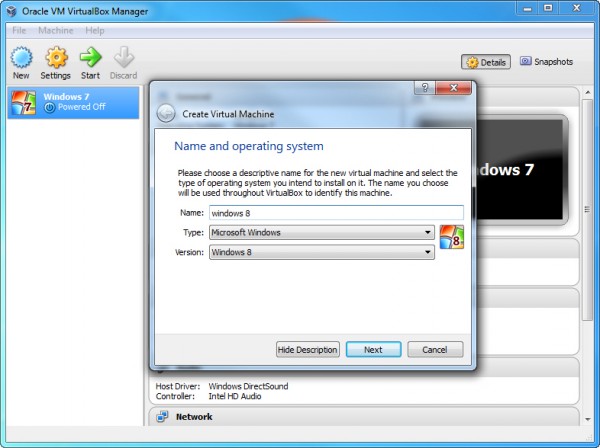
    Launch VirtualBox and click New in the Manager. In the Create Virtual Machine dialog box enter “Windows 8” as the name of the OS. VirtualBox will fill in the rest of the details for you.

    Next set the Memory Size. Accepting the recommended memory amount will likely be fine. On the next screen choose to “Create a virtual hard drive now” and click Create. Accept VDI (VirtualBox Disk Image) as the hard drive file type.

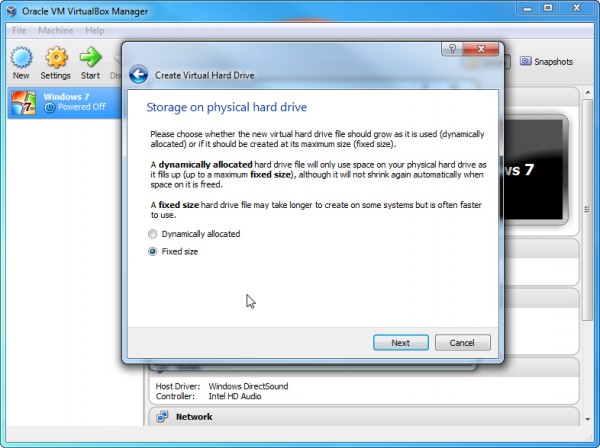
    You’ll now be asked if you want the new virtual hard drive to be dynamic (it will grow as required) or a fixed size. I always select the latter option. It takes a while to create a fixed size drive, but the operating system runs faster afterwards.

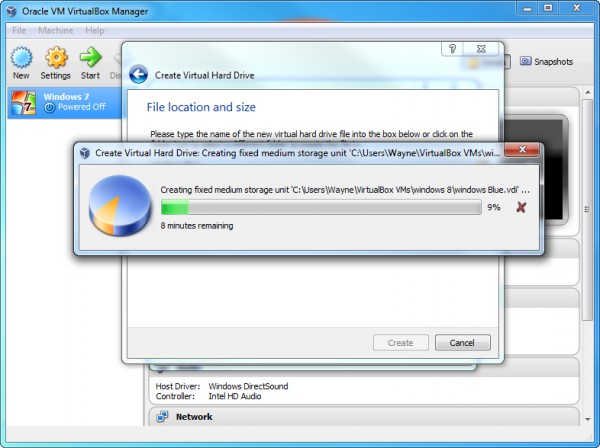
    Type in a name for the new virtual drive and choose a size for it. Again, accepting the default will likely be fine. Click Create and VirtualBox will begin building the drive. It will probably take around 10 minutes or so to do this (maybe more if like me you choose to convert some large videos at the same time).

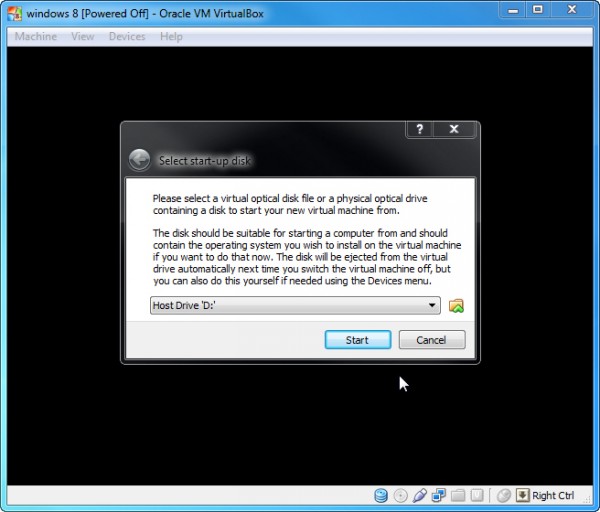
    The “Select start-up disk” window will open. If you’ve burnt the downloaded ISO file to disc you can select your drive in the drop down menu (if it’s not already selected). If you just have the file residing on your hard disk, click the folder icon and navigate to it instead.

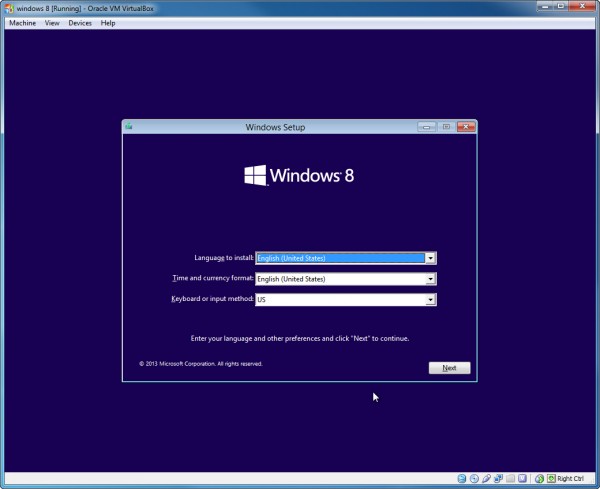
    Once selected, click Start and Windows 8 (which is what the OS is referred to throughout) will start to load. The language screen will appear first. You’ll have to accept English (United States) as this is the only option in the leaked build. On the next screen, click the “Install now” button.

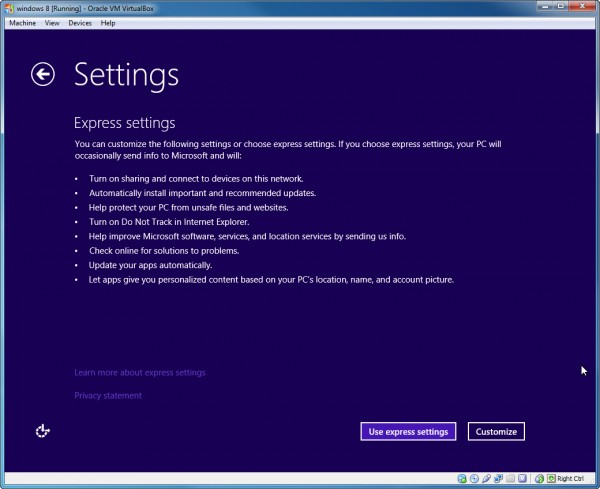
    Choose the “Custom: Install windows only (advanced)” option. It will show you the drive it’s going to be installed on. Click Next, and it will begin the installation process, rebooting when required. When that’s done, personalize the OS by picking a color and entering a PC name, and then choosing to use the express settings (which I do) or customizing things further.

    Set up a Microsoft Account if required, and then that’s it. Windows Blue will be up and running and you can begin trying it out for yourself.

  • Is it time for Microsoft to make big changes to Windows 8?

    So a very early build of the next version of Windows has leaked online. Codenamed Windows Blue it includes features such as additional Snap Views and changes to the Charms. There’s nothing to get too excited about here, not yet at least.

    But I’ve been wondering lately, if it isn’t time for Microsoft to change course and steer away a little from the direction it set with Windows 8. There’s no sign of that happening in the Windows Blue leak, but that doesn’t mean we won’t see more fundamental changes added to the new version as development progresses.

    Although we still don’t know how well Windows 8 is selling, we do know it’s not exactly setting the world on fire. Microsoft told us it had sold 60 million licenses, but no one outside of the software giant knows how many users that equates to. But we do know PC sales are dire, and Windows 8 hasn’t just failed to boost numbers, it’s at least partially responsible for their decline.

    It seems clear at this point that Microsoft has two options. It can stay the course and hope sales and adoption pick up. That tablets running the operating system really take off, and people and businesses embrace the brave new world that is Windows 8 and RT. Or it can tweak the OS to make it more appealing to the masses who still use PCs and spend most of their time on the desktop.

    The problem is Microsoft really is between a rock and a hard place here. It needs people to accept apps and the modern UI as the future — this is what links every device, from PCs and tablets to the Windows Phone, after all. People bemoan the fact that you have to go through the Modern UI to get to the desktop, and there’s a thriving market of companies producing software designed to bypass the Start screen, but Microsoft knew from the word go that it couldn’t bake in a simple skip option itself. It needs users to get used to the new front end, to encourage them to download and use apps, which wouldn’t happen if everyone was skipping the Modern UI. App use leads to app creation, leads to app use.

    But maybe this restriction is what’s holding Windows 8 back. If Microsoft gives in a little and provides direct access to the desktop in Windows Blue, maybe the reinvented operating system won’t be such a turn off for PC users. After all, Windows 8 is a lot more than a touch friendly, app centric interface. Beneath that divisive veneer lurks a damn fine operating system.

    The other issue Windows 8 has is the lack of official apps. And that’s partly down to the fact that it isn’t seeing the level of adoption that would make it a must develop-for platform. For a lot of firms, like Google, Facebook and the BBC, there’s no reason to make apps for Windows 8, there’s no benefit. Lack of OS adoption leads to lack of app creation, leads to lack of OS adoption.

    So my question is should Microsoft accept its bold vision is a little too bold, and make concessions to the operating system to encourage people to get on board, or should it stick to its guns and just focus on making the best OS it can — entirely on its own terms?

    Personally I’ve pretty much come full circle with Windows 8. When I first used the Developer Preview I quite liked it. The more I used the OS (the subsequent previews and the actual release), the less I liked it. Then I accepted it, and finally I sort of quite like it again. It’s just very different from previous versions of Windows, and when you’re used to working one way, having to learn to do things differently is an inconvenience.

    Still, I know Windows 8 is a topic that BetaNews readers have strong viewpoints on, so I’d like to know what you think Microsoft should do. Comments below please.

    Photo Credit: Eray KULA/Shutterstock

  • Foursquare video reveals the twin pulses of New York City and Tokyo

    Millions of people around the world use Foursquare to check into places they visit. The company has taken a year’s worth of these check-ins at two of the planet’s largest cities — New York and Tokyo — and plotted them on a map.

    The result is a video that runs from 4AM right round the clock and up to 2AM, showing the cities pulsing as they come to life and then die back down again.

    Dots represent single check-ins, and straight lines link sequential ones. Each check-in is color coded and a key on the left hand side of the video shows you what each one represents. Red is residence, green is food, cyan is arts & entertainment, and so on. You’ll need to view the video full screen to really discern the difference.

    The result is an attractive almost mesmerizing look at life in two great cities. As Jon Parker comments under the video, it also provides an insight into just how many people feel obliged to check-in on bridges.

    Photo Credit: andrea michele piacquadio/Shutterstock

  • Google shutting down Reader is great news

    I’m a big fan of Google Reader. I don’t just access it every day, I access it, probably on average, every couple of hours or so (and still do, despite my switch to Microsoft). I have hundreds of feeds in there, and thousands of stories starred. So really I should be gutted that Google has decided to kill it off. But I’m not.

    I was at first though. I even signed the petition to get Google to change its mind, even though I knew it was futile. But then I took a step back and realized that what initially seemed like devastating news for a Reader fan such as myself, was actually a blessing in disguise.

    Google has slowly been killing off Reader for a while. The service had a minor interface refresh in 2011, but only so Google could turn off friending, following, sharing items, and commenting in favor of adding Google+ integration, which reduced the service’s usefulness for a lot of people. While Google Reader has continued to serve its core purpose, it hasn’t grown, or evolved. In fact it’s been left to stagnate, unloved and all but forgotten. Its end for a long time has been nigh.

    Google says a dwindling user base is the reason it plans to end Reader’s life on 1 July, but it’s a dwindling user base that Google itself engineered. If it had pushed the service, sold the benefits of it, updated it, added features and re-introduced sharing, Reader use would likely have grown and flourished, not withered and died. But Google doesn’t want Reader any more. It wants us to forget about feeds and embrace social sharing instead. It wants us to embrace Google+.

    RSS Isn’t Dead

    With Reader as the dominant service, but left to stagnate, RSS as a technology has largely fallen out of favor (arguably it never reached its true potential anyway). But now that Google is closing Reader — the search giant removed the service’s entry from the black menu bar that runs along the top of Google pages yesterday — suddenly feed readers are back in the news. Services like Feedly are getting a huge amount of new users as the Reader exodus begins in earnest. And alternatives many of us have never heard of, such as The Old Reader, NewsBlur, Goodnoows, and Rolio, are all picking up thousands of new users too. Services that previously would have struggled to get anyone to choose them over Reader are now enjoying massive growth. There’s competition once more in the world of feed readers, and competition is always good. It’s what drives success and innovation.

    While I’ve yet to settle on a Google Reader replacement I really like, I’m not too worried. Digg says it is working on a new RSS tool which should be ready by the time Reader goes under, and I’m sure Digg won’t be the only company building a service for all those many Reader refugees who’ll be left without a home when Google does pull the plug.

    After all there are hundreds of thousands of users who still believe in and rely on RSS, even if Google no longer cares about them. And a lot of those people looking for a good service are influential journalists, bloggers and people who like to ensure they have their finger on the news pulse at all times. They’re good people for any media savvy firm to cater for.

    Yahoo would be a great fit for a Reader alternative, as would Microsoft (although I can’t see the latter building an online RSS service when it offers feeds directly through Internet Explorer, and RSS lacks the cool the company craves anyway).

    Google abandoning Reader actually reminds me of when Microsoft stopped development on Internet Explorer at IE6. MS believed the browser couldn’t be improved and so left it alone, left it to stagnate. And that was exactly what was required for Mozilla to steal a massive chunk of users with a modern browser that was being actively developed and introduced hot new features, like tabs.

    In closing Reader, Google hasn’t killed off RSS, it’s simply released its choke hold on the technology, and with luck — if the right savior surfaces at the right time — maybe we’ll finally get the product Reader could have become, with the sharing and commenting features that Google took away restored once more.

    Or is that all just wishful thinking on my behalf?

    Photo Credit: Aaron Amat/Shutterstock

  • Kinvey adds an Enterprise Edition to its Backend as a Service platform

    Kinvey, a Backend as a Service (BaaS) company that helps developers set up and operate scalable cloud backends for mobile, tablet and web apps, is branching out with a new Enterprise Edition.

    According to the firm, the new platform integrates with various enterprise backend systems including Oracle, Salesforce CRM, LDAP and Active Directory, and will allow developers to easily create their own enterprise-grade mobile applications.

    The Enterprise Edition combines Kinvey’s Data Links technology (which the company says was designed to “mobilize” data from virtually any source to any device, on any platform) with Authentication Links to enable businesses to rapidly prototype, publish and maintain their apps, while adhering to strict security and authentication protocols. The platform also comes with an enterprise-grade Service Level Agreement.

    With the new Enterprise Edition Kinvey is intending to position itself against Mobile Enterprise Application Platforms (MEAPs). Sravish Sridhar, founder and CEO of Kinvey, explains: “Historically, enterprise app developers have been forced to make an unfortunate choice: agility or security. Those who’ve selected a MEAP have forfeited agility. We expect to see MEAPs begin to roll out on-prem BaaS solutions, requiring yet another false choice. Enterprise app developers and architects demand the flexibility of private or public cloud options”.

    Pricing for the new platform will be based on the number of integrations to databases and authentication systems required.

  • Switching from Google to Microsoft, part 2 — Teething problems

    Second in a series. You know when you go somewhere on holiday and in a moment of fancy you think to yourself “I could live here”? But a small part of you knows deep down inside that the reality would be very different from the fantasy? That’s a bit like what my first experience of swapping from Google to Microsoft has been like so far.

    I’ve used Internet Explorer on and off over the years, but I’ve never used it for very long. The last time it was my main browser was in 2003, ten years ago. Similarly I’ve used Outlook.com since it launched, but not as my main email provider. So in setting them up to use on a daily continual basis I’ve found it all quite odd. I’m adrift in a place where they do things differently. Not worse — well not really — just differently.

    Trying to set up Outlook.com to send and receive emails from my Gmail account was an interesting experience. I went into Email Settings in Outlook.com, clicked “Your email accounts” and then clicked “Add a send-and-receive account”. I filled in my email address and password where prompted and clicked Next. And then some sort of alarm went off at Google HQ — with dire red alerts appearing on every Google page imaginable, including YouTube, telling me that someone had tried to access my account and advising me to change my password.

    I calmed Google down, told it that it was me accessing my account (Google for its part remained utterly unconvinced and demanded I sign a waiver), and then I went back into Outlook.com and tried again to set things up properly this time. The “Add a send-and-receive account” wizard didn’t want to be very wizardly, and just refused to do anything aside from tell me that I needed to enable “POP Download” in Gmail. POP was already enabled, so I decided to just go into Gmail settings and configure forwarding there, then set up a sending only account for Gmail in Outlook.com, which worked fine. And then, more out of curiosity rather than anything else, I went back to the “Add a send-and-receive account” and added my second Gmail account. Everything worked fine this time. Very odd.

    Setting Up Internet Explorer

    Switching from Firefox to Chrome was incredibly easy. Switching from Chrome to IE was a bit more awkward. I don’t ever use the Modern UI version of Internet Explorer 10, because I hardly ever only have just one site open, and the desktop version is better suited to my needs (it allows me to jump between open pages much quicker). I imported my bookmarks/favorites from Chrome to IE10 without any real drama, but they were imported in an apparently random order which took a while to organize because I have around a hundred or more!

    I have a folder of bookmarks of favorite sites that I open every morning. IE had no problem opening these but for some reason decided to change the zoom on half of them. So some pages required a magnifying glass to read, while others I could make out very clearly from the other side of the room. I adjusted the zoom for all of the pages to 100 percent and now everything is more or less fine. I’ve no idea what that was all about, and it won’t do it again, so maybe Internet Explorer recognized me as the new boy and was welcoming me with a spot of hazing.

    I then finished off by customizing IE to make it more useable. As someone who likes to have a ridiculous amount of tabs open at all times, I had to move the tab bar on to a separate row so I could actually see the tabs properly. I have to assume people who usually use Internet Explorer only have a maximum of two tabs open at a time, because with the giant address bar there’s not much room for any more.

    Similarly, because I have so many tabs open I don’t want thumbnails of all of them to display when I mouse over the IE button on the taskbar, so I went back into settings and killed that feature.

    Now I’m using it all the time, IE’s page rendering looks really weird (Amazon in particular looks awful — the writing is very small, and even blown up to 125 percent it’s not great), but that’s something I guess I’ll get used to quickly enough. There’s nothing really wrong with it, I hasten to add, it’s just not what I’m used to.

    On to add-ons next. I have Adblock Plus installed on Firefox and Chrome, but it isn’t available for IE, so I’ll have to find a replacement, or just have ads. The majority of the add-ons I use for Firefox and Chrome aren’t available, so I’m going to try and just use the vanilla version of Internet Explorer for a while, and then seek out any add-ons I find I really can’t live without.

    Interestingly, while writing this IE10 has twice replaced Outlook.com with message starting “This page can’t be displayed” and suggesting solutions for the problem. A problem that neither Firefox nor Chrome has. I really hope that’s not a sign of things to come or this could be a very short lived experiment.

    Photo Credit: Sam72/Shutterstock

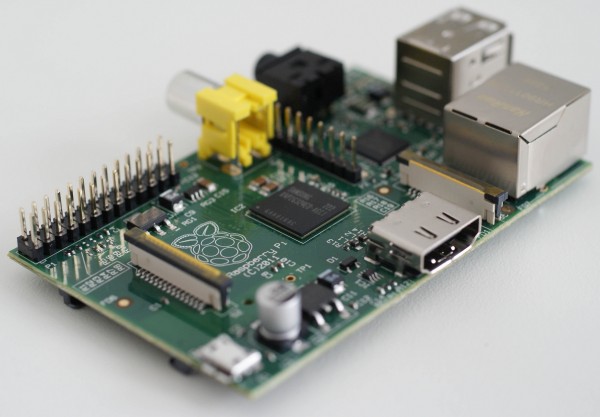
  • It sold a million units in a single year — so what’s next for Raspberry Pi? [Q&A]

    I’m a huge fan of Raspberry Pi, the super-affordable ARM GNU/Linux computer that’s bringing programming back into schools (and beyond). In one year alone, more than a million Pis have been sold globally, which is a phenomenal achievement, and demand for the uncased credit card-sized device shows no signs of abating.

    I spoke to Liz Upton, Head of Communications at Raspberry Pi Foundation (and wife of the foundation’s Executive Director Eben), about their eventful first year, and plans for the future.

    BN: How did the idea of Raspberry Pi come about?

    LU: Back in 2006, when Eben was teaching at the University of Cambridge he started to notice a decline in both the numbers of kids applying to read Computer Science, and in the level of knowledge that those kids arrived at the university with. We talked about it with our friends in the pub, like you do. And plenty of them thought it was a real problem too — some of them thought it was such a problem that we came together and decided we’d try to do something about it. We had a hypothesis: that the fall in numbers and skills had to do with the disappearance of programmable machines in kids’ lives. Computers like the BBC Micro or the Amiga had been replaced from the bottom end by sealed-unit, black-box consoles, whose whole business model is that you shouldn’t be able to program them. And from the top, there was the PC. Of course, a PC is a wonderfully programmable machine; but in most families it’s also a very vital tool for family life. It’s where you do your banking or your homework. And many kids aren’t allowed to mess around with the family PC for fear of breaking it. We felt a very cheap, programmable unit that kids could buy with their own pocket money, so they had a sense of ownership, was a possible solution. It’s still early days, but on seeing some of the kids who’ve had a Pi for some months now, I’ve a feeling we were on to something.

    BN: Where did the name come from?

    LU: “Raspberry” comes from the tech industry’s fondness for fruit names (there are lots of fruit-named computer companies, like Apricot, Tangerine…those, of course, are the only ones I can think of off the top of my head). And “Pi” is for Python, which has always been our first choice of teaching language (it was even before we knew what the hardware would look like). We initially thought that using Pi rather than Py would make for a really nice logo in the shape of the Greek letter, but as you can see, we didn’t actually end up going that way!

    BN: You’ve just sold your millionth Pi. Are you surprised by its success?

    LU: Around the end of 2011, just before we started selling Pis, we started to worry that perhaps we’d bitten off more than we could chew. We’d managed to raise enough capital among ourselves to produce 20,000, and the plan was to use the profits from those Pis to seed the next batch (which would have taken a couple of months to make), and so on. We realized that we might have a problem on the day when we made a pre-released OS available for the Pi, well before anyone actually had one — all of a sudden 60,000 people arrived on our website and downloaded this buggy software for a platform that didn’t even exist yet. It suggested that the demand was much, much bigger than we’d anticipated. We decided that we’d need to revise the business model, because there was no way we could make enough fast enough with the resources we had to satisfy the sort of demand we were seeing. So we approached RS and Farnell, two British components companies which already had world-wide distribution networks in place, to see if they’d be interested in manufacturing the Pis for us under license so we could build up to a workable level of stock immediately. That was an enormous help in trying to deal with the demand we were seeing, but as you’re probably aware, we’ve still been running to keep up, even though there is currently one Pi coming off the production line in Wales every few seconds!

    BN: Raspberry Pi seems like a very British project, a modern day BBC Micro, but it’s been well received in America. Why do you think that is?

    LU: I think that a need for access to tools is universal. And those problems of introducing kids to programming — the ubiquity of the family PC and the games console — are universal too, at least in the developed world. Industry is starting to notice a decline in standards in young people too; we work with a number of industry bodies in the UK and in the US which are also promoting proper computing for young people, because they don’t want to see a situation where the skills base dries up and blows away either. Eben and I will be at Intel International Science and Engineering Fair in Phoenix in a couple of months, to do some work with the kids there. I love doing this stuff; and it’s always so much fun in the US, with the American tradition of science fairs (which we don’t have a real equivalent of in the UK).

    BN: The Pi is manufactured in the UK. Why did you switch from China?

    LU: Moving production to the UK was a purely pragmatic decision: the Sony factory in Pencoed, South Wales, was able to match the prices we were seeing in China because they use a lot of smart automation and lean practices. It’s far more convenient for us; if there’s a problem we can jump in the car and be there in a few hours, and there’s no language or cultural barrier. And Sony really knows how to build a robust, quality product.

    We really wanted to manufacture in the UK from the start, but none of the factories we spoke to when the Pi was under development (we weren’t aware that Sony had a plant with the capacity to do this back then) were prepared to risk producing a machine for a company with no proven track record and a fuzzy idea of what sales might look like. So we did what so many small manufacturers do, and went to China, where factories were prepared to deal with what we thought at the time would be small volumes.

    From a patriotic point of view, it’s been absolutely wonderful to bring the Pi back home. Eben was born about ten miles away from the factory where the Pis are made, and we still have family out there, so we know the area pretty well. South Wales is one of those places which had a rich manufacturing heritage and used to be quite wealthy, but it’s changed dramatically as the UK’s manufacturing industry has declined. So we’re really, really delighted to be able to bring some jobs back to the area, and to be able to demonstrate to people that yes, you can build in the UK for the same amount of money you’d be spending overseas. We’d love to see more electronics companies in this country do the same; it’s great for the economy, and there’s a real sense of pride in being able to write “Made in the UK” on your product.

    BN: How did the Minecraft Pi edition come about?

    LU: We think that a hook, something that isn’t on-the-face-of-it educational, is vital if you’re going to make something desirable to kids. After all, I learned to program when I was a kid because I had a BBC Micro, I played games on it, and I wanted to make my own. That’s not an unusual trajectory. Minecraft’s a fantastic tool to get kids interested in what they can do with the platform — and for the Pi Edition, Mojang made sure that the game API would be hackable, so kids are encouraged to do a little programming in-game to make their Minecraft world swankier. We’ve seen some great stuff come out of that; kids are making analogue clocks in the Minecraft world, and great big 3D versions of games like Snake and Pacman.

    BN: Any other similar tie in projects planned. An Elite: Dangerous version perhaps?

    LU: I really ought to twist David’s arm on that one! [David Braben, co-author of Elite is one of the Raspberry Pi Foundation’s trustees]

    BN: What are some of your favorite Pi community projects?

    LU: That’s becoming an increasingly hard question to answer. There are so many projects out there that we find at least one thing every day that’s impressive enough to make our blog. It’s hard to beat the Beet Box for humor — it’s a project which uses a Pi and a Makey Makey to make a capacitive-touch drum kit out of root vegetables. There’s loads of fun stuff like that. But if we’re being serious, I’ve been most touched by some of the adaptive technology we’ve seen being made with the Pi; there was a guy who made a single-button audiobook machine for his elderly grandmother, who has very limited vision and mobility, and loves books. Hit the button once: your book starts. Hit it again: it stops. And when you get to the end, it automatically starts the next book. It’s not difficult or terribly complicated technology, but it’s made a huge difference to one lady’s life.

    BN: You’ve had an eventful first year. What have been some of the highlights for you?

    LU: It’s not the awards or the sales figures: the thing that really gets me is watching people’s lives change because of this thing we’re doing. Paul Beech, the guy who won the competition we ran to find a logo, is a great example: when we met him he was a freelance designer, but in the last year he’s set up a company called Pimoroni, with a small factory and a bunch of employees to make Pi cases and other neat Pi stuff. They’re great; they make a big effort in their local community in Sheffield to support making and hacking; and they’re bringing jobs to another part of the UK where manufacturing decline has left things very depressed. Liam Fraser, who was still at school when he first came across the Pi, has done a load of volunteering for the Foundation, and has got a year’s work with a company in Cambridge off the back of that, and a much more impressive university application form. People are building businesses around the Pi; we think entrepreneurship makes the world spin, so it’s wonderful to watch that happening. And, of course, there are the jobs that have come to Wales as a result of the Pi. That’s probably the single thing that makes me proudest.

    Oh — and last year, Steve Furber [principal designer of the BBC Micro and the ARM microprocessor] shook my hand and told me I was doing a great job. Serious hero-worship moment.

    BN: You’ve got a camera board coming out in April that will allow Pi users to build video applications. Any other similar add-ons planned?

    LU: We’re looking at a display board too, but that’s currently in the very early stages.

    BN: What does the future hold for the Pi — new versions?

    LU: The Foundation’s committed to making sure that we don’t suddenly up-sticks and change the platform under people’s feet: the open community has been very good to us, and the last thing we want to do is to make the work they’ve done on the available software redundant. We want to continue selling the Raspberry Pi Model B for a good long time yet; we do have a final hardware revision to make, but the platform will be set in stone after that. We don’t have plans to make a new Pi at the moment; what we are putting a lot of effort into is improving the software stack. We reckon there are orders of magnitude of performance increases we can shake out of Scratch, for example; and this isn’t stuff you can expect the community to do, because it’s a very long and fiddly job. So Scratch, Wayland, Smalltalk: you should see some big improvements coming over this year. We’re also switching a lot of our concentration to our educational mission this year, after a year spent scrambling to get on top of manufacture.

    Photo credit: gijsbertpeijs

  • Sorry Google, I’m switching to Microsoft

    A week ago, I had a dream. I was sitting on a beach with a glass of wine and a laptop and I was searching the internet using Bing. My wife came up, saw what I was doing, and said “Why aren’t you using Google?” To which I replied, “I’m boycotting it. The company shutdown Reader.” Yes, that’s right, I dreamt Reader was being shuttered before Google even announced it, and now I’m using Bing. Spooky or what?

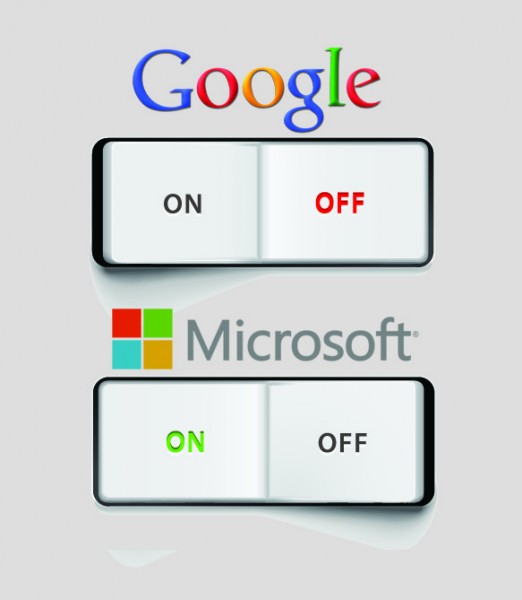
    But let’s make one thing very clear here. Although I plan to switch to using Microsoft’s services for a while, it’s not a boycott. I realized, after the dream, that I’ve been so tied into Google that I’ve never really given Microsoft’s alternatives — Bing, Outlook.com, Bing Maps, and even Internet Explorer — a fair chance to see how they compare. I’ve used them, in passing at least, but I’ve never used them full time. And today that’s about to change.

    From now, I’m going to start using Outlook.com as my primary email account (still using my Gmail addresses to send and receive messages of course) and Internet Explorer as my web browser. Having only just really made the full time transition from Firefox to Chrome, that will take a while to get used to.

    I’ll be searching exclusively through Bing, which is easy as it’s the default in IE anyway, and using Bing Maps instead of Google Maps. I already have SkyDrive set up through Windows 8, so I’ll switch to using that entirely, in place of Google Drive. Where there’s a straight replacement for an occasional Google service — Bing Translator, for example — I’ll use that. My aim, really, is just to fully immerse myself in Microsoft’s services, and to get a real idea of how they compare.

    Change Can Be Good

    A few years ago I was a die-hard iPhone user, but then I switched to a Galaxy S II, and then to an S III, and while I still own (and love) my iPad, I can’t see myself ever going back to the iPhone — well not without a huge incentive. Because I use my Samsung phone all the time, I’ve become so used to how it works, what features and apps are where, that switching back to an iPhone will seem like a retrograde step. The same is true with Windows 8. Although the OS could stand a lot of improving, I’m used to it now, and prefer the way a lot of things are done in it. When I switch back to Windows 7, it seems odd and (admitting this feels weird) not as good.

    I’m thinking by committing myself to Microsoft’s services, forsaking Google’s, I might — just might — end up preferring at least one if not more of them. I might discover features and ways of doing things that are better and that I will miss if I switch back to Google.

    Or I might end up realizing just how much better Google is at everything. We’ll see.

    I’m not the first BetaNews writer to try giving up Google. My colleague Joe Wilcox did something similar two years ago. Worried that he’d sold his soul to the Mountain View, Calif.-based company he tried to swap as many Google products for alternatives, including Microsoft services. Ultimately he failed.

    Because my plan isn’t a boycott, or — like Joe’s idea — an attempt to entirely remove Google from my life, I will still use some of the big G’s products. I have an Android phone and won’t be swapping it for a Nokia Lumia. Microsoft doesn’t have anything that competes with YouTube (aside from Bing Videos), so I’ll have to stay with that. I use Google Reader religiously, but I may take the opportunity to switch to Feedly, because I’ll have to at some point anyway, so it might as well be now.

    These are the Google products I intend to try and replace with Microsoft ones.

    • Google Search — Bing
    • Google Images — Bing Images
    • Google News — Bing News
    • Google Maps — Bing Maps
    • Gmail — Outlook.com
    • Chrome — Internet Explorer
    • Google Talk/Chat — Skype
    • Google Drive — SkyDrive
    • Google Translate — Bing Translator
    • Google Shopping — Bing Shopping

    In a month, give or take, I’ll report back on how I got on, and what — if anything — I learnt from the experience and which Microsoft services I loved and preferred, and which I couldn’t wait to give up. In between then and now I’ll also report on any discoveries I’ve made. Like, for example, the fun that’s involved in switching from Gmail to Outlook.com full time.

    I’m curious though, have you switched from one of Google’s products or services to a Microsoft alternative, and if so which one(s). And what made you change? Comments below please.

    Photo Credit: Pixotico /Shutterstock