Category: Mobile

  • Apple iPhone Tops Mobile Phone Industry in the U.S.

    If you live in the U.S. and own a mobile phone, it’s most likely an iPhone, according to a new study conducted by Nielsen. From January through October of this year, Apple’s little wonder device was the most popular phone in the country.

    It beat the BlackBerry 8300 (Curve), which came in at No. 2. BlackBerry’s cumulative share still exceeds the iPhone’s, however, as the touchscreen Storm and entry-level Pearl also placed quite high on the list. Coming in at No. 3 was Motorola’s RAZR V3, despite its considerable age and lack of smartphone features.

    By the numbers, the iPhone 3G took 4 percent of cell-phone ownership in the U.S. (it’s unclear how previous models and the 3GS fit into this breakdown), while the Curve had 3.7 percent. The gap was wider between the second- and third-place finishers, with the RAZR taking only 2.3 percent. Meanwhile LG had a strong showing, with four handsets appearing in the top 10, and a cumulative market share of 6.4 percent.

    As to web activity on cell phones, Google topped the list of sites accessed via a mobile device, and competitor Yahoo came in second with its Yahoo Mail site. Gmail came in third, and YouTube won out in terms of destinations for mobile video, making it a very solid year for Google in terms of the mobile web.

    Notably, no Android devices made the top 10 list of popular devices, but Motorola’s Droid arrived late to the game. Expect to see it, or possibly the Nexus One, somewhere on this list in 2010.


  • How HTC Became a Smartphone Hero

    The last few years have been brutal for some of the best-known companies in the handset business. Nokia has watched its dominance erode, Motorola failed to maintain the momentum it created with the Razr, and Sony Ericsson’s prospects look bleaker by the day. But while some venerable phone makers struggle to remain relevant, Taiwan’s HTC — a relative newcomer in an increasingly crowded field — has become a dominant force, reports Wired News. Here’s why:

    • Smart about smartphones: HTC was early to recognize a shift in mobile toward a more PC-like model, centered on standard chipsets and operating systems and focused on the Internet. The company initially aligned itself with Microsoft and now is solidly in the camp of Google Android. Meanwhile, Motorola, Sony Ericsson and others dragged their feet. Lesson: See the future clearly.
    • In Google we trust: HTC (GigaOM Pro profile) recognized that Android — not Windows Mobile — was likely to emerge as a winner, and then it moved quickly. The company is a founding member of the Open Handset Alliance, a Google-led consortium of mobile players centered on the Android operating system. It produced Android’s first handset — T-Mobile USA’s G1 — and has continued to churn out Android phones as the OS picks up traction around the world. Wisely, it plans to ramp up its Android efforts and focus less on Windows Mobile, which is becoming less relevant by the day even as the smartphone space heats up. Lesson: Bet on deep-pocketed winners less hampered by their past.
    • Touchscreen crazy. Apple (GigaOM Pro profile) was the first to gain traction with a touchscreen superphone, allowing users to eschew bulky QWERTY keyboards in favor of a more intuitive user interface. HTC saw that touchscreen technology would be the interface of the future long before bigger rivals like Nokia and Sony Ericsson realized it and joined the bandwagon. It has effectively drafted on Cupertino’s momentum with the G1 and, more recently, the Droid Eris from Verizon Wireless. And demand for touchscreen technology will only ratchet up as consumers increasingly demand higher tech in smaller form factors. Lesson: If you can’t invent first, then be a super-fast follower.
    • Sense user interface. HTC introduced its new UI earlier this year with the debut of the HTC Hero, which received rave reviews for its software. The Sense UI continues to garner praise and looks to play an increasingly larger role as the company expands its smartphone portfolio. Lesson: Be unique and make your software stand out.
    • Effective brand-building. Once happy to churn out handsets that sported carrier brands, HTC has stepped out of the shadows by building its own brand. The company ramped up those efforts in the last few months with its “You” campaign, which touts the personalized features of its handsets. The move not only allows HTC to market a phone as a must-have feature “that gets you,” it also prevents carriers from co-opting its phones with their own marketing campaigns — like Verizon Wireless has done with its Droid initiative. That marketing will be crucial if HTC is continue to grow its mind share among consumers. Lesson: Use marketing to help get people to love your products.

    HTC still faces stiff competition in the cutthroat smartphone space, of course. The momentum of Apple’s iPhone continues to grow; Research In Motion has only gained traction in recent months; and a host of other manufacturers are joining the Android bandwagon.

    But HTC has impressively built out its worldwide footprint in the last two years, and its ad campaigns are helping the company morph from a simple hardware manufacturer into a major consumer-electronics player. So while some mobile dinosaurs are fighting for their survival, the new kid on the block continues to pick up steam.

  • Sony Ericsson Shows Off New Eco-Friendly Elm And Hazel Greenheart Phones


    Sony Ericsson has announced two new phones in its Greenheart line of eco-friendly devices – the Elm and Hazel. Standard features of each phone include a 2+ inch screen, ergonomic key layout, 5.0 megapixel autofocus geo-tagging camera with video recording, and Facebook, myspace and Twitter integration. Sony has also included Wi-Fi, Bluetooth, MicroSD Support, Google search and Google Maps, Wisepilot, turn-by-turn navigation with AGPS and 10 days free weather forecast with Accuweather. A “noise shield,” clear voice and intelligent volume adaptation are also included for voice conversations.

    There are many more features we found interesting, including video calling, HD Voice compatibility, animated wallpaper support, a rich media player, and full exchange/regular email support. A shame about the Netfront Internet browser in each though, as we generally prefer the Webkit experience.

    One thing about the screens on each device; the Hazel has a 2.6 inch (16 million color) TFT screen, while the Elm has a 2.2 inch (65k color) TFT screen. Both have talk time of about 10 hours for GSM/GPRS and 3G/UMTS talk time of about 4 hours. Standby for either modes is more than an astonishing 430+ hours. Video calling will drain the battery in about three hours.

    How are these “green” phones? Well they both happen to share these characteristics:

    • Recycled plastics
    • E-manual in phone
    • Free from hazardous chemicals
    • Low power consumption charger (EP300 GreenHeart)
    • Walk Mate eco application
    • Green calculator
    • Minimized packaging

    The Sony Ericsson Elm phone and the Sony Ericsson Hazel phone support GSM/GPRS/EDGE 850/900/1800/1900 and HSPA 2100/900. The Elm will be available in the colours Metal Black and Pearly Rose from Q1 2010. The Hazel will be available in the colours Superior Black and Passionate Rouge from Q2 2010.

  • Hair Salon opens up in ABC toilets

    some things you only see in Lebanon,
    take for example this girl ‘straightening’ her hair in the ABC Achrafieh ladies room – yes, with a flat iron plugged into the wall!

    Hair Salon in ABC toilets

    i had a quick chat with her, during which i learnt that she had a valid excuse for the absurdity of her situation – no i wont go into details – but this begs the question, “Is it pure coincidence that she just happened to be carrying a flat iron at the right time, or are we just going overboard with appearances, unwilling to be ungroomed for the slightest moment?”

    tags: beirut, lebanon, lebanese, girl, lady, toilet, bathroom, hair salon, flat iron, straightening iron, abc, achrafieh, mall, department store, absurd, only in lebanon, photo, image, picture, ladies room

  • HTC Imagio by Verizon Wireless Video Review

    Hi, Everyone here is a quick video review of the not so new HTC Imagio. We will have a review of the Omnia2 and comparison a little later, just so you know what to get while your out there shopping this holiday.

    Enjoy:

    Share/Bookmark

  • Making Your Blog Mobile: Testing the Web Strategy iPhone App

    Experimenting With Mobile Apps
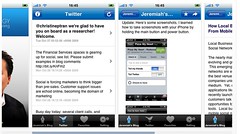
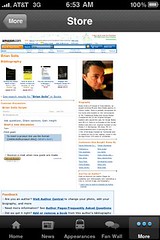
    It’s clear that content can become more contextual and personalized as it transects with location based devices.  A few weeks ago the folks at the company MotherApp, created a “Web Strategy iPhone App (download in iTunes)” to take on the go. This isn’t just a “m.” mobile website that shows essential content minus heavy graphics, this is a true iPhone app, with the native interface of Apple products, see screenshots below. I’m not the only one, they created the app for Tim Ferris (iTunes), Guy Kawasaki (iTunes) and Brian Solis (iTunes) and others.


    Screen shot 2009-12-14 at 6.36.57 AM
    Above: Screenshots of the Web Strategy iPhone App, featuring latest Tweets and Options
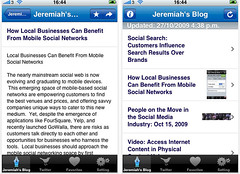
    Screenshots of the Web Strategy iPhone App
    Above: Screenshots of the Web Strategy iPhone App, featuring latest blog posts details and summary of posts


    Mobile Based Apps Offer Content On The Go
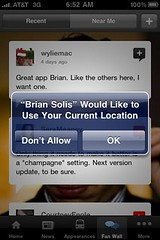
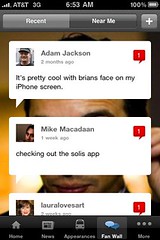
    The content can be accessed on an iPhone, even if there’s no internet connection, the content is downloaded. Secondly the content is in a clean Apple native user interface making it easier to read and navigate, rather than some clunky “m” looking site. Also, you can serve up a variety of content sources related to your brand. Also, the app has location based content, I’m looking at Brian’s app, and it can serve up Fan comments based on location (it asks you for your current location, first). In the future, it would be interesting if two fans of Brian Solis’s app would be signaled to each other they are in proximity, resulting in unique engagements. Brian’s app links directly to his amazon page, where his books (products) are available for sale.


    photo
    Brian Solis’s Apps Requests To Access Your Location
    photo
    Brian Solis’s Apps Filters Fan Wall Shout Outs By Proximity.
    photo
    Conversion: Brian Solis’s App Promotes His Books, With Links to his Amazon Store.


    What’s the downside? The URLs and comments are visible, only my voice. In the future, I’m sure these will be native into the app, so the community can talk back. The barriers to entry are still high, you’ll need to find an app developer to build this for your iPhone or other mobile device.

    Apps for Events and Corporate Conferences
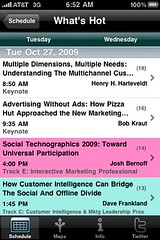
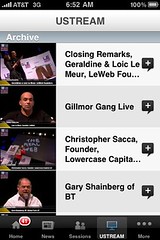
    It’s not just personal brands, I recently noticed the Forrester Consumer Forum iPhone app that listed out the schedule, top topics “What’s hot” based on attendee votes (I think) and the ability to create a schedule of tracks to attend. LeWeb has the most impressive event iPhone application, with links to previous videos, session list, news, maps, and speaker roster. Nearly the entire event website was ported to the device on the go.


    photo
    Forrester’s Consumer Forum App Highlights the “Hot” sessions. No doubt, of course, it’s Josh Bernoff.
    photo
    LeWeb IPhone App Streams Archived Videos


    Key Takeaways

    • Expect majority of top blogs to have mobile apps within the next few months, at first they will be custom created, then a platform will emerge allowing them to quickly ported to multiple platforms (blackberry, droid, etc).
    • This platform will emerge that will create this blog network, and new advertising opportunities will emerge who are able to cascade the information to the mobile devices. Players like Federated Media, Blogher, should move quickly.
    • Content will become location-based, as blog posts, tweets, and other content is based on a specific area (a foodie blog, reviewing restaurants in Mission district, SF) the content will auto-surface to the application when needed.
    • A standard will be set for all conferences and events to have a mobile based event that encourages members to find out about sessions, find other attendees, and even tweet from it.

    I’ll continue to experiment with the Web Strategy brand in a variety of mediums, to test, and report back to you what works and what doesn’t.


  • Upcoming Events(Omnia2 & Imagio)

    Today we received the new Omnia2 and also the Imagio for reviews. We received this new devices and will be reviewing them shortly after I have time to play with and get use to it to give you the best comparison and maybe even a video 4 way comparison with the HD, TP2, Imagio, Omnia2 and if I feel like it, Iphone 3G. Look out this week to get all these details and reviews coming your way.

    Share/Bookmark

  • Sony Ericsson “XPERIA X10” vs. Apple “iPhone 3G S” Specs Comparison


    xperiax10iphone

    Sony Ericsson has a very strong play coming in 2010 – the XPERIA X10. With specifications straight out of Star Trek, this just might be the device to propel the Google Android operating system ahead of iPhone 3G S. The new XPERIA X10 (specs courtesy Sony Ericsson) is their most powerful phone ever, and we put it head to head with the iPhone 3G S (specs courtesy of Apple) in a detailed specs comparison. The North American market has been dominated by the iPhone 3G, and it is now even more powerful than before with the updated S version. Both phones have rich application environments – the iPhone with App Store, and the XPERIA X10 with the Google Android Market. We’ve read that the XPERIA X10 will come to the USA courtesy of AT&T (and labeled as the XPERIA X10a) in 2010; this could be one interesting matchup. We’ve highlighted the winner of each category in Green, the loser in Red, and neutral/subjective specs are in Yellow. Any categories left in White we couldn’t make a decision based on incomplete data, or felt was too trivial. Please leave a comment with anything we’ve missed.

    Please remember that there are some specifications and experiences not listed here. Click to learn more about the XPERIA X10 (link includes movies) and its incredible user interface that is light years beyond any other Android phone. Click to learn more about the advanced operating system experience of the iPhone 3G S. I have used an iPhone 3G for a very long time and believe its an incredible mobile experience. This will be tough for the consumer – it is truly important that both devices are tested (when possible) to ensure the right choice. The XPERIA X10 is already shaping to be such a “wow” product though..

  • Sony To Release FVA-U1 USB-Based Mofiria Finger Vein Authentication Device


    PIA0001001344

    Sony Japan has announced they are bringing a device based on Mofiria technology to the market on December 18th. The USB-based FVA-U1 is a tamper resistant authentication device, similar to a fingerprint scanner, except it scans the veins in your fingers. Compared to the other biometric authentication techniques, vein authentication technology achieves higher accuracy on personal identification and forgery resistance because it uses the veins inside the human body. Finger vein patterns differ from person to person, each finger to finger, and it is said that they do not change over the years. Mofiria technology uses a unique method where a CMOS sensor diagonally captures scattered light inside the finger veins. The vein pattern is quickly and accurately extracted from the captured finger vein image without a fixed finger position – ensuring it will be very easy to scan your finger vein pattern. Sony will also be providing a SDK for Mofiria technology, and has stated this is network compatible.

    qfhh7c00000lzdst

    Sony hopes to attract businesses where security is key, hospitals, universities and information security specialists with this new product offering. The Y30,000 FVA-U1 will come with a special case, USB cable, guide, instruction manual, and warranty. Sony has also launched a new Mofiria website.

    PIA0001001343

  • More on Voice input text

    We recently reported about the new voice prediction text input, well I have more images and information. This application just entered beta 2 and they are working hard to get it out to us soon. They sent us some more information to give to you guys, and we will do a review of it sometime this week or next week, so wait for that.

    vp1.bmp: when app is launched

    vp2.bmp: Spoke Greg Aronov and then typed letter "G"

    vp3.bmp: Selected Greg Aronov

    vp4.bmp: Selected Email for Greg Aronov (this is common compostion window for all types of messages…always listening indicated on top)

    vp5.bmp: same as vp4.bmp except that the green listening toggles back and forth between listening and speak then type (a simple indicator to user)

    vp6.bmp: Shows word "voicepredict" being predicted when user speaks it and taps the letter "v"

    vp7.bmp: Shows symbol "?" being predicted when user speaks it and taps the symbols LSK

    vp8.bmp: same as vp7, except users can speak emoticons and sms-lingo words

    vp9.bmp: same as vp8, but shows that when mobile is tilted and the screen goes into landscape mode

    vp10.bmp: A feature wherein users can update FB and Twitter status. This screen is launched when user presses "update status" which is the LSK shown in launch screen of vp1

    vp11.bmp: A feature to reply to the latest sms (so users have most of the power of an Inbox but do not need to manage an entire inbox). This screen launched when user presses "Last sms" which is the RSK shown in launch screen of vp1.

    vp11 vp1 vp2 vp3 vp4 vp5 vp6 vp7 vp8 vp9 vp10

    Share/Bookmark

  • Sony Ericsson Satio Withdrawn From Two Major UK Retailers Over “Software Problems”


    SE0809_satio_hero_black_scr

    According to a recent Reuters article, UK retailers Carphone Warehouse and Phones 4U have withdrawn the Sony Ericsson Satio from general availability after numerous customers reported “software problems.” Whilst there aren’t any specific details of the errors, BBC News is reporting that it is related to “frozen screens and problems with ringtones.” This is rather depressing news for Sony Ericsson, who has had a very turbulent experience in the mobile market in the last few years with massive losses in market share. Sony Ericsson has offered one of its strongest hardware lineups in recent memory with the Satio, Aino, and Yari, which excited many consumers because of their interesting features. However, with retailers in the UK pausing sales, could potential consumers eyeing the Satio for a holiday purchase look elsewhere? It seems likely.

    This also casts a dark cloud on the Satio’s release in the USA, if it ever comes this way.

    Sony Ericsson said it was “giving this matter its utmost priority and working toward solving it”.

  • eBay Introduces Bargain-Hunting Deals App for the iPhone

    The biggest shopping day of the year for Americans is this Friday, the dreaded Black Friday, and people are in a consuming mood. At the same time, economic pressures have folks watching what they spend. eBay today introduced a new app that capitalizes on both those impulses, called Deals.

    Deals shares a lot of the functionality of the more full featured eBay mobile app, but it specifically targets eBay’s daily deals, and any zero bid items that have less than four hours remaining in their auction times, with no reserve price and free or fixed rate shipping, and a total price that includes shipping costs. In other words, with the deals the app presents, you pay exactly the price listed.

    The app opens with a few featured daily deals already displayed in rotation on the main screen. You can then click on category buttons at the bottom, choosing between apparel, sports, computers, instruments, jewelry, electronics, collectibles, and photography to view auctions from those categories that fit the criteria I mentioned above.

    The built-in searches are great for idle browsing (and possibly ruinous for those with strong impulse buying urges), but if you want to target items more specifically, you can either search on the fly, or create and save your own custom search. Creating a custom search allows you to specify keywords, a category, and a price range, and also assign an icon that will be displayed alongside the other default categories at the bottom of the app screen.

    If you’d rather not save your search, there’s a magnifying glass icon at the top of the app that you can use instead to launch a one-time search. Next to that is another button that lists all the deals found in your most recent search. In use, I found that there wasn’t enough search criteria to ensure truly focused results. I’d love the addition of an “at least x dollars” filter, so that when I search for “iPhone,” for example, I can filter out most accessories and replacement parts.

    Finally, you can sign in with your eBay account so that you can pay on the fly for any deal you find via the app with PayPal. The idea behind the app, after all, is to make sure eBay customers have access to the site no matter where they are. Apparently eBay mobile wasn’t driving enough business, and the Deals app is designed to remedy that situation. The app is free in the U.S. store (iTunes link), but beware the hidden costs of shopaholism.


  • 4 Big Gambles Google Is Taking With Chrome OS

    You’ve gotta hand it to Google: The company is never shy about throwing the proverbial spaghetti against the wall to see if it will stick. Over the years, it’s introduced countless projects that have gone through long beta cycles only to fail miserably — or achieve a degree of success far below what was expected. Google Docs, for example, was supposed to topple Microsoft Office, and is still predicted to do so, but if that ever happened, I missed it.

    Next year, Google will introduce one of its most ambitious projects yet: Chrome OS. There are quite a few misconceptions going around about the new operating system, among them that it’s aimed squarely at Microsoft’s operating system hegemony. It’s not. Chrome OS is targeting netbooks, not desktop and server systems. Still, the operating system includes some bold gambles from Google. Here are four of them.

    Return of the thin client. Take a look at this CNet news story, which reports that  “Oracle’s Larry Ellison today resurrected the company that designs a scaled-down desktop system — known generically as the network computer — and announced plans to ship new models in the first quarter of next year.” But note the date: 1999, not 2009. Indeed, Ellison was championing thin clients — computers with few local hardware resources that would get applications and data out on a network — back in the late 1990s.

    It was an idea that was subsequently tried many times, and failed. Yet fast-forward to today, and Google’s Chrome OS is placing the very same bet. As company officials noted yesterday: “In Chrome OS, every application is a web application. Users don’t have to install applications. All data in Chrome OS is in the cloud.” Chrome OS netbooks will be thin clients.

    All data in the cloud? Many of the smartest people predicting the future of cloud computing are noting that companies want to deploy hybrid public and private cloud applications, namely because they don’t want to have all of their data on a remote network, with little control over it and the potential for lock-in and losses. However, Google’s Chrome OS is a bet that consumer and business netbook buyers will be perfectly happy to trust everything to the cloud. There won’t even be hard disks on Chrome OS netbooks — only solid-state drives. Will users accept such an absolutist model?

    Poof goes the OS. Chrome OS is architecturally very different from other operating systems, bypassing many types of boot processes and others in order to optimize performance. Additionally, however, the OS will actually reimage itself if malware is detected. If Google pulls this off, Chrome OS systems may be free of the guaranteed performance decay that Windows systems tend to have over time. Still, users may be wary about an operating system that’s ready to exit stage left at any given moment.

    Drivers? Support? Fuhgeddaboudit. Have you ever called Google for Google Docs support? I haven’t either, even though I use the applications. When you release an operating system, though, if it reaches a large audience, that audience is going to want support. Just ask Microsoft, which spent years trying to effectively support and patch Windows Vista.

    In addition to excellent support, which I don’t think of as Google’s specialty, users of Chrome OS are going to want their netbooks to work seamlessly and instantly with their printers, digital cameras, smartphones and more. Chrome OS isn’t being built from scratch. It’s Linux-based (the Ubuntu team at Canonical has been helping it take shape), so Google can get a headstart by incorporating existing driver libraries and the like.  But Microsoft spent years trying to catch up to Apple in terms of automatic hardware detection and installation with its Plug-and-Play initiative, and Apple users will tell you that it never quite succeeded. Is Google about to find out what a huge headache it can be to support an operating system? History argues that will be the case.

    Don’t get me wrong. I think Chrome OS will be one of the most interesting tech stories to watch next year. In many ways, though, it’s a Hail Mary.


  • Google Chrome OS 2009 = MSN Companion 1999?


    YouTube video courtesy of googlechrome

    Google announced their Chrome OS yesterday…

    Releasing the Chromium OS open source project

    And, like a lot of people I watched the live stream on a web page built using Cold Fusion (how retro!) and requring either Real or Windows Media to watch (what happened to YouTube?). I thought Chrome OS was going to be a superset of Android and was very excited about the prospect of this super-Android on tablet computers. Instead, I became less and less excited by Chrome OS as the presentation unfolded.

    After the announcement’s conclusion, I tried to figure out why this all seemed so familar. Then, I remember a product I really liked that failed about a decade ago: Microsoft’s MSN Companion. The MSN Companion was based on Windows CE (like today’s Windows Phones) and essentially hosted Internet Explorer 4 in its firmware. The MSN Companion was a desktop dedicated web browser. Although it was not a mobile device, it was essentially 10 years ahead of Google’s Chrome OS.

    msncompanionanddash.jpg
    MSN Companion with a T-Mobile Dash on top of it to provide relative size information

    I thought the MSN Companion was a great idea a decade ago. However, I’m not sure what is essentially a dedicated browser opearting system is what we need or want today.

    New Career Opportunities Daily: The best jobs in media.

  • Choosing the Right Tool Is Key for Mobile Advertisers

    Text messages and banners on the mobile web are the most noticeable kinds of wireless ads, according to new research from Parks Associates, but mobile video and click-to-call campaigns draw the best response from consumers. Such contradictions underscore why advertisers need to use a variety of tools as they deploy their mobile campaigns.

    Text-only ads generated the highest recall rates of 11 types of mobile come-ons, with 49 percent of respondents saying they noticed such pitches all or some of the time, the market research firm said during a webcast today. Ads at the top of a mobile web page were the second-most noticeable, with 45 percent of users recalling them. Click-to-call ads fared worst, with 27 percent of people noticing them, and movie trailers were recalled by only 31 percent.

    Fascinatingly, though, the least-noticed ads drew the highest response rates in Parks’ study. Movie trailers drew a 38 percent response rate, outperforming all other ad types, while 35 percent responded to click-to-call campaigns. Meanwhile, text-only ads managed to draw responses from only 26 percent of users, and ads atop web pages generated a 30 percent response rate.

    Parks’ figures highlight why advertisers need to have a wide assortment of weapons in the mobile arsenal as they try to target users via their phones. Nearly every phone on the market supports text, allowing advertisers to potentially reach broad swaths of mainstream users via SMS (GigaOM Pro, sub. required), for instance, but advertisers also have a chance to engage tech-savvy consumers via mobile video and to encourage would-be customers to call them directly with click-to-call ads.

    Mobile advertising has long underperformed amid excessive hype, and the space will continue to endure growing pains over the next several years. But Parks predicts the North American market is poised to take off as the economy recovers, exploding to $1.5 billion in 2013 from $208 million this year. For those figures to become reality, though, advertisers will need to employ a number of tactics — and pick the right ones based on what they’re trying to sell and who they’re trying to reach.


  • Chrome OS Unveiled, Focused on Netbooks, the Cloud

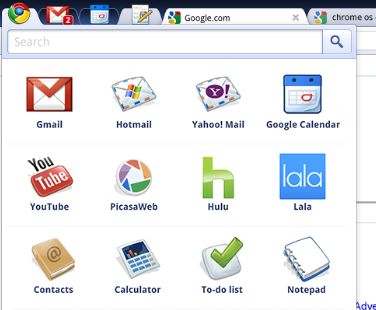
    Chrome OS is a natural evolution of the work that’s been done on the Chrome browser, Sundar Pichai, VP of product management, and Chrome OS engineering director Matthew Papakipos said when they unveiled it at Google’s Mountain View campus on Thursday. The operating system is designed to imbue web applications with the “full functionality of desktop applications.” As for the reasons behind the development of the new platform, they pointed to rapid growth in the netbook market — where Chrome OS is aimed — and cloud computing.

    Goals

    With Chrome OS, Google had three goals, according to Pichai: speed, simplicity and security. ”Chrome on Chrome OS will be even faster than Chrome [the existing browser],” he noted. “In Chrome OS, every application is a web application. Users don’t have to install applications. All data in Chrome OS is in the cloud. If a user loses a Chrome OS machine, the user should be able to log back into the cloud and retrieve cached data.” Pichai also demonstrated that Chrome OS loads in only a few seconds.

    The demonstrations made clear that the OS relies heavily on “panels,” pop-up windows housing web-based applications that are similar to multiple open windows in a browser.  Papakipos, meanwhile, characterized the security model in Chrome OS as very much like the one in the Chrome browser, and unlike the one in standard operating systems: If malware is detected, all cached data is saved; Chrome OS is subsequently re-downloaded, then freshly imaged on a machine. If an application crashes in a tab, only that tab goes down.

    Coming to Devices Next Year

    The target date for delivery of Chrome OS machines is the end of next year. Google is working with hardware partners to bring Chrome OS to market, Pichai said, and doing so in unusual ways. Chrome OS is not aimed at hard disk-enabled machines, for example, but rather at systems with solid-state drives. Google is also working with hardware vendors on what Pichai described as “slightly larger netbooks,” with full-sized keyboards and large displays. All the open source code is available today, as are all the design documents, said Papakipos.  You can find the source code for the OS and other links here.

    So does Chrome OS have a fighting chance in the hot netbook market that it’s squarely aimed at, given that it won’t make its debut on devices until late next year? Chrome OS will run on both x86 and ARM processors, which as jkOnTheRun has noted, will give it a broad spectrum of coverage on devices, and could make it a significant player in the emerging ARM-based smartbook hardware category. Still, the OS will significantly trail the arrival of Microsoft’s Windows 7, which is also squarely aimed at netbooks.

    Even though netbooks have already been exploring new low-priced territory for portable computers, Chrome OS-based netbooks could also take prices much lower. Google CEO Eric Schmidt said in July that “we do not plan to charge for it, in an open source form,” but that “there may be other ways we can make money from it.” He added that:

    “The rough argument is we do things that are strategic because they get people to ultimately use the Internet in a clever and new way. We know that if they use the Internet more, they search more, watch more on YouTube, and we then know that our advertising [will reach them]. We do not require each and every project to be completely profitable or not profitable — we look at them in a strategic context: are they making the web a better place?”

    Could Google subsidize Chrome OS-based netbooks in an effort to attract users with low prices and feed them into its search-and-advertising ecosysytem? As is true for most of Google’s projects, feeding that lucrative ecosystem tends to be a high priority for the company. It will no doubt be one as Chrome OS makes its way into devices next year.


  • Video: Austin WiMAX Launch Event

    Verizon Test

    WiMAX Test

    Sprint held a happy hour last night to show off the WiMAX launch in here Austin, Texas, so I wandered over for some BBQ and broadband. I want to love WiMAX, but I can’t get excited about the promise of upload speeds of some 400 kilobits per second, which are only a wee bit more than what my Verizon 3G connection delivers. However, on the download side things are decent for a wired network and awesome for a wireless one.

    And before any WiMAX boosters despair, I was told that the local 4G network should continue to improve over the next few weeks, which is why I’m holding off on an all-out review. For a sneak peak, check out the experience in the video below. You can see some freezing in the Hulu video stream during the demo; John Taylor, the Sprint spokesman I interviewed, said the location we were in had only two bars of coverage, which may have been the problem. Given the paucity of devices on display for mobile use and the lackluster network quality so far, I’m still thinking the bet that Clearwire (which is powering the 4G part of the Sprint network) and Sprint made on WiMAX is a bad one, but I’m hoping to be proven wrong.


  • The Trouble With iPhones

    The iPhone has not only changed the way people consume data on their mobile phones — thanks to its touchscreen, and the myriad of apps that make grabbing such info from the web on a small device easy — it’s changed assumptions as to which devices consume the most data on mobile networks. Bytemobile, a company that provides equipment for carriers to help deliver video and data to mobile devices using less bandwidth, issued a report today that shows the difference in data consumption by device among carriers that have the iPhone and carriers that don’t. It’s pretty significant.

    Laptops are still consuming most of the data on carrier networks that don’t have iPhones on them, but once folks get a touch-based smartphone such as the iPhone (and right now it’s the most popular touch-based smartphone out there), the volume of data used by those devices far exceeds that of laptop usage. In other words, when it comes to the network and data consumption, the device does matter. The report also offers some self-serving data about video consumption on mobile devices that may help carriers save on bandwidth consumption. (GigaOM Pro, subscription required).

    Cisco expects mobile data traffic to increase 63-fold over the next five years, driven in part by video. But while it’s clear that laptops and touch-based smartphones make video consumption easier, the rise may not be as steep as Cisco predicts. The report found that while the average video online is about 5 minutes in length, about half of the people only watch 60 seconds of a video, which means that sending the entire file to a user would be a waste of bytes and bandwidth. Only 31 percent of people watched all of a video, and 30 percent watched less than 10 percent. The rest of the viewers stopped watching somewhere in the middle. In addition to bandwidth consumption, such findings also could help determine where best to place ads. Although I for one hate getting pre-roll ads on my phone because that data consumed counts against my mobile bandwidth cap. But maybe I’m just super cheap.

    Regardless, the problem with the iPhone is that it’s both a gateway drug for consumers, who’ve now tasted the mobile web and want more of it, as well as a canary in the coal mine, as it shows carriers what’s likely to happen as other touch-based smartphones become more popular on their own networks. Curtailing video, as suggested by the report, will solve some issues, but once you give folks a taste of broadband, they’re going to want more.


  • LiveScribe Pulse Smartpen App Store (Beta) Live

    It is quite an interesting world we live in these days when even a pen has its own app store…

    LiveScribe’s Pulse Smartpen Gets Smarter with the Beta Launch of an Application Store

    Of course, the LiveScribe Pulse Smartpen is no ordinary pen. It can record and playback the ink you write on a paper with it as well as synchronize recorded sound with the ink. I bought my pen back in May and have been getting good use out of it.

    You can find its app store beta at…

    http://www.livescribe.com/store

    The first page of paid apps for the Pulse Smartpen (21 apps) are mostly in the 99 cent to $2.99 range with the loan outlier being the $14.95 American Heritage Spanish Dictionary.

    There are also 9 free apps in the store ranging in topics/functions from a video poker game to spanish travel phrases to guitar chords for beginners.

    New Career Opportunities Daily: The best jobs in media.

  • Gartner 2012 Top 10 Consumer Mobile Apps List & What Gartner Missed!

    Anyone who knows me knows that I love lists (lists of pretty much anything amuses me), predictions for the next year, and conspiracy theories. As you might guess, I don’t much believe in some of these despite their entertainment value. Gartner Research is usually a good source of lists and predictions (not to mention magic quadrants). And, in this item, I’m even going to count them among conspiracy theorists since they use the term “killer applications”…

    Gartner Identifies the Top 10 Consumer Mobile Applications for 2012

    However, don’t be fooled by the title. Gartner doesn’t actually name a single app. This lists consists of mobile app categories like money transfer, location-based services, and mobile search (their top three categories). Despite their interesting and mostly well-thought out list, it misses the boat by a wide degree. Here’s what they missed.

    1. Games! I know I’m going out on the limb here. But, I predict that people will buy games, lots of games for their mobile devices in 2012. What could lead me to make such wild speculation? Oh, I dunno. Just a hunch 😉

    2. eBooks/eReading: I predict that the dedicated ebook readers (like the Amazon Kindle) will be viable but less important products by the end of 2010. General purpose mobile devices like the iPod touch/iPhone, Android smartphones, and netbooks will be the main ebook platform despite their less optimal reading environments (at least using today’s technologies).

    3. Mobile Entertainment without traditional game features: This includes location-based social networking type apps and services that have become extremely popular over the past year

    4. Apps that move traditional media (especially TV programming, newspapers, and magazines) to the “third screen” (mobile devices)

    5. Augmented Reality: I know, I know. Most of what we see now are toy-apps or have limited functionality. This will change.

    Let’s get back together in 2012 and see how Garter Research’s list fared against Ogasawara Seat-of-the-Pants Research’s list.

    New Career Opportunities Daily: The best jobs in media.