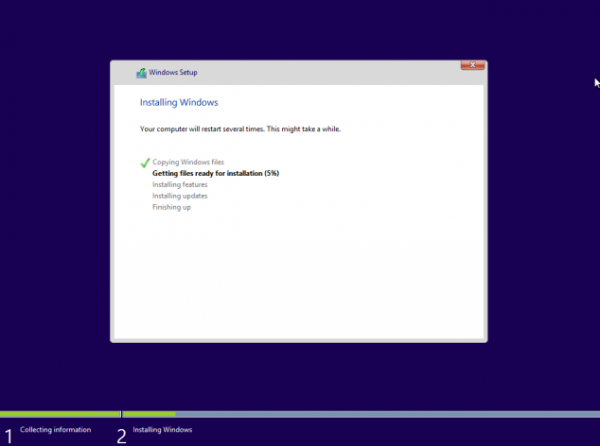
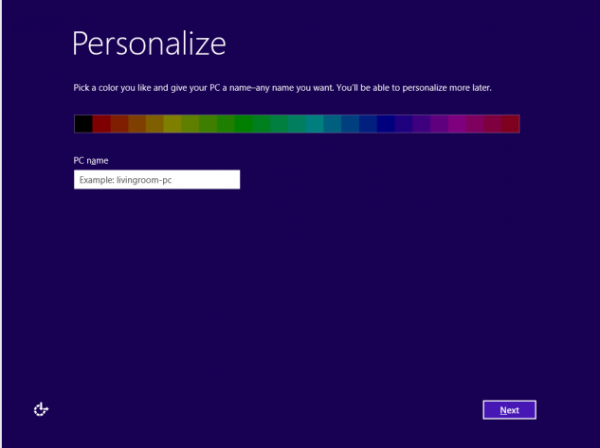
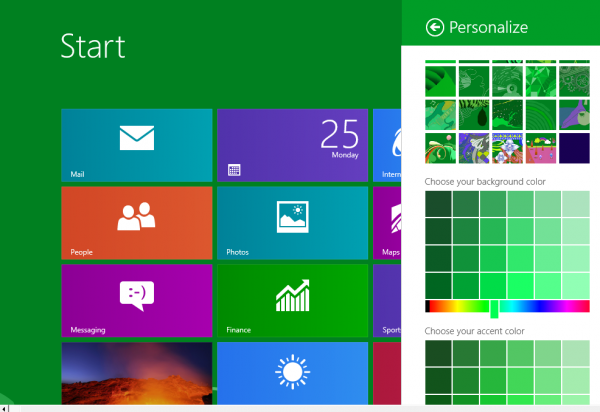
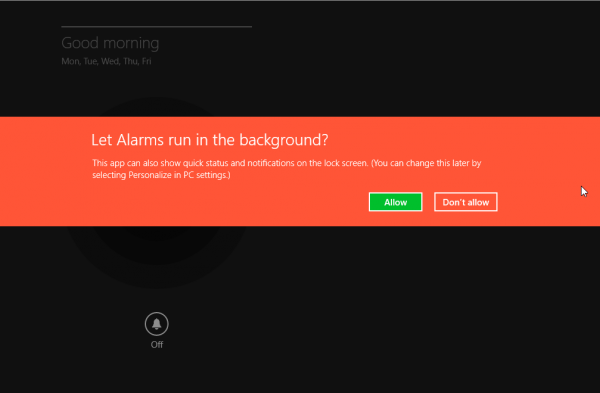
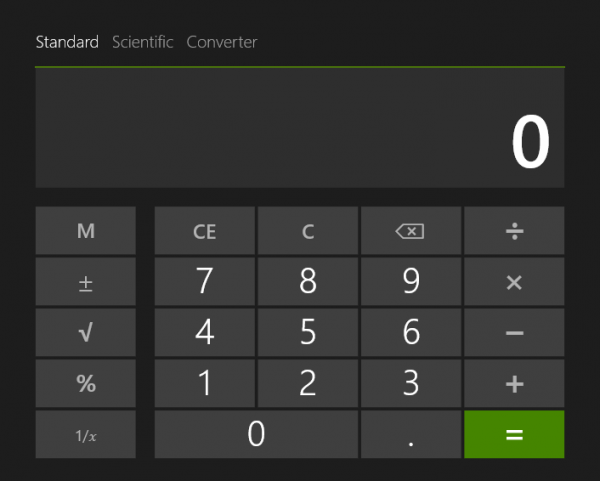

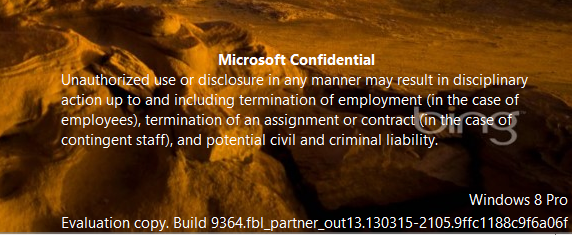
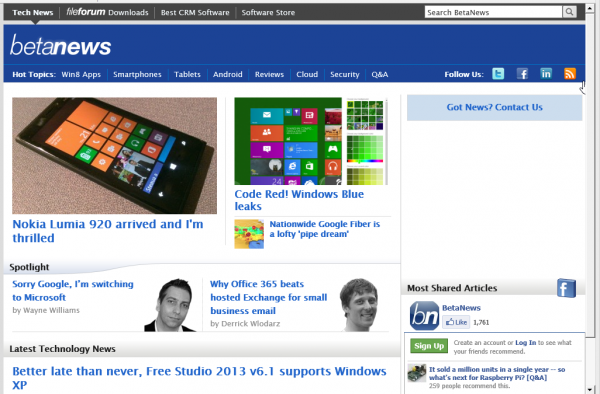
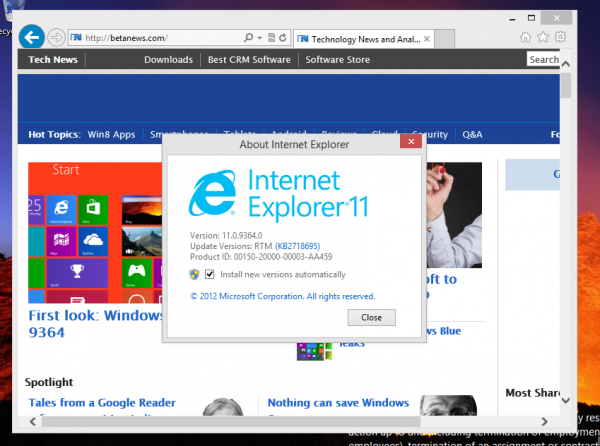
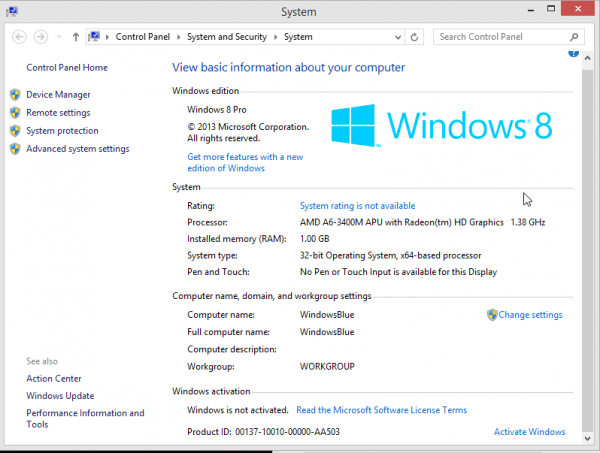
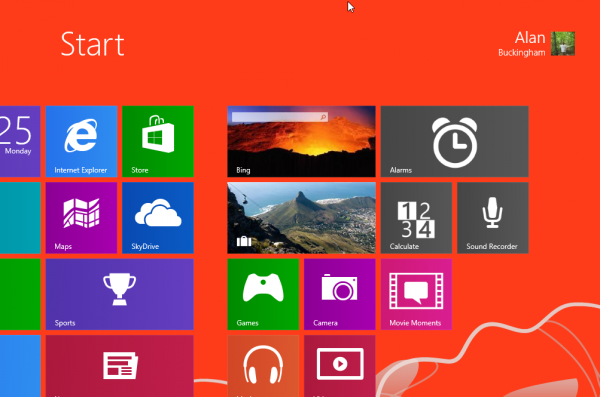
Windows Blue owns tech news for the past two days, from its leak to BitTorrent yesterday, to first-look articles today. While we all try to digest what is included in the next version of Windows, which really is more of an update to the current iteration, it really is much easier to get a sense by visual aid as opposed to listening to talking heads like me drone on with descriptions.
When I installed the leaked build, 9364, yesterday and fired it up I was blown away by all of the changes Microsoft has made in what is essentially an interim update. Over the coming days I will take a more in-depth look at some of these things, but for now, I at least have plenty of screen grabs to try and illustrate what your next operating system will look like.
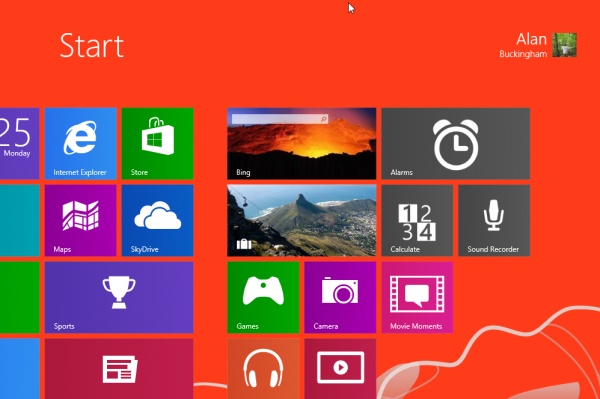
I also have a better idea of where the company is heading in the future, and some of you will likely not be happy with it. The addition of Metro versions of the Calculator (now called Calculate) and Sound Recorder are harbingers of the continued move away from the desktop and onto the Start screen.
I am not saying the desktop will be gone when Windows 9 debuts (rumored for late 2014), but I think it will, at the very least, be squeezed out of the picture even further. When Office gets there, then the move may be complete. Personally, as long as the apps are there in Metro, I don’t really care, but I know the traditionalist change-haters will be out with fangs showing over this.
Scroll through the slideshow of images I grabbed as I tested the new build. Windows Blue is not ready for Prime Time by a long shot, but there is much to get excited about.

Last week, Digg revealed plans to build a replacement app for Google’s soon-to-be-defunct Reader and compete with other services that have suddenly become popular, like Feedly and The Old Reader. While I wait to someday have my OPML file uploaded to The Old Reader (currently number 3,590 in the queue), I am trying out some other alternatives — I really liked Feedspot, but updating seems spotty.
In a blog post, Digg says “Google did a lot of things right with its Reader, but based on what we’re hearing from users, there is room for meaningful improvement. We want to build a product that’s clean and flexible, that bends easily and intuitively to the needs of different users. We want to experiment with and add value to the sources of information that are increasingly important, but difficult to surface and organize in most reader applications — like Twitter, Facebook, Tumblr, Reddit, LinkedIn, or Hacker News. We likely won’t get everything we want into v1, but we believe it’s worth exploring”.
Sounds good so far, but we will need to wait for an actual app before getting too excited. The company is continuing to gather suggestions from Reader refugees as it builds the app. In fact, it has set up a mailing list for news on the progress and it is complete with a Reader shutdown clock.
When I was growing up one of my parents’ favorite expressions was “do as I say, not as I do”. The old adage likely rings true in this case as well. You see, as a rule I don’t recommend downloading files from BitTorrent, as you are just as likely to get a virus as a legitimate program, movie or song. That applies to leaked files especially.
But, there are legitimate reasons for the sharing service — upcoming artists share music, Linux shares distros, even producers have distributed movies in this way.
However, when a new build of Windows leaks out then I consider all bets off. That was the case over the weekend as Windows “Blue” build 9364 hit the interwebs with a major splash. I am a tech geek…how could I resist? I will not link to the torrent file here, but I am pretty sure that one of our faithful commenters may do exactly that. If you look around the web carefully enough, you can find it.
Setup
 The download is 2.64 GB and the file comes as an ISO — ready for you to burn straight to a blank DVD and install (I actually used a USB thumb drive, but to each his own). Do not install this as your main operating system. It’s an early test build and just as likely to crash as it is to run. If you have a test machine then use that. If not, then use something like Virtual Box.
In my case, I opted for the virtual machine. I prefer VirtualBox from Oracle, though I prefer it mostly because it is free. With that said though, it works as well as any other I have tried. I used version 4.2.10.
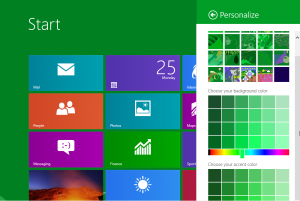
Setup takes about 30 minutes. Once Windows Blue begins you will receive the usual prompts to login to your Microsoft account, pick a screen color and more. Screen color options have been expanded in this new build.
Yes, you will get the usual email and text messages prompting you to approve the computer that has just been added to your Microsoft account. As the install is preparing the colors change on the screen in a rather psychedelic fashion.
Internet Explorer 11
Microsoft seems to be going all Firefox/Chrome on us lately by updating its web browser at a faster pace. The latest iteration of Internet Explorer is version 11.
This build of the web browser is not tremendously different from 10, which is built into Windows 8 and now can be installed on Windows 7 as well. I found nothing particularly different here, but there are likely changes in the backend.
SkyDrive
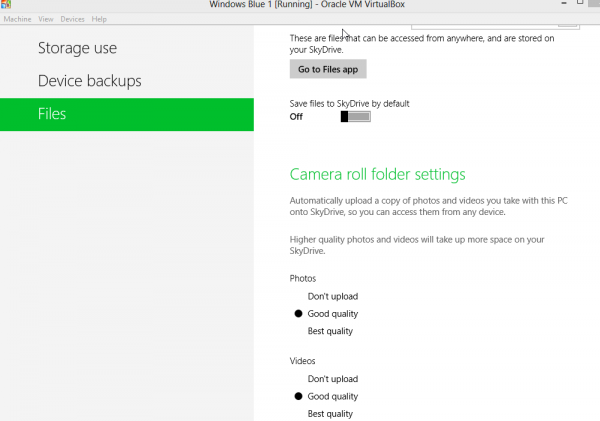
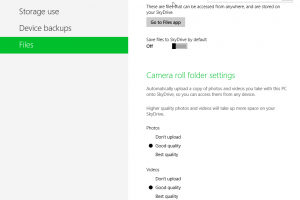 SkyDrive is now a part of the basic Control Panel in the
 Metro Modern UI interface. When you open the Modern UI version of the Control panel, you will find SkyDrive integration built right in.
There are options for Storage Use, Device Backups and Files.
Snap to It!
Are you bored with the old Snap feature? Only two apps? Now you can snap more programs into place. The next version of Windows allows for 4 apps to be “snapped” into position.
These are, of course, long and thin across your monitor. However, it is a much better way to switch around between multiple apps. Users can navigate back and forth between all without need of the old-fashioned alt-tab option that we have all grown rather accustomed to.
There is More
Windows Blue build 9364 just leaked yesterday morning. I’ve only mentioned some of the main changes, but in the coming days we will get down into the more in-depth stuff — the real nuts and bolts of what is included in this release that we all knew was coming later this year, but were taken unexpectedly by over the weekend.
I plan to delve more into this build in the coming days and add to the knowledge base as my understanding of Blue grows. For now, I suspect that this is enough to make most heads spin, including my own.
While Windows Blue is not technically the next version of Windows, it is also not exactly a service pack either. The reality lays somewhere in between the two.

The Wirecutter, a popular gadget site run by former Gizmodo head Brian Lam, was under attack on March 19 and 20 from a source that should have been trusted. The advertising agency that handles that site and many others like The Awl, The Hairpin, The Splitsider and more, came under attack thanks to an exploited flaw in the code.
The Wirecutter reports that “the cause was an exploit on an OpenX advertising server run by the guys who handle ads for The Wirecutter”. The attack reportedly lasted for 10 hours and allowed for the insertion of malicious code onto an advertising server that could be inserted into the ads displayed on The Awl network.
The site is warning its users that this means “that, if you visited an Awl network site (including The Wirecutter) Tuesday or Wednesday, you may have been exposed to malware”. The site goes on to explain that to fix the problem “We nuked our existing ad server and are moving to a different ad serving platform entirely in the near future”.
The site’s Kevin Purdy, formerly of Lifehacker, wrote a question and answer section included in the announcement and intended to help users understand what happened and what the risks are — and most importantly, what to do if you visited the site during the affected time frame.
For those who were using Google’s Chrome, the web browser was actually blocking access to the site during this period so, unless you bypassed the warning, you should have no worries. The editor was left with nothing much that he could say other than “I apologize for putting you and your computer at risk”.
Photo Credit: Photosani/Shutterstock

The tech news these days seems filled with stories of piracy, security flaws and every company trying to push its latest software and hardware releases. Then, every once in a while, something truly fun and enjoyable comes along to save us from our otherwise overwhelming tech world.
Today is the birthday of Captain James Tiberius Kirk, who also goes by the alias of William Shatner. To celebrate the Captain’s birthday, online TV streaming service Hulu wants to open up the Star Trek world to even more viewers.
The service today announces that users should “set phasers to Hulu“. The company’s Katherine Rea tells us that “Hulu is making every episode from every Star Trek series available to watch for free until the end of the month. Resistance is futile. Almost as futile as controlling a population of tribbles”.
Hulu is also playing off of the March Madness frenzy that is currently in full swing. The service has set up “Star Trek Madness 2013” brackets and is looking for your input on the best episodes ever.
You have nine days to try and catch every show, unless of course, you subscribe to the service. Fire up your browser or comapible set top box and…Live long and prosper.

Back in February Adobe announced plans to kill the storage portion of its seemingly popular Photoshop.com web service and migrating users’ content to Adobe Revel. The move seems painless on the surface — all of your images will be exported to Revel automatically. Except, that is not entirely the case.
In fact, all of the JPEG images will be moved. Only. Other formats, including video, PSD, RAW, ACR, PNG, TIFF, must be archived by the customer or they will be lost. Those file formats are not yet supported.
Today Adobe began sending notifications out via email to all of its customers, calling it a “friendly reminder”, but there was bit more than a warning included about file types. The company also pointed out that “Revel gives you more access to your photos than ever before — on the web, iPhone, iPad, and Mac”.
While those on Windows and Linux will still be able to access Revel on the web, there is currently no real support for these platforms, nor is there any for Android or Windows Phone. Adobe does promise that it is “planning to support additional platforms, as well as, popular file formats beyond JPEG and video”. So much for “more access to your photos”.
For those currently on Photoshop.com, your JPEG images will be automatically moved to Revel, starting April 2 — providing you visit the site and confirm that you wish them to be moved. The rest of your videos and images will remain safe on the Photoshop site until June 18. Revel is free for up to 50 photos per month, while a Pro plan provides unlimited importing at $5.99 per month.
Photo Credit: Olaru Radian-Alexandru/Shutterstock
 With last week’s installment, this little series largely came to an end for now, but it doesn’t mean that I am not actively planning for future improvements to the digital lifestyle in our home. In fact, my list of ideas for improvements is a rather lengthy one, though the expenses are enough for now and I have no desire to incur the wrath of my wife with more deliveries showing up on our doorstep.
But, where exactly do I want to go from here? The ideas are endless, but for the sake of brevity I will list only a few here. These are the ones I have prioritized at the top of that future list. The ones I consider most important to make everything work quicker and more smoothly.
The Network
My office, which resides way up on the third floor of this old Victorian, contains the cable modem and router. The router is a new Netgear model, only a couple of months old, and there is no need for change here — it has wireless N as well as gigabit ethernet. The cables running from it to the desktop PC and home server are Cat 6 and capable of handling that speed. The cable running into the wall, and down a chase to the basement where the switch resides is also Cat 6.
The switch, in this case, is the choke point. It is a couple of years old and I went cheap when I purchased it — 10/100, not 10/100/1000. That is one place for improvement.
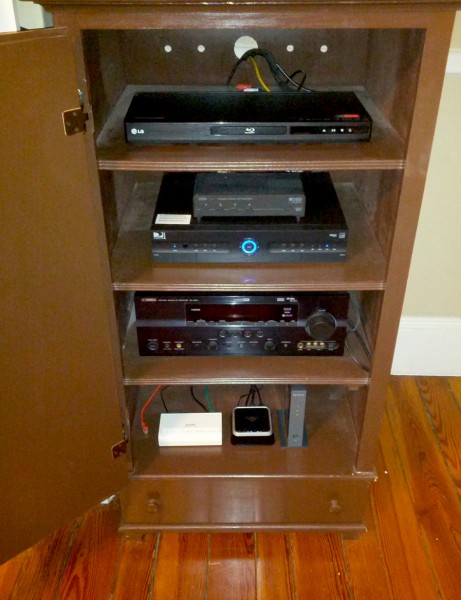
Wires from that D-Link switch run up behind the entertainment cabinet, and again are Cat 6, which is good. They hook to various items in the cabinet — a DirecTV HD DVR, Blu-Ray player, a Google TV and another switch. That switch is also not gigabit capable — another spot that needs improvement. The second switch is simply for future expansion, like that Roku 3 I am eyeing.
That cabinet also contains a Netgear wireless extender, which is “N” capable, so there is no need for an upgrade in that department, meaning that this area of the network only requires two new switches — a minor expense.
The Server
The FreeNAS box has adequate storage at the moment, but I have filled all bays with drives, and even added a modest 320 GB external one as well. It is only a matter of time before I run out.
With that in mind I am looking at external multi-bay drive enclosures. Four bay units can be had for under $100 and internal SATA drives in the 2 TB range are cheap. Even better, they can be added on an as-needed basis, meaning it’s an expense spread out over time, which is a wife-friendly way of doing these things.
Computers
A few months ago I would have put HTPC in this section, but feel I have owned my last one now. I never used it to its full potential because I love my DirecTV — actually I love NFL Sunday Ticket — so it was more a media jukebox and never a DVR. The addition of the Google TV added all of the Media Center functionality I was using, saved shelf space and was much cheaper than building a new HTPC.
My laptop is slightly over a year old, my daughter’s is from Christmas, the older one is a candidate for Linux and the desktop and server are just fine.
No expenses coming here. I say that knowing it is a jinx. The old server was fine until smoke suddenly started coming out of it one morning.
Home Theater
And now we reach my weakness — not because it needs improvement, but because I simply love playing with this stuff. Our home theater works great. We have a 7.1 channel Yamaha A/V receiver (using only 5.1), Blu-Ray, DVR and Google TV. What’s not to like?
I have been coveting a new receiver. As much as I have loved Yamaha over the years, I must confess that I have a mistress named Harman Kardon. The new line is sleek and beautiful. Plus, most new receivers come with ethernet — I have no idea exactly why I need that in a receiver, other than as a toy to play with. Yes, I know it plays Pandora and the like, but so does Google TV, and it feeds into those 5.1 speakers as well.
I also like to play with set top boxes and both the new Roku 3 and WD TV Live intrigue me. The new Roku 3, with its ability to play audio from a headphone jack on the remote, is especially fascinating, but these are far down the list, given that I just purchased the Google TV and do not feel like being questioned about why we need another device with similar functionality.
In the End
…The love you take is equal to the love you make. No, seriously. There is not really that much on the above expense report. Network switches are cheap and the set top boxes I mentioned are not necessary. The receiver is pricey, but not needed now. The big thing is expanded storage for the home server, and I expect that to be in the $200 range for starters — the enclosure and one 2 TB drive.
However, I seem to find new toys on an almost daily basis, so I expect this list to continue to expand. For now though, I must say I am happy with how things have turned out.
If you are on a Mac and using either the Apple-supplied Safari browser, or one of the popular alternatives like Firefox or Chrome, then you may have begun noticing some unexpected ads in the browser lately. Hopefully not, because it spells bad news for you, and that news is Trojan.yontoo.1.
Security firm Doctor Web is credited with the discovery of this latest attack on the Apple ecosystem. Like many Trojans though, it requires the user to make mistakes in order to get a foothold on the system. In fact, the cardinal mistake, clicking on a pop-up plugin message, is the culprit.
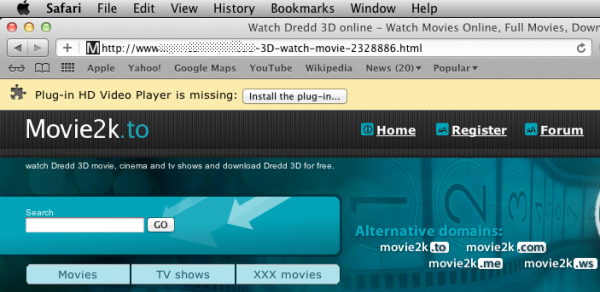
In order to pull this off, Doctor Web reports that “criminals crafted movie trailer pages that prompt users to install a browser plugin. In fact, the prompt only imitates a common dialogue displayed when a plugin needs to be installed or additional configuration is necessary. After clicking on ‘Install the plug-in’, the user is redirected to another site from which Trojan.Yontoo.1 is downloaded”. In addition, the Trojan is also now being spread by downloads of a media player, a video quality enhancement program or a download accelerator.
Once infected, computer’s browsers begin display fake ads on many websites, including the Apple.com. The Trojan then injects ads into those pages using third-party code. This allows the attackers to collect unauthorized ad views on nearly any website they want.
While all of us on Windows have grown accustomed to all of this, it remains new for those customers who opt for Apple hardware and software. However, there has been a growing number of attacks on OS X, including the recent, and rather embarrassing Java exploit, that hit Apple back in February.
Screenshot: Doctor Web
 Last month Google released a transparency report revealing how often law enforcement inquires about users’ private data. Hint: it’s more often than you want to believe. Not to be outdone, today Microsoft posts its own data, which the company refers to as the “2012 Law Enforcement Requests Report”.
While the number of requests may seem staggering, there is some perspective to be had in all of this. First the raw data reported — “Microsoft and Skype received a total of 75,378 law enforcement requests. Those requests potentially impacted 137,424 accounts”. Sounds rather high doesn’t it?
However, Microsoft is a huge company, with vast web properties, so that number, large as it may seem, includes only 0.02 percent of active users. The company has many hundreds of millions of accounts across its online and cloud services. Even more promising for privacy advocates, the company claims to have disclosed content in only 2.2 percent of the instances. Also while Microsoft operates in over a hundred countries around the world, the company discloses data in just 46 — rest assured that Mahmoud Ahmadinejad will not be receiving the software giant’s help.
Microsoft reports that the “data covers law enforcement requests and/or court orders Microsoft received in calendar year 2012 related to our online and cloud services – including, for example, Hotmail/Outlook.com, SkyDrive, Xbox Live, Microsoft Account, Messenger and Office 365”.
The small percentage of users affected, and the even tinier amount of data disclosed, is heartening. We all want law enforcement to be able to do its job when it comes to stopping terrorists and hackers, we just don’t want them snooping on the average citizen because he or she happens to have political or religious leanings that they find unagreeable.
Photo Credit: Lasse Kristensen/Shut
 Despite our recent disdain for Google, there’s no denying the Mountain View, Calif.-based company is a juggernaut when it comes to web traffic. It totally dominates search and its YouTube subsidiary, which has just announced a brand new milestone, is equally unstoppable in the online video market.
The YouTube team claims the service “now has more than a billion unique users every single month”, which is a phenomenal figure. The service, which was started back in 2005, has been growing steadily since inception and was purchased by Google in 2006, perhaps saving the video company from being litigated out of existence.
While that number of regular visitors is huge, the breakdown provided with the announcement is even more staggering. Consider what the numbers really mean — one out of every two people on the Internet visits YouTube. The company further puts it in perspective this way — “Our monthly viewership is the equivalent of roughly ten Super Bowl audiences. If YouTube were a country, we’d be the third largest in the world after China and India”.
The team wraps up with a message to all of its users “From the aspiring filmmaker in his basement and the next great pop musician, to the fans all around the world who tune in, subscribe and share their favorite videos with the planet, thank you for making YouTube what it is today”. Now where can the company go from here?

While we all wait on the edge of our seats for the Xbox 720, or whatever the next-generation console will be called — and I doubt it will be 720 — there is a lot more going on in the Microsoft gaming world than there perhaps should be, given that E3 is getting closer. Some is, of course, pure speculation, which seems to drive the tech industry these days. Some is purported leaks of console information. And then, low and behold, some is actually real information.
I have no desire to discuss rumors — just tell me when you actually know something. I also do not plan on touching a leaked document because who knows if it’s real? What I can tell you is what actually is real.
First, Microsoft’s Fuse Labs today announced the latest version Kodu Game Lab. The company claims the project is “a complete 3D game development environment designed to let kids create their own 3D games”. Microsoft describes the engine thus: “Kodu is built around a custom visual programming language that makes it easy for everyone to learn how to program”.
The new version of Kodu supports touch as an input, new water game characters, programmable control for some of the world settings and programmable control of some character settings.
Kodu is not all that is going on in the Microsoft gaming universe this week, though. This also marks the PAX East show in Boston. Larry Hryb of Xbox Live lets it be known that visitors will get to preview some of the upcoming hot Xbox games at the show.
For instance, Halo 4’s Castle Castle Map Pack will receive its first playable demo, as will Gears Maxim Map Pack, State of Decay, Max: Curse of the Brotherhood and Motocross Madness as well as some new Windows 8 and Windows Phone games.
Hryb also teases that “there is a lot more we’ll have in the booth, from Windows 8 and Windows Phone 8 games, to upcoming Xbox LIVE Arcade titles”.
And you thought you had to wait for E3 in June to get some big Microsoft gaming news…well, okay that may be just slightly bigger, but at least this should hold you over until then.

I don’t really like to play the part of the curmudgeon. But, I am getting a bit tired of the Google “me too” way of doing business, despite the fact that I have to admit I have followed it to a large degree in the past. The company was not the first (obviously) with a web browser, but got me to switch from Firefox — a move I have begun to regret, given recent problems. Google was not the first with cloud storage and, though I signed up for the free version, I pay for real storage on Amazon Cloud and use Crashplan for backup services.
I have used Google Docs, but I prefer Office. In fact, beyond Android, there is really not much being offered that I cannot live without. Don’t get me wrong — I am not being as bold as my colleague Wayne Williams and his total switch, but I have become a bit ambivalent to all of Google. I could switch to Bing. I could go back to Firefox. Neither would really cause me stress.
However, recent events have not helped my perception of the company. And, yes, by that I refer to the whole Reader debacle. I know there are alternatives, though most seem snowed under at the moment. That one simple kill, which is a part of much broader strokes the company has taken lately, was enough to leave a rather permanent bad taste in my mouth.
And now, today, the information giant would like me to trust it with all of my notes, lists and other data with the new Google Keep — or perhaps I should say “keep until the next spring cleaning”.
Give me one good reason why I should leave Evernote, where all of this data is already stored, works across every platform known to man, is completely free and has proven an ability to stay up and running and honest in the face of attacks from hackers?
Keep works on fewer platforms, has fewer options and comes with the headache of knowing that Google may simply decide it is no longer relevant to some future business model.
Honestly, if I were to leave Evernote, which would only happen if the business somehow goes south, I would sooner trust Microsoft and OneNote with my information. The company has a much better track record of trust than that search giant does.

Microsoft announced the coming of Windows Embedded 8, including Industry and Handheld versions, earlier in 2013. The release is today, as both OEM and businesses can begin downloading and implementing various flavors of the newest version of the operating system.
“Edge devices connected and working in unison with an enterprise’s broader IT infrastructure unleash the potential of the Internet of Things by yielding the actionable data and operational intelligence that drive businesses forward”, Kevin Dallas, general manager of Windows Embedded at Microsoft, says.
Windows Embedded versions are all around, though most people do not realize it. The Microsoft OS can be used to run everything from store cash registers to ATM’s. There was even some talk of the Windows 7 version being used to power set-top boxes, though that never materialized. Dallas explained that “From the rich, familiar experience of Windows to integrated management, analytics and cloud platforms, Windows Embedded 8 coupled with the full breadth of Microsoft technologies for intelligent systems helps enterprises gain lasting competitive advantages in retail, manufacturing, healthcare and a variety of industries”.
According to the company, today’s release will not be all — “Businesses will also have the ability to add or buy enterprise-specific functionality for their Windows Embedded 8-based solutions through licensing options Microsoft will make available in July”. The company had previously released a beta version for developers to get started with.
Photo Credit: pixs4u/Shutterstock

Way back in the deep, dark early days of Rebox Instant by Verizon, I got the opportunity to take the streaming service for a test drive. We later learned that the service would be exclusive to the Xbox 360 — at least as far as gaming consoles are concerned. That exclusivity begins today.
Larry Hryb, better known as Major Nelson to Xbox fans everywhere, announces that “the Redbox Instant by Verizon app is available on Xbox 360 now”, though he asterisks this statement with some fine print to let consumers know that they will need that Xbox Live Gold subscription in order to take advantage of the new video-on-demand goodies.
That is, of course, not the only fee customers will incur here. Like rival Netflix, users also are required to pony up a monthly fee for the streaming privileges. In this case, $8 per month for DVD and $9 for Blu-ray. Before you wonder why those distinctions matter for a streaming service, let me explain. Both subscription models entitle the user to four actual discs per month — you know, the old-fashioned, go to the store and get it from the big red box kind. While that seems very last decade, bear in mind that many movies, especially new releases, are not available for streaming.
Hryb finishes up by noting that: “As an added bonus, Redbox Instant by Verizon will be unlocked from Gold for a limited time so download it from the Xbox LIVE Marketplace today”. Enjoy it while you can.

It is officially that time of the year — when grown men call in sick to sit home and watch younger men and women play basketball. In other words, it’s March Madness time. While you are watching those games, and possibly cursing your bracket choices, Microsoft would like to have a bit of your attention.
While the company’s first big Microsoft mobile viral campaign, known as Smoked by Windows Phone, seemed to pop up everywhere and get all sorts of attention, the latest campaign has kept a much lower profile.
Now Microsoft aims to change that as Ben Rudolph, father of both campaigns, announces that the Windows Phone Challenge is coming to the television during the big college basketball tournament. “A new spot that pits the Nokia Lumia 920’s PureView camera head-to-head against the Samsung Galaxy SIII will run on ESPN and CBS throughout the men’s and women’s NCAA tournament”, Rudolph says.
Only the one 30-second spot is planned for TV as of right now, but there is a longer format version, along with other videos, that you can watch over at that Challenge Playlist on YouTube.
Microsoft’s Windows Phone platform has been getting batted around a bit the past couple of days and likely needs the good publicity anywhere that it can be found, and Rudolph is probably the perfect guy to try and right the ship.
 Many people use Really Simple Syndication without actually realizing it. Like SMTP in the background of email, RSS is the backbone of a number of things, including the podcasts you get from the iTunes store. Last week Google set off on an apparent challenge to kill RSS, or at least it seems that way to many of us.
Overshadowed in all of our talk, gripes really, about the loss of Google Reader is removal its RSS extension from the Chrome store. The extension placed the, now familiar, orange square in the URL bar and allowed users to easily subscribe to feeds by clicking and sending them to Google Reader.
Well, that extension was not gone from the Chrome store very long. Australian programmer Justin Kelly has already forked the code and re-uploaded it into the Chrome Web Store (here), but with some changes — gone is the Reader option, replaced by options for Feedly, NewsBlur and The Old Reader (where I remain more than 30,000 down in the queue — just saying). Others can be added from the options page.
Kelly describes it as a replacement extension for “modern, well supported web based RSS readers” — perhaps a bit of a dig at Google and the lack of support and updates it has provided in recent times.
Photo Credit: nasirkhan/Shutterstock
 The tiniest of details can sometimes lead to the thorniest of problems, which Google may discover with its brand new Nexus 10 ad which debuted today. The video seems innocent enough — it follows a young couple through nine months of pregnancy as they plan for their new bundle of joy and discuss what to name the baby boy.
However, if you scroll through the comments of the just-posted one minute ad, you will find something interesting. Commentor Ram Gadde points out that “sex determination of fetus is prohibited in India”. He then later opines that he thinks, for that reason, “this ad will be banned in India”.
The commercial, for the most part has received a positive responses with ericcartmansh saying “steppin it up. Good stuff le Goog” and VaeVictus 666 chiming in “really well done ad. Good job Google”.
After some quick digging, I determined that the aforementioned Indian law is actually in effect so, while if Google actually plans to run the ad in India, there is a chance it could be banned, it is likely not of any major concern to the company. Google will reap benefits from almost anywhere the clever little video is shown and can always make a separate ad for any markets that block it. The global market continues to make everything much simpler and yet much more complicated.
 Microsoft is making another attempt to get into the Chinese market by way of something other than piracy. China is the world’s largest market for computers, but many of the customers run pirated versions of software, including Windows and other Microsoft products. Now the company is attempting to provide users with a legitimate way to get their hands on its wares, and not just software.
In October 2012 Microsoft opened a version of its online store in the Chinese language, and now Tmall, one of largest online shopping malls in the People’s Republic of China, has just added an official Microsoft retail point.
The new online store not only features Microsoft’s own software, like Windows and Office, but also Microsoft branded hardware, such as Surface, and the firm’s popular range of mice and keyboards. The store additionally offers hardware from Microsoft partners for computers, tablets and Windows Phone handsets.
“We are excited to be working with Tmall.com for the official launch of Macrosot’s flagship store” said Kevin Egan, the vice president of E-commerce for Microsoft retail stores. “Chinese consumers’ appetite for brand-name, quality products is surging and they are increasingly making purchase decisions based on experience, value, and service quality”.
So, is this enough to stop the rampant piracy that Microsoft and other software makers face in this market? Probably not, but it is a great outlet for the hardware and perhaps will provide the opportunity for Surface and Windows Phone to get a toehold within one of the world’s largest economies.
 I will spare you all of the crying and griping about the whole Google Reader thing — you have heard it all by now. Suffice it to say that I no longer plan to trust Google with much of what I do. Other companies axe products, as I learned when Microsoft killed my beloved Live Mesh last year, but Google is more regular and ruthless executioner, but I digress — I promised no rant here.
My colleagues and I are discussing where we will all go after being chucked from Google lands into the jungle. There are a number of options, and Feedly is among the popular destinations. But I was not impressed in my, admittedly very short, look at the service. I also fired up Opera and imported my OPML file into its built-in RSS reader, but it’s not cloud-based, and I was left with more than 10,000 “unread” stories. Granted it can be fixed, but do I want to?
In the end I settled on a very simple web-based solution called The Old Reader. I would love to tell you how much I like service, how I recommend you move there immediately, but I fear I will not have those answers for days at this point. The road this refugee treads is a long one, and there are many more homeless in front of me anxious to be fed.
My initial attempt to import my OPML file from Google Takeout resulted in a message that told me, rather matter-of-factly, that “There are 46,908 users in the import queue ahead of you”. That number was as of 9:41 AM ET this morning. As of this writing — more than six hours later — I have moved up quite a ways. The site now tells me that “There are 35,296 users in the import queue ahead of you”. I figure I should be in sometime around the end of this week, perhaps sooner if I get lucky.
Its not the fault of the service. I am pretty sure that Google warned no partners ahead of its Spring Cleaning announcement that suddenly sent a tsunami of traffic the way of these third-party services. All of them scramble for bandwidth and more servers. I suppose it’s a good problem for a business to have, although most would have been well-served with a warning about the mass of refugees coming their way.
Thankfully we all have until July 1 to get this sorted out. There is time to try multiple services and pick a favorite and there is time for the app makers to get up to speed with their new-found popularity. It just begs the question, once again, what Google’s powers-that-be are thinking in making this move. There is obviously a business here, and the biggest Internet company in the world failed to find a way to capitalize on it.
Photo Credit: Scott Maxwell / LuMaxArt/Shutterstock

You have no doubt heard the term “Monday Morning Quarterback”, which refers to the person who always has the plan that would have won the game the day before. Now you can be an armchair mountaineer thanks to Google’s latest update to its Maps program, that brings some of the biggest and baddest climbs to your computer screen.
The Maps teams has gone to a number of extremes and this time they are scaling the heights of some of the most feared peaks on the planet. The team visited Nepal, commonly thought of as the gateway to the Himalaya’s, and captured images that must be seen to truly be appreciated.
According to Google’s Dan Fredinburg: “This awesome trek began at Everest Base Camp where the crew rolled out over 70 miles through the mountains and through the towns — through lovely days and real powerful color splashes alike”. The team ventured as far up as an altitude of 18,192 feet. Along the way panoramic images were capture and are subsequently made available for viewing on your PC or mobile device.
In what seems somewhat of a surprise, Google has also made a number of the panoramic images available within Microsoft’s Photosynth app — “if you’re using a Windows Phone or iOS device, you’ll want to have a peek at Photosynth“, Fredinburg states.
This latest release adds to the existing World’s Highest Peaks that is already part of the Google Maps collection — a set that includes several Andean peaks and also the famed Kilimanjaro in Africa.