
Author: Alan Buckingham

  • Google takes a Field Trip to visit iOS

    Apple fans can breath a sigh of relief — not only do they now have Google Maps again, but today they gained another Google travel app, Field Trip. The app quietly rolled to the iTunes Store today with no fanfare, nor even an announcement from the search giant, bringing with it all of the features that many Android users have grown to love.

    Field Trip works in the background and is unseen the vast majority of the time. However, when the user is out and about, it can suddenly spring into action when a place of interest is detected nearby. These can include local history as well as the latest and best places to shop, eat and even have fun.

    Google pulls the data from TimeOut, Thrillist, Food Network, Zagat, Eater, Sunset, Cool Hunting, WeHeart, Inhabitat, Remodelista, Atlas Obscura, Dezeen and Daily Secret, Songkick and Flavorpill. More services are being added regularly.

    The new iOS version is available in multiple languages — English, Arabic, Catalan, Chinese, Croatian, Czech, Danish, Dutch, Finnish, French, German, Greek, Hebrew, Hungarian, Indonesian, Italian, Japanese, Korean, Malay, Norwegian, Polish, Portuguese, Romanian, Russian, Slovak, Spanish, Swedish, Thai, Turkish, Ukrainian and Vietnamese.

    Field Trip for iOS is free and compatible with the iPhone 3GS and newer devices and will also work with the iPod touch and iPad as well. Just a word of caution — if you are traveling to somewhere historical (like Williamsburg, Virginia), the app can become quite active, to the point of annoying — but it is a good kind of annoying.

  • Google expands European Street View

    Despite some setbacks in Germany a couple of years ago, Google is pushing ahead, today announcing a new expansion of its Street View service on the continent. Ulf Spitzer, Google’s Street View Program Manager, today took the wraps off of a major update to the company’s Maps offering in the old world.

    For the first time, Google has added street level imagery for Bulgaria, adding the cities of Sofia, Plovdiv and Varna, Veliko Turnovo and Koprvishtitsa. Not stopping there, the search giant also covered the ski resorts of Borovets, Bansko and Pamporovo, as well as the Architectural and Museum Reserve Tsarevets and the popular tourist destination of the Black Sea coastline.

    Russia, which had already been partially covered by Street View, with Moscow and St. Petersburg having been done, now has the city of  Sochi, site of the 2014 Winter Olympics added, as well as the Golden Abode of Buddha Shakyamuni, the largest Buddhist temple in the Republic of Kalmykia.

    Spitzer also added that “in the UK we’re refreshing some imagery in major cities like London, Manchester, Glasgow and Cardiff, as well as filling in some of the gaps where we had no Street View coverage. For example, we’ve added brand new images to parts of the Scottish coastline, in pockets of East Anglia and parts of South Wales”.

    The addition of Bulgaria brings Google’s total to 48 nations covered by Street View and the company is continuing to push into new locations.

  • Happy anniversary! Banking malware targets Google Play

    Today is the one-year anniversary of the Google Play store and the company celebrates with a big sale. However, things may not all be balloons and ribbons in Android land. Something darker lurks just beneath the surface of Google’s Android marketplace.

    Brian Krebs, a former Washington Post reporter who now writes a security blog, found a bit of information that could make your hair curl. Krebs makes a habit of hanging out on the seedy side of the web and he recently hit potential paydirt, encountering a new botkit that is making the rounds and leverages actual verified accounts from the marketplace to trick users into downloading phony banking applications. Krebs spotted a developer purchasing verified Google Play accounts for $100 each on an underground forum.

    According to Krebs, “Google charges just $25 for Android developers who wish to sell their applications through the Google Play marketplace, but it also requires the accounts to be approved and tied to a specific domain. The buyer in this case is offering $100 for sellers willing to part with an active, verified Play account that is tied to a dedicated server”.

    The malware, which goes by the name ‘Perkele’ does not appear to be overly sophisticated as far as a modern mobile malware app goes, but it is still being endorsed by buyers.

    Krebs explains how the new malware works: “When the victim goes to log in to their bank account at their PC, the malware Web inject informs the victim that in order to complete the second, mobile authentication portion of the login process, the user will need to install a special security certificate on their phone. The victim is then prompted to enter their mobile number, and is sent an SMS or HTTP link to download the mobile malware”.

    While many of us may pause at such a prompt, average users likely would not. Especially given today’s two-factor authentication that a growing number of sites require — for some reason Google just prompted me to enter a code texted to my phone this morning when I first logged into my account.

    Is there something to worry about? Likely not, but it is reason to be cautious, but then again there is always reason for that. If an app prompts you to do something out of the ordinary then go directly to the website — type the URL into your browser — do not click a link. Check it out before you go any further. I know it sounds paranoid but, as the old saying goes, better safe than sorry.

    Photo Credit: koya979/Shutterstock

  • Box updates Windows 8, WP8 cloud apps with new features

    Cloud is one of today’s biggest keywords and Box is one of the top services in the game. Now the company has rolled out a series of updates to its apps for both Windows 8 and Windows Phone 8 and added some rather cool new features for its customers on both platforms. Given that Box claims more than half a million downloads of its Windows 8 app, there is certainly a market for the service.

    First off, there is a new Preview mode for documents that works without even opening the document — a feature that was already included in the company’s Android app, where Box’s Simon Tan claims the service has an “average [of] more than 100,000 previews per day”. The preview mode works with more than 75 file types, including Word, PowerPoint, AutoCAD, Adobe Illustrator and a lot more. This feature is coming to both platforms.

    There are also some platform specific updates for your computer, tablet and mobile handset. The updated Windows 8 app now sports a navigation bar for a quick way to get to your All Files home, Updates and more. Users can access this by swiping down from the top of the screen in the Metro app. Box also promises improved spacing and utility for the semantic zoom functionality.

    As for Windows Phone 8 customers, they can expect added support for Office documents and PDFs to open directly in Microsoft Office, as well as a new design for the Box live tile and the ability to pin it to the start screen.

    According to Tan “all of these new features and enhancements add up to a packed release across both Box for Windows Phone and Box for Windows 8. Version 1.5 of both apps are available now on your devices”. Box needed the updates and new features in order to stay competitive in a growing market — especially where it must compete directly with SkyDrive built-in functionality.

    Photo Credits: zzoplanet/Shutterstock

  • Google celebrates Play store anniversary with special deals

    It is the one year anniversary of Google Play store — or at least the renaming of the Android market. Google loves to celebrate these kinds of occasions with a sale. This one is no exception, as the company has kicked off with deals on music, books, magazines, videos and, of course, apps.

    Jamie Rosenberg, the vice president of Digital Content at Google Play announced the deals today, saying that “since no birthday is complete without presents, we’re celebrating with a bunch of special offers across the store on songs, TV shows, movies and books. We’re even offering a collection of games with some fun birthday surprises created by developers”.

    Of course the Android operating system maker also took a moment to pat itself on the back by letting everyone know that the Play store has more 700,000 apps and deals with all of the major music companies, movie studios and publishers to bring you the music, movies, TV shows, books and magazines.

    The deals include free songs from classic artists like The Velvet Underground, free books like A Quest of Heros, purchase of the movie Kung Fu Panda (ask your kids) for $4.99, a free episode of Breaking Bad and lots more.

    The sale is live right now and UK customers can even pay with their new Google Play gift cards. You can also use a credit card or have your purchase charged to your mobile phone bill. Google will take your money however you wish. Well, except cash.

  • Roku 3 released with new UI, motion sensitive remote

    I knew this would happen. After battling to decide between Roku and Google TV and opting to buy the Vizio Co Star, Roku has gone and released its brand new Roku 3 box this morning, and also made me jealous of all the cool stuff the company has added into its latest set top box.

    Roku’s vice president of business development, Jim Funk, made the announcement this morning that the company is “excited to introduce the new, fully loaded Roku 3 — our fastest, most powerful streaming player to-date”.

    The box comes with a completely revamped user interface designed to provide quicker access and greater visibility, especially for customers who have installed a lot of channels. The Roku Channel Store and Search are now fully integrated into the home screen and have been redesigned with a new on-screen experience to make browsing simpler.

    Gaming on the little box has also been improved because the new remote control is motion-sensitive. The Roku 3 comes with Angry Birds pre-installed to invite you to try out that functionality. In addition, the RC has a built-in headphone jack. When plugged in, it automatically switches the audio over to your ears and mutes any external speakers — handy for moving around while listening to music and not disturbing the rest of your home. However, the company failed to cite what the range for this capability is.

    If you do not want to replace your existing box just yet then you can hold out and the new UI will begin rolling out to Roku 2 devices in April. Otherwise, the Roku3 is available now for $99. I wonder if my wife would kill me if I bought two set top boxes within a month of each other?

  • Nokia photo app begs Facebook to bring Instagram to Windows Phone

    Windows Phone users have many of the apps they need — though not always the official ones. However, one noticeable service is lacking — Instagram has yet to release a client for Microsoft’s mobile platform. Given that the software giant spent $240 million to purchase a stake in the social network back in 2007, and that Facebook now owns Instagram, that has to sting a bit. Then again, Microsoft writes the Facebook for Windows Phone app, but let’s not chuck salt on wounds by going there.

    Nokia, the flagship handset maker for Windows Phone, is apparently so desperate to right this perceived wrong that it wrote an app to fill the gap. “Many of you have asked when Instagram will be coming to Windows Phone, and the #2InstaWithLove app was created as a way for you to have your voice heard. The app allows you to take a photo using the classic polaroid filter and automatically adds the hashtag #2InstaWithLove”.

    To be fair, Nokia is not trying to rip off the mobile photo-sharing kingpin, but only use this as potential lobbying power in its battle to get the app onto Windows Phone devices. According to Nokia’s description in the Windows Phone store, “It’s all about showing Instagram just how passionate the Windows Phone community is — so be creative, have fun and be sure to share your favorite photos with us using a social network of your choice”.

    The Finnish handset maker is clearly taking lobbying to a whole new level — and with good reason. Instagram has become a staple for Android and iOS customers, and many Windows Phone users are feeling left out in the cold. Given that Nokia is known for its incredible cameras and Carl Zeist lenses that are built into the Lumia devices, it’s really a shame that this growing portion of the market is still learning to do without.

  • Google reveals how often the Feds ask for your personal info

    Google is characterized in some many different ways. While some of us look to the Mountain View, Calif.-based company as our savior, others refer to it in terms like “Skynet” — the computer and artificial intelligence system that runs the world in the Terminator movie series. That latter reputation is one Google tries hard to change; Transparency Reports are example.

    Today, Google’s Legal Director, Richard Salgado, announced that the company will be adding National Security Letters to its report. “When conducting national security investigations, the U.S. Federal Bureau of Investigation can issue a National Security Letter (NSL) to obtain identifying information about a subscriber from telephone and Internet companies”, stated Salgado.

    The Federal Bureau of Investigation (FBI) actually prohibits companies from making this information public, but Google worked with officials to allow its customers to learn more of what is going on behind-the-scenes. According to Salgado: “When conducting national security investigations, the U.S. Federal Bureau of Investigation can issue a National Security Letter (NSL) to obtain identifying information about a subscriber from telephone and Internet companies”.

    Google has won this battle and gained the right to begin including data about NSLs in its Transparency Report. The data is now displayed on a new page dedicated to these inquiries. Exact numbers are not given, but the data is displayed in ranges, such as between 0 and 999 NSL’s were received in 2012 — not a big help, but better than no data at all. Salgado explains: “You’ll notice that we’re reporting numerical ranges rather than exact numbers. This is to address concerns raised by the FBI, Justice Department and other agencies that releasing exact numbers might reveal information about investigations”.

    Google attempts to walk a thin line here between easing the potential fear from privacy-minded users and following what the government allows them to reveal. This is one small step in the right direction.

    Photo Credit: Brian A Jackson/Shutterstock

  • Twitter is a liberal echo chamber

    I certainly cannot speak for everyone, but for me, Twitter is the go-to news source. Yes, the service does get pwned sometimes, but more often than not, what is reported there is real and ahead of services like CNN. I also use the social network for weather updates and sports news from the beat reporters who cover my favorite NFL team. Twitter is great for this type of information.

    However, according to a new report just out from Pew Research, when it comes to public opinion, Twitter leans decidedly to the left. BetaNews is not the place for politics, and I will not opine on what I think of that leaning — only that the study makes a clear case.

    None of this should come as much of a surprise. After all, while those on both sides of the political fence attempt to utilize the service, including politicians themselves who are looking to further their agendas, the majority of average users, according to the poll, are “considerably younger than the general public and more likely to be Democrats or lean toward the Democratic Party. In the 2012 news consumption survey, half (50 percent) of adults who said they posted news on Twitter were younger than 30, compared with 23 percent of all adults. And 57 percent of those who posted news on Twitter were either Democrats or leaned Democratic, compared with 46 percent of the general public”.

    Numbers Don’t Lie

    Examples of liberalism litter the study — 77 percent of Twitter users were “happy” about Barrack Obama’s re-election while public opinion was at a more stable 52 percent. California same-sex marriage was approved by 46 percent of the Twitterati, but only 33 percent of the public at large. The examples go on.

    Throughout most of the study, the results are almost entirely consistent, though the percentages vary on a case-by-case basis. According to Pew “this tilt to the Twitter conversation was evident throughout the fall campaign. In nearly every week from early September through the first week of November, the Twitter conversation about Romney was substantially more negative than the conversation about Obama”.

    Breaking the Norm

    Just when you thought you had this figured out, Twitter throws a wrench into the works. The study cites several political events that were viewed more favorably by the average citizen than by those who took to Twitter to post their opinions. Among those events — Obama’s second inaugural speech and the 2012 State of the Union address.

    There were also a couple of anomalies — both Mitt Romney’s choice of Paul Ryan for a running mate and the June 2012 Supreme Court ruling on health care were met largely with mirrored reactions from both Twitter and the general public.

    What does it Mean?

    There really is not much to argue with here. I honestly doubt that any of this comes as a great surprise — those in the tech world tend towards more liberal views in many cases, though certainly not all. The more tech-savvy also tend to be younger and more likely to use services like Twitter — again, in most cases.

    And Pew covered its backside nicely by doing an exhaustive study to ensure the results were accurate. The research firm called this “the conclusion of a year-long Pew Research Center study that compared the results of national polls to the tone of tweets in response to eight major news events, including the outcome of the presidential election, the first presidential debate and major speeches by Barack Obama”.

    In the end, Pew could only conclude that Twitter reactions to political events result from the unique profile of active Twitter users and the extent to which those events engage different communities.

    Photo Credit: lev radin/Shutterstock

  • Microsoft set to demo Windows Embedded 8 Industry this week

    Microsoft has visions of the “intelligent grocery store” and this week the company will put those dreams into motion at the Retail Tech Japan trade show. The show is described as “a vast collection of cutting-edge retail information technology ranging from store systems (e.g., Point-of-Sale registers) to head-office systems, in-store promotion devices, RFID / IC tags, backyard systems and logistics”.

    Today, Microsoft’s John Boladian, marketing director for Asia Pacific and Greater China, announced that the software giant will be running a series of demos showing off Windows Embedded 8 Industry. The new version is set to replace the older Windows Embedded POSReady 7.

    Boladian, who was formerly with the Windows Embedded team, claims that “this year’s RTJ will also see an exciting debut of demos showcasing Windows Embedded 8 Industry, a fixed-platform solution based on Windows 8 that provides specialized devices, particularly in retail, with the requirements they need out of the box”. The demos will take place at Microsoft’s booth # RT1302.

    Boladian goes on to explain that the booth will be “showcasing  streamlined, beautiful line-of-business applications that leverage Multi-Touch, Internet Explorer 10, enhanced power management and  connectivity, and lockdown capabilities”.

    Windows Embedded 8 Industry will be released shortly after the RTJ show. However, customers can already grab a Release Preview version from Microsoft if they wish to begin experimenting and building solutions.

    Photo Credit: Retail Tech Japan

  • The White House agrees — you should be able to unlock your phone

    You asked and, this time at least, the government listened. Back in January, the legality of unlocking one’s cell phone was rolled back after the Library of Congress failed to renew a 2006 ruling, letting it to expire. The outcry could be heard round the world, as the saying goes.

    These days, though, Americans have an outlet for their distaste — the government’s own “We the People site”. And citizens visited that site in droves — 114,322 of you demanded that the White House re-evaluate this ridiculous (my word, not the carriers’) law. The petition laid out the gripe in plain words — “Consumers will be forced to pay exorbitant roaming fees to make calls while traveling abroad. It reduces consumer choice, and decreases the resale value of devices that consumers have paid for in full”.

    Today those voices were heard. White House spokesman R. David Edelman announces that “If you have paid for your mobile device, and aren’t bound by a service agreement or other obligation, you should be able to use it on another network”. Edelman even went so far to describe it as “common sense, crucial for protecting consumer choice, and important for ensuring we continue to have the vibrant, competitive wireless market that delivers innovative products and solid service to meet consumers’ needs”.

    This does not entirely fix the problem, though the White House obviously carries a lot weight. There is still the matter of the Librarian of Congress and that little DMCA problem that the country has. However, the Edelman statement is fairly clear, while attempting to be gentle to the LOC.

    So, what do all of you think? Is this a basic right that should be protected? Could any of you possibly be against this and, if so, why?

    Photo Credits: Slavoljub Pantelic/Shutterstock

  • Microsoft updates Azure Enterprise Management

    Just last week Microsoft began rolling out the Azure service in 25 new markets around the world, but the updates have continued today as Microsoft continues to move forward in its competition with services like Amazon S3, Google Cloud Platform and others. Today the company’s Azure Director, Alex Simons, announces updates to the identity and access management capabilities in Windows Azure.
    The service gains three new features — the ability to manage users and their access rights in the Windows Azure Portal; preview of the new phone based two factor authentication for users who are Global Administrators in Windows Azure AD; and the ability to manage the synchronization and federation between your Windows Azure Active Directory and Windows Server Active Directory from within the Windows Azure Portal.

    According to Simons “this is another step in our continuing effort to bring a set of secure, enterprise grade identity and access management capabilities to Windows Azure”.

    With Azure AD administrator, you can now create user accounts, assign users to your existing subscriptions and users can create their own new subscriptions. In addition, as a Directory administrator you will be able to disable user accounts or reset their passwords from within the Azure management portal.

    The phone-based two-factor authentication is still in preview mode, while with Synchronization and federation you will be able to follow a few steps and reduce the work required to securely manage access to your cloud resources.

    Simons wraps up by letting customers know that “I hope you’ll find these new capabilities useful and valuable.  We’re really looking forward to your feedback on them and to delivering more capabilities like this in the near future”. The updates are rolling out as I write this, so you should see them across the board very soon, if not already.

    Photo Credit: Sergej Khakimullin/Shutterstock

  • Hit the slopes! Burton app is exclusive to Nokia Lumia

    Last week at Mobile World Congress in Barcelona, Spain, Nokia unveiled an upcoming mobile app that teams the handset maker with snowboard legend Burton. The app comes exclusively to Lumia devices. A brief hands-on was shown off by the folks over at Windows Phone Central, but today Nokia released a full-blown teaser video, complete with some spectacular filming of the extreme winter sport.

    While some of the functionality here is similar to what Google Now can do for Android — weather, information and maps — the Burton app also contains a video sequencer that allows the user to shoot short bursts of video and then edit and chop them on the fly. It also comes with a feature called “Tune up” that provides playlists that customers can enjoy on the way down the slopes. Finally, users can watch Burton Open Events on their Lumia handsets.

    The app is free and available now in the Windows Phone store. If you are not a snowboarder then you may still find some use for this Burton app, because of the video sequencer feature. If you do plan to hit the slopes, then you can expect to get the latest snow forecast for more than 2,600 resorts around the world.

    The Burton app becomes another part of the Nokia Collection, which was recently joined by NFC Writer — a group of apps that are exclusively for Lumia customers.

  • Evernote is hacked, claims user data ‘should’ be safe

    I am sure I am not alone when I say that Evernote is one of my favorite services. It makes life so much easier — I can write a note on my PC and then see it on my phone when I am out. I can add an item to a shopping list and it appears on my wife’s phone while she is in the store. There are all sorts of cool possibilities. But, if you visit the service today then you may be in for a bit of a surprise.

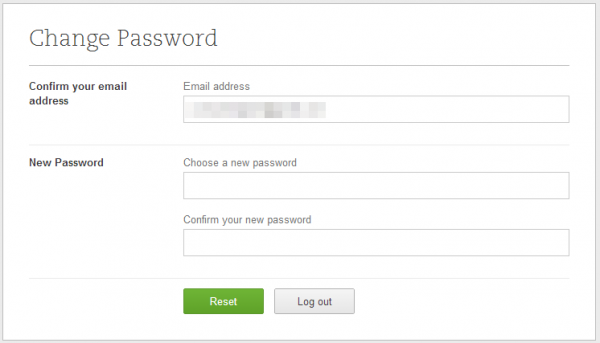
    When you try to log into the site you will be taken to a prompt that asks you to please change your password — no you did not enter your login credentials wrong. The service announced this morning that it was hacked. Dave Engberg of Evernote posted the bad news, while also trying to reassure customers that there is really nothing to worry about and that the password change is simply precautionary.

    “Evernote’s Operations & Security team has discovered and blocked suspicious activity on the Evernote network that appears to have been a coordinated attempt to access secure areas of the Evernote Service”.

    Engberg goes on to assure “in our security investigation, we have found no evidence that any of the content you store in Evernote was accessed, changed or lost. We also have no evidence that any payment information for Evernote Premium or Evernote Business customers was accessed”.

    However, the company did find that the attackers were able to gain access to Evernote user information, which includes usernames, email addresses associated with accounts and also encrypted passwords. Engberg continues to resassure: “Even though this information was accessed, the passwords stored by Evernote are protected by one-way encryption”. The company claims that it is only forcing users to change current passwords as a measure of extra security.

    The announcement wraps up with the usual plea to users about secure passwords — do not use dictionary words, never use the same password on multiple sites, and the other warnings generally associated with these events.

    Upon hearing this news, I immediately visited my own account and, sure enough, was prompted to change my password. I store nothing of importance there — the hackers are welcome to my family’s grocery list. I would ask them only to buy some of it for us if, for some reason, they did gain access.

  • Google shows off ‘How Search Works’

    We all use it everyday. Be it Google, Bing or another alternative, we search for things without even really thinking about it. Google, however, wants to show you a little bit about what all goes into this seemingly simple activity. Friday, the company unveiled a new web site called ‘How Search Works‘ that gives a rather in-depth look behind the scenes.

    Google has, for sometime now, run an “Inside Search” blog that provides a bit of information on updates to the company’s core service, but this one really lifts the curtain, though you still will not find any real trade secrets revealed — though there is a 43-page document explaining how Google evaluates results. It is an interesting look at what really goes on when you type that innocent “funny cat videos” term into the little box. Yesterday Jake Hubert, a Google Product Manager, took to that blog to announce the new web site.

    “Ask a question, get an answer. But what happens in between? Last year we released an animated site that illustrates an email’s journey to friends and family around the world. Today, we’re releasing a similar website called How Search Works”.

    There is information about crawling and indexing, algorithms, combating spam and Google policies — “We want to organize the world’s information. But what about malware? What about credit card numbers? There are many tricky issues we think about on a daily basis. Here you’ll find a list of policies organized around particular topic areas. We’re starting with policies related primarily to content removals, but this is a living document and we plan to update over time”.

    There is a very helpful section called “tips and tricks” that aims to point all of the useful information that can be found on Google with simple searches — recipes, movie times, currency conversion, weather and more.

    Finally, there is a rather cool “Playground” page that tells you about the famous Google Doodles, A Google a Day, Search Globe and other fun information.

    Google loads up the information and, while much of it is geared towards the average consumer, there are also useful topics for webmasters looking to optimize their sites and boost traffic. Again, you will not find the secrets of SEO, but you will learn some tips that may just help you out — in both search and design.

  • Microsoft Photosynth finally reaches Windows Phone 8

    By now most of you have likely heard of Photosynth, the Microsoft Labs project that made the mainstream, first as a web app and then on mobile. Now the mobile version has finally been ported to Windows Phone 8 devices as version 1.5 lands in the Windows Phone store today.

    Photosynth is a panorama app that can take multiple high resolution images and stitch them together into a fantastic picture that users can pan around — you can see some great examples on the website (it requires Silverlight).

    Microsoft’s Michael Stroh made the announcement earlier today, saying that “I know many shutterbugs have been waiting eagerly for this free app—and it appears patience has paid off. The Windows Phone 8 release contains several handy new features”.

    Among those new features is Lens Integration, which allows the user to launch Photosynth right from within the camera app. There are also new sharing features built in, allowing other Windows 8 users to view your shared panoramas — users can still share via Facebook, Twitter and Email. Finally, Microsoft claims better camera controls, especially in the area of lighting.

    Users can, as always, publish their images to the Photosynth website to share with the world. This makes the panorama visible directly from Bing Maps and Bing search results.

    I really like Photosynth, and I am very happy that Windows Phone 8 customers finally have access to the service. However, WP8 has been available since October 2012. Microsoft’s slow support helps to explain part of the problem the mobile OS has gaining traction.

  • Vimeo aims to be the Instagram of video

    Instagram has become wildly popular for sharing pictures, thanks, in part, to its filters that allow the user to alter the appearance on a particular image to get just the right look. Now Vimeo wants to add that same functionality to your videos. Today Ryan Hefner took the wraps off of Vimeo Looks.

    Looks debuts with a large set of filters — more than 500, according to Hefner. Customers can cruise through them and quickly try out different ones to find what they think will showcase the video in the best way. Hefner points out that “you can also check out recommended Looks tailored to your specific video, or browse by genre, mood, location, color, time period, even holiday”.

    The Looks filter system is based on Vivoom, which is used by major studios like Sony, Warner Brothers, and ESPN for their own video production.

    If you are wondering if you can produce a popular online video then consider that, according to ComScore, “Nearly 36.2 billion video content views occurred during the [past] month”. The report goes on to state that “83.5 percent of the U.S. Internet audience viewed online video”. That is a tremendous amount of online media being consumed. None of this means that you are the next big meme, but the audience is out there.

    Vimeo previously allowed users to add music to their videos — watch out for that DMCA thing — and now Looks can enhance the video portion of your little, or big, production. Users can check it out and get started by visiting the Vimeo Enhancer. For now, Looks is free, but Vimeo claims that the offer is for a limited time.

  • Last chance — Windows 8 Pro $15 upgrade ends today

    If you purchased a Windows 7 computer between 2 June 2012 and 31 January 2013 you are eligible for an upgrade to Windows 8 Pro for only $14.99. In fact, even if you did not actually purchase a computer, you can still get the cheap upgrade.

    If you have not yet jumped on this offer then the clock is ticking down for you. Today is the last day to take the plunge. You will need to fill out some basic form information and then you’ll receive a code in your email. Use that code to make your purchase and the price will drop to $14.99.

    If you are still on the fence about switching to Windows 8, a move I recommend, then there is nothing to worry about — grabbing the cheap deal does not mean you need to actually install the operating system today. You simply need to make your purchase now. You can run the installation tomorrow or next year.

    It is unlikely that Microsoft will suddenly extend this offer, so today is the last opportunity to take advantage of a good deal. Tomorrow the same upgrade to Windows 8 Pro will run you just slightly more — $199.

  • Internet Explorer 10 for Windows 7 speaks your language

    Yesterday Microsoft, at long last, rolled out Internet Explorer version 10 for Windows 7 — a browser that had been available to Windows 8 users since launch back on October 26, 2012. Today the software giant followed up with language packs for that new software release.

    Each language pack comes as a separate download and is, of course, completely free. There are countless ones available from Afrikaans to Marathi and all the way through to isiZulu.

    Microsoft points out that “The Internet Explorer 10 Language Packs install language specific resource files, allowing users to view the user interface (UI) of Internet explorer 10 in a different supported language. To use these language packs, you must install the matching OS language pack on Windows before proceeding”.

    The download file names may seem a bit cryptic, but if you are feeling confused then scroll to the bottom of the page and there you will find a list of the languages in alphabetical order, followed by the abbreviation. Use this as a key and you should have no problems.

    Customers will need to be running service pack 1 of Windows 7, though these also are compatible with Windows Server 2008 R2 Service Pack 1 and higher. Installation is simple, but if you need help then there are instructions provided right on the download page. Microsoft supports just about everything possible — unless you choose to speak Latin. Even my Gaelic speaking ancestors would be happy! As for the retiring Pope, well…

    Photo Credit: Igor Petrov/Shutterstock

  • Office 365 means business

    Today Microsoft reminded rank-and-file customers that the productivity suite cloud isn’t just an option for consumers. New Office 365 SKUs are now available, bringing the focus back to businesses. Kurt Delbene made the announcement, claiming that “Microsoft’s most complete Office cloud service to date has new features and offerings tailored to the needs and budgets of small, medium-size and large organizations”.

    The updates start with Office 365 ProPlus. This is surprisingly similar to the new home version. It includes Word, Excel, PowerPoint, OneNote, Outlook, Publisher, and Access, though adds InfoPath, which is an app designed for creating, distributing, filling and submitting electronic forms, and Lync. Like its consumer brethren, ProPlus can be used on up to five devices. However, Delbene points out that “IT departments also get the controls they need, including the ability to run Office 365 ProPlus side-by-side with other versions of Office and tools to streamline and manage updates for their users”. This will be available as a standalone offering for $144 per user for an annual subscription.

    Next up is Office 365 Midsize Business, which targets businesses with anywhere from 10 to 250 employees. In addition to the ProPlus features, this one provides access to online versions of Exchange Lync and SharePoint, along with what Microsoft describes as “simplified IT tools they need to maintain control while reducing complexity. Active Directory integration, a Web-based administration console and business-hours phone support are also included”. Pricing for this model is set at $15 per user, per month or $180 per user annually if businesses prefer to go that route.

    Finally, there is Office 365 Small Business Premium. This is for the organization that employs 10 people or less. Besides all of the traditional Office apps, it includes business-grade email, shared calendars, website tools and HD videoconferencing capability. Pricing for this level of service comes in at $12.50 per user, per month or $150 per user, per year.

    Debene states: “With today’s general availability of Office 365 for all businesses, the new Office is now fully available to businesses, academic institutions and consumers”. But he makes an off-hand, dig against Google Apps: “This release unlocks new scenarios and delivers capabilities that far surpass anything available in browser-only solutions”.

    For many businesses, browser-based solution might just be enough. For example, Google Apps for Business is $5 per user per month. There is no desktop software, but how many people work disconnected these days? That option includes 25GB email storage and 5GB Google Drive per user, plus calendar, contacts and chat, among other features. A $10 per-user, per-month option adds data archiving and discovery.

    Google’s solution costs considerably less — $70 versus $150 for Small Business Premium — but does it offer more? The answer as much as anything depends on how much more value Office 365 subscribers see in having the productivity suite running on their PCs and that of using a more familiar and tested product. Other benefits, like anytime, anywhere, on-anything access, are similar for Google and Microsoft cloud suites.

    Microsoft recently scored some big wins, bringing its Office 365 platform to governments like the city of Chicago, as well as institutions and non-profit organizations.

    Photo Credits: James Thew/Shutterstock