Author: Alan Buckingham

  • Microsoft pushes out Windows 7 SP1 on March 19

    For those people who haven’t moved on to Windows 8, don’t worry — you will still get something new. Microsoft has announced that Service Pack 1 for Windows 7 will automatically push through the Windows Update tomorrow.

    This is not entirely new, though. In fact, Service Pack 1 released way back on Feb. 9, 2011, but has remained optional. Users could previously install SP1 from Windows Update, but the task required manually adding it to the installation list. The difference now is that Microsoft will no longer give users a choice in this matter. That is not a bad thing, because SP1 rolls together a number of security updates for your computer.

    According to Microsoft’s Brandon LeBlanc, “Starting tomorrow, the installation will be fully automatic with no user action required for those who already have Automatic Update enabled. SP1 will be released gradually over the coming weeks to all customers on the RTM version of Windows 7. The service pack will take slightly longer to install compared to other updates”.

    The update will only happen on consumer computers, so IT has nothing to fear from this sudden change. The update only applies PCs that are not managed by any Microsoft management tool such as Systems Center Configuration Manager (SCCM) or WSUS Server. Businesses will need to roll out this update on their own.

    Customers should make the move as soon as possible because Windows 7 without SP1 will become unsupported on April 9. In other words, this is not really an option for you or IT. The good news is that, after two years in the market, most users likely already have the updated version of the operating system. This is simply a last ditch effort to get the stragglers on board and perhaps make things just a bit more secure.

    Photo Credit: Adriano Castelli/Shutterstock.com
  • New Kinect for Windows SDK coming March 18

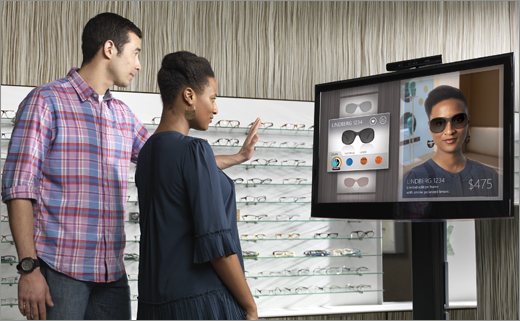
    Yesterday at the Engadget Expand conference Microsoft’s Bob Heddle, the director of Kinect for Windows, announced a new software developer kit is coming very soon — tomorrow, in fact. Version 1.7 will be made available March 18, and Heddle promised it will be the “most significant update to the SDK since we released the first version a little over a year ago”.

    Version 1.7 promises new interaction, including push-to-press buttons, grip-to-pan capabilities, and support for smart ways to accommodate multiple users and two-person interactions. Heddle explains that “we wanted to save businesses and developers hours of development time while making it easier for them to create gesture-based experiences that are highly consistent from application to application and utterly simple for end users”.

    The company is also adding more features to Kinect Fusion — a service that create accurate, full, 3-D models. Fusion will now include OpenCV and MATLAB Samples to allow developers to build advanced Kinect-enabled applications while using industry standards.

    The new SDK also marks a milestone of sorts. Microsoft will be making Kinect for Windows code samples available through CodePlex — marking the first time Kinect code has ever been available through an open-source resource.

    Heddle promises that the new features will be “fully compatible with all previous commercial releases, so we encourage everyone to upgrade to the new version”. If you want to check out the on-stage demonstration from Heddle then there is a video available for you now.

    Photo Credit: Microsoft

  • Your security problem isn’t Microsoft, it’s everyone else

    I suppose we sort of already knew this. Ever since Microsoft turned on the firewall by default back in XP SP1, Windows is safer to use and improves with each new version. Perfect? Far from it, but the imperfections are more about what you add than what Microsoft provides. Secunia reports that the vast majority of problems experienced by Windows users these days are caused by third-party software.

    In a new report Secunia tells us: “In 2012, 86 percent of the vulnerabilities affecting the Top-50 programs in the representative portfolio, infected third-party programs. This means that only 14 percent of vulnerabilities present in the Top-50 programs on the computers of the PSI users stem from Operating Systems and Microsoft programs. The 86 percent is a substantial increase from the previous year — 2011 — when vulnerabilities in third-party software represented 78 percent”. The number of third-party vulnerabilities is up from 57 percent six years ago.

    Unsurprisingly, Oracle’s Java leads the way, followed by Adobe Reader. Microsoft is not entirely blameless, though, because Silverlight is surprisingly high on the list as well.

    The report goes on to claim that the number of flaws targeting Windows users rose 5.5 percent last year. Eighty percent of those vulnerabilities had patches available, which puts part of the blame on the end user.

    This is mostly good news for Microsoft. Though Silverlight needs work, the company is largely doing a much better job of protecting its customers, and Windows 8 is the best example so far. Now if only the company could better educate the end-user the internet would become a much safer world.

    Photo Credits: maraga/Shutterstock

  • Overhauling a home network, part 4 — From an HTPC to Google TV

    Fourth in a series. Before I go any further I am anticipating the obvious question here — how can you replace a Windows Media Center HTPC with a box that has no DVR functionality? For many of you this may be impossible, but for me it is simple. We have DirecTV and the HR21 HD DVR for TV — I cannot live without my NFL Sunday Ticket. The HTPC is simply used for DVD rips, music and pictures, so we never used it to its full capability. That makes the move to the Vizio Co-Star an easy one.
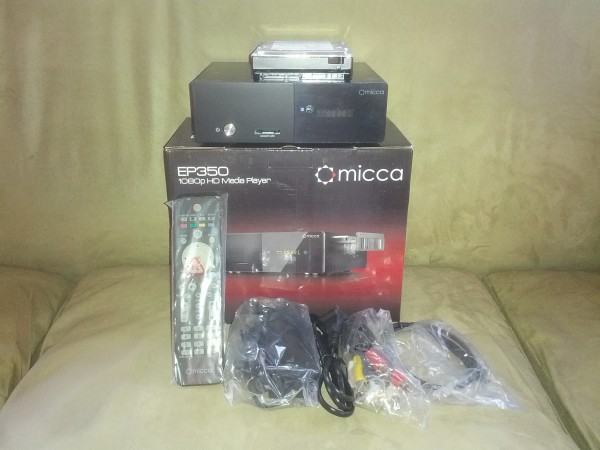
    And, after last week’s disastrous start to the home theater portion of this endeavor, anything had to be a step up. With the Micca box safely returned to Amazon, it was time to make Google TV the one box to rule them all, replacing both HTPC and Netgear NeoTV 550.

    Getting Started

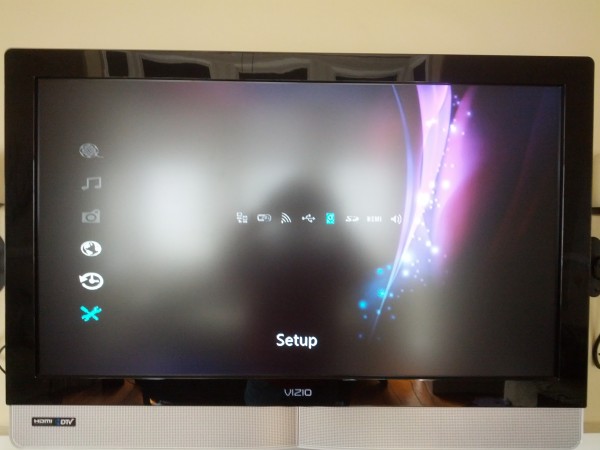
    Setting up the Co-Star is fairly painless. Simply plug your cable or satellite box into the Vizio via HDMI in and then use another cable to run from HDMI out to either your TV or A/V receiver. It takes 5-10 minutes to walk through the on-screen steps to get your picture to look perfect, pick up your cable or satellite content, control your TV power and volume and more. Unfortunately, as I run everything through the Yamaha receiver, I still need that second remote to control volume and power for that device.
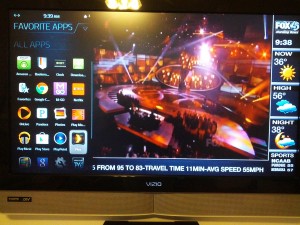
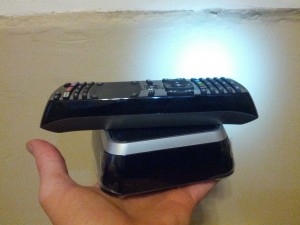
    The remote is a bit on the chunky side, but that is because of the full QWERTY keyboard on the back. All of the buttons are there to control your DVR — guide, list, menu and more. There is also a laptop-like touchpad for full mouse control and a large V button that launches the apps, including a number that are pre-installed, such as Amazon Prime, Netflix, Google Play, Chrome and several more.

    Getting your Computer Media

    By default, Google TV does not pull in video, music, movies and pictures from computers on your home network as others like the Roku can do.

    For this you can use Plex. You will first need to set up the Plex Media Server on one of your computers — preferably something that is always on, like a desktop PC. Setup is easy. Simply add media by category, like music, pictures, TV shows and movies. Browse to the folder where each is stored and add the folders.

    Now head to the Google Play store and grab the Plex app — there is one specifically for Google TV, but unlike the Media Server and Android apps, it is not free. However, it is only $0.99 so don’t panic.

    Other Apps

    There are a number of other apps that are made for Google TV like Pandora and Google Music, to name only two.  You will also find a number of video apps, but sadly some of the bigger ones like Crackle and Watch ESPN are not compatible.

    Conclusion

    After living with the Vizio Co-Star for almost a week it has truly become the only box we need in our home theater. All of the live and recorded TV is played and controlled through it and all of our music, pictures and recorded DVDs are easy to access from Plex. However, most of our movies are in ISO format, which doesn’t play, so I am slowly converting them to AVI using Freemake Video Converter.

  • Digg, Feedly tramp on Reader’s grave, announcing new RSS tools

    Apparently there is some new Samsung phone being announced later today, but for the past 24 hours Google owned the news cycle for all of the wrong reasons. Yesterday the company tried to quietly announce its latest round of spring cleaning, but an app included in that list, Reader, got a bit more attention than the company likely wanted.

    Now companies are stepping all over one another in a rush to fill a void that is apparently much larger than Google would have you believe. Feedly, perhaps the biggest competitor, already posted detailed instructions on how to get rid of Reader and move to its service. The company claims this move was “something we have been expecting for some time: We have been working on a project called Normandy which is a feedly clone of the Google Reader API – running on Google App Engine. When Google Reader shuts down, feedly will seamlessly transition to the Normandy back end. So if you are a Google Reader user and using feedly, you are covered: the transition will be seamless”.

    Now, today, Digg follows suit with its own announcement about working on an alternative for disenfranchised Google Reader customers. In an earlier announcement Andrew from Digg states: “We’ve heard people say that RSS is a thing of the past, and perhaps in its current incarnation it is, but as daily (hourly) users of Google Reader, we’re convinced that it’s a product worth saving. So we’re going to give it our best shot. We’ve been planning to build a reader in the second half of 2013, one that, like Digg, makes the Internet a more approachable and digestible place. After Google’s announcement, we’re moving the project to the top of our priority list. We’re going to build a reader, starting today”.

    The company is asking for help and suggestions with the project and hopes to make it the best alternative for angry Googlers, which many of us here at BetaNews seem to qualify as today.

    If the petitions that have sprung up around the web today are not enough to get the search giant’s attention then at least user’s will have a fair amount of alternatives to choose from.

    Photo Credit: metalstock/Shutterstock

  • Don’t be scammed by fake Xbox 720 beta offers

    I don’t mean to sound paranoid, but…it seems potential danger lurks everywhere on the Internet and your inbox — as criminals seek to infiltrate your computer or raid your bank account. That old saying that everyone is out to get you is basically true these days. Well, not everyone, but a surprisingly large number of people truly are out to get you.

    And, to get you, they need a plausible scam. That usually means a “message from your bank” or one from PayPal — I get the latter on a daily basis. But the underside of the web also utilizes other means — virus scares and current events. It’s the current — or future — events that attract the attention of Microsoft’s Larry Hryb, better known as Major Nelson.

    Hryb notes that a number of sites offer users to sign up for a chance to become a beta tester for the next-generation Xbox gaming console — Xbox 720, Xbox 8 or whatever it will be called.

    Needless to say, these sites will be happy to accept your sign up information, but what you get in exchange will certainly not be a brand new Xbox.

    Hryb feels obligated to issue a warning via both his Twitter account and blog:

    Confirmed: All sign-up pages for testing the “next Xbox” are FAKE. Do not give them your information — it’s a scam.

    — Larry Hryb (@majornelson)

    While the readers here tend to be the more tech savvy and likely would laugh at such warnings, there are apparently enough people falling for this to warrant the attention of the Xbox Live chief and prompt him to attempt some measure of damage control.

    Photo Credit: Photosani/Shutterstock

  • Google plans to execute Reader, among other apps

    I can live with iGoogle going away — I never use the service anymore. But this one really hurts, though perhaps more to those of us who write about technology than those who read about it. However, statistics show that many of you also use the RSS feed to easily track your favorite sites. That is why today’s execution notice from Google hits below the belt.


    Reader, along with several others, have been rounded up, tried and found guilty of not being productive enough to warrant continued life. Reader will die July 1. Other Google services have varying dates — some sooner, while others get a stay.

    Others included in this roundup were Apps Script, CalDAV API, Google Building Maker, Google Cloud Connect, Google Voice App for Blackberry, Search API for Shopping and Snapseed Desktop for Macintosh and Windows. I would say that none are of consequence compared to Reader, but I would hear from fans of each and, since I understand the hard feelings at this time, I will be kind.

    The announcement comes from Urs Hölzle, the SVP of Technical Infrastructure at Google, who tries to console readers by telling us: “These changes are never easy. But by focusing our efforts, we can concentrate on building great products that really help in their lives”.

    There are still alternatives out there, at least for RSS, but it is a diminishing market. For now you have a varying amounts of time to replace the app you can’t live without, but all are on their final leg. I suppose you can petition Google, but its unlikely the company will change its mind.

    Photo Credit: Ryan Jorgensen – Jorgo/Shutterstock

  • Finally, Netflix U.S. gets social with Facebook sharing

    Netflix, the popular DVD-by-mail and internet streaming service, today announced that it is bringing social sharing to your video experience with new Facebook integration — a feature previously available elsewhere, but prevented here by U.S. law. Now you can no longer pretend to your friends that you really didn’t watch that sappy love story last night.

    Netflix’s Cameron Johnson, director of product innovation, states that “Netflix members in the U.S. can share their favorite shows and movies on Netflix with friends by connecting to Facebook and agreeing to share”.

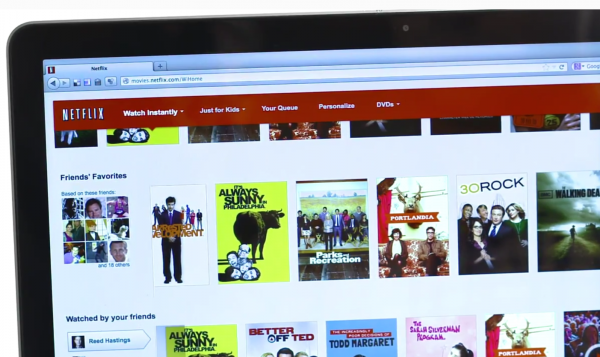
    The integration will add a new row to your Netflix titled “Watched by your friends” and customers will also be able to see what movies and TV shows were rated four or five stars in the new “Friends’ Favorites” row. As for that potentially embarrassing movie I mentioned at the beginning, you do not really need to worry about that. The new service will allow you to choose not to share a specific title by clicking the “Don’t Share This” button in the player. The company also promises easy control over all of this — “You can also visit your ‘Social Settings’ in ‘Your Account’ on Netflix.com to turn on additional sharing to Facebook or stop sharing altogether”, Johnson explains.

    While Netflix has expanded its reach to other markets and integrated this feature for them, this took a long time to become available for U.S. customers. The company had to wait for Congress to update a video-sharing law, which it did in December 2012, that previously prevented the sharing of video rental history for privacy reasons. The law was a relic from the Robert Bork Supreme Court nomination era, when his rental records leaked to the public.

    Netflix is rolling this feature out now and promises that all customers will have access to it by the end of this week.

  • I’m shocked! Shocked! More teens have cell phones and use the Internet

    As the parent of two teenagers I am always interested in studies about their digital lifestyle. Pew Research Center has a new report that claims that “smartphone adoption among American teens has increased substantially and mobile access to the internet is pervasive”. You don’t say? I believe I could have told you that simply by visiting my local mall. So much for the “tell us something we don’t know” moment.

    Still, the research firm did its homework and published some interesting numbers. Pew studied a group of 802 teens between the ages of 12 and 17 to reach its results. For instance, 78 percent of all teens have cell phones and almost half of those, 47 percent, are smartphones. For the record, in our household it is an even 50 percent — the 16 year old has a smartphone, the 13 year old does not yet have his first phone, though it is a subject that seems to come up daily.

    The study also announces that 23 percent of teens have a tablet, 95 percent use the Internet and 93 percent have a computer at home. Again, all rather unsurprising numbers based on my own experiences, but I question the demographics that are not mentioned anywhere in the study.

    “The nature of teens’ Internet use has transformed dramatically — from stationary connections tied to shared desktops in the home to always-on connections that move with them throughout the day,” says Mary Madden, Senior Researcher for the Pew Research Center’s Internet Project and co-author of the report.

    To sum up, as I point out, none of this qualifies as shocking and it meshes with my personal experiences, however I question how much these percentages really mean, given that they would certainly drop off dramatically with income level. In other words, I am not convinced they represent everyone across the board, but that is not mentioned here, so I am only musing and not stating.

    Photo Credit: J. McPhail/Shutterstock

  • When will they learn? New York Jets big Twitter failure

    The storied NFL franchise, the New York Jets, once home to “Broadway” Joe Namath, hopefully has learned a Twitter lesson — never ask something without fully thinking through the consequences, especially when your fans may be nearing the end of their proverbial ropes. Just ask Microsoft about this.

    The organization chose last night, on the eve of free agency, to ask fans for their input on the direction the team should take. I seriously doubt the Jets had any real intention of allowing fans to overrule management, but meant more a fun gesture to make fans feel more a part of the process. The Jets proceeded to ask “Free agency begins tomorrow. The Jets priority should be _________”.

    None-the-less the publicity stunt failed miserably, with responses raining in letting the team know exactly where it currently stands in the market. A few of the thousands can be read below and, as you can see, the team certainly learned what fans really think.

    • a new team — yansore cfs (@BigDavesRants)
    • Oh the mentions this is gonna get — Mike Garafolo (@MikeGarafolo)
    • A prayer from God — Devanand Ramjit (@_KingPingPong)
    • To take a year off and cut their losses. — The Tax Man Cometh (@Stateman1952)
    • EVERYTHING!!!!!!!!!!!!!!!!!!!!! — Matt Orso (@SportsTalk2345)
    • Forfeiture of the 2013 season. — Panda (@L7Panda)
    • Cutting everyone — Ian Kenyon (@IanKenyonNFL)

    Shall I go on? Search Twitter for yourselves if you wish to read the countless others. It is not the first, nor will it be the last, lesson learned by a business entity when it comes to social media. The problem is, these days screw-ups like this become very high-profile in a hurry.

  • BitTorrent Live leaves private beta, meets the public

    There is a lot going on right now down in Austin, Texas. This week the city plays host to the popular SXSW Interactive show — an idea that began as a music festival and then added technology to the mix. Today BitTorrent chose the location to remove the private tag from its Live streaming service and let the public play with it for the first time.

    The service is a Peer-to-Peer live streaming platform that the company says is “for anyone with mobile video or webcams, for anyone in the moment, on the ground, or on the front lines; for everyone with the need to break news or break it down in real time”.

    The BitTorrent Live service started testing in November of 2012 and has been utilized by at least one very popular podcaster I personally know. He told me he had no problems broadcasting a stream of his live show and encountered only minor hiccups during the testing phase.

    The company notes that “we’ve demonstrated scaling and improved stability during our invite-only period, and are excited to open our service up to anyone who wants it. Thanks to all our early users for their support”.

    The service is still a beta, just of a public nature now, so perhaps you should temper your expectations here, and also have a backup plan just in case. If you want to give it a shot then head over to BitTorent Live to get started.

    Photo Credit: Sergey Nivens/Shutterstock

  • Guess what? Flash is vulnerable again…still

    On the day Microsoft promises an Internet Explorer 10 update that enables Adobe Flash without white-list restrictions, guess what happens? Adobe releases another Flash security bulletin. This is the wrong contest, competing with Oracle’s Java to see which can be the most vulnerable platform on your computer.

    An official statement from Adobe’s Wendy Poland informs that this latest update is “to address security updates in Adobe Flash Player 11.6.602.171 and earlier versions for Windows and Macintosh, Adobe Flash Player 11.2.202.273 and earlier versions for Linux, Adobe Flash Player 11.1.115.47 and earlier versions for Android 4.x, and Adobe Flash Player 11.1.111.43 and earlier versions for Android 3.x and 2.x. These updates address vulnerabilities that could cause a crash and potentially allow an attacker to take control of the affected system”.

    Once again, users will need to update Flash immediately to avoid potential danger. A better suggestion is, of course, simply not to install the software to begin with, but that remains a tall order for most web surfers as the platform continues to power parts of many websites we visit on a daily basis.

    As always, remember to never install the update when prompted by a website, but to instead, head to the official Adobe site to grab any potential updates. Even then, you may want to hold your breath as you surf.

    Photo Credits: maraga/Shutterstock

  • You’re the villain who killed the Marvel Comics giveaway

    If you were anywhere on the Internet yesterday then you likely learned that Marvel comics, publishers of popular series like The Hulk, Captain America, Thor (sadly a personal favorite of my wife) and more, teamed up with Comixology for a giveaway. The Marvel #1 promotion wanted to distribute over 700 free comics via its platform.

    Well, to say there was demand may be the biggest understatement I make today. Fans flocked to the website and the servers were periodically overloaded and taken down. Now the company has been forced to suspend the giveaway as it tries to recuperate from the overwhelming onslaught.

    According to Comixology CEO David Steinberger: “We expected a high degree of excitement for the Marvel initiative — and had believed ourselves prepared – but unfortunately we became overwhelmed by the immense response. We’re still struggling to keep our systems up”.

    Steainberger goes on to explain “we’re pausing the Marvel Comics #1 promotion for the time being. For those of you that want to take advantage of the offer — you will get your comics”.

    For now the company has put up a form where fans can go to fill out their email address. Comixology promises to keep customers up-to-date about what is going on with the offer and also insures that those who managed to get in when the contest was live will receive their free comics, but there is no guarantee of exactly when that will be.

  • Tomorrow Microsoft makes your Windows 8 PC less secure than it is today

    On the heels of Apple disabling Flash on OS X after the Adobe platform was used to compromise company computers, Microsoft goes the other way. The company today announced that beginning March 12 an Internet Explorer 10 update on Windows 8 and Windows RT will enable Flash content to run by default.

    Rob Mauceri, Internet Explorer group product manager, explains: “As we have seen through testing over the past several months, the vast majority of sites with Flash content are now compatible with the Windows experience for touch, performance, and battery life. With this update, the curated Compatibility View (CV) list blocks Flash content in the small number of sites that are still incompatible with the Windows experience for touch or that depend on other plug-ins”. What about the large number that are compromised?

    Mauceri explains that the company believes that having more sites compatible with IE leads to a better user experience. To that end, “the update will be made available to customers with Windows Update. The curated CV list applies to IE on the desktop for Windows RT since the most common reason to block Flash is that the site relies on other plug-ins that are not available on Windows RT”.

    Absolutely no mention of security is made in the announcement, despite the rather constant bulletins released by Adobe. At this point I recommend paying a visit to your Internet Explorer settings and enabling the “Click to Run” option so that Flash cannot launch without your explicit permission.

    Photo Credit:  Korn/Shutterstock

  • Microsoft entices students with Office 365 deal

    Just in time for mid-term exams, or for the few students who actually work during Spring Break, Microsoft offers a suite — ah, sweet — deal on Office 365. Not coincidentally, the offer carries many, if not most, in higher ed through the end of the school year.

    Microsoft’s Jeff Meisner explains: “Starting today, college students in the U.S. can get three months of Office 365 University and 20 GB of SkyDrive storage for free”.

    In January, Microsoft launched Office 365 Home Premium. The University edition is slightly less full-featured, including Word, Excel, PowerPoint and OneNote, which are likely the only apps that are really important to students anyway, although I am sure some would not mind having access to Publisher. Office 365 University does, at least, include the same 20GB of free SkyDrive space that comes with a subscription to the Home plan.

    In addition to offering the three free months, Microsoft adds an additional three months if the student shares the offer on Facebook — talk about pleading for viral marketing. Customers will need to provide a valid .EDU address to qualify and, according to the terms, “This Offer commences at 12:00 AM Pacific Standard Savings Time on March 11, 2013 and all Offer redemptions must be made via the Offer Site by 11:59 PM Pacific Standard Time on May 12, 2013 or while supplies last at which time the Offer ends. Redemption codes must be used no later than May 12, 2014”.

    While I am not exactly sure how supplies of a downloaded program can run out or why Microsoft waited until now to makes this offer, given that we are approaching the end of the school year, but it is still a good deal for a segment of Office users who frequently cannot afford to shell out the normal cost for software such as this.

    Photo Credit: Goodluz/Shutterstock

  • Microsoft brings enterprise communication service Lync to Windows Phone 8

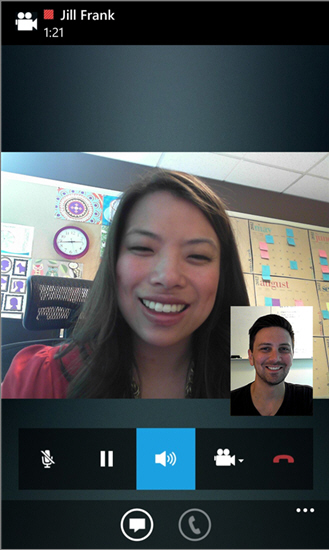
    This morning, with no fanfare, Microsoft rolled out its Lync app for Windows Phone. Lync is a Skype-like product that is bundled with some versions of Office, but is geared towards an enterprise audience. Corporations can run a Lync server to keep better control over the service, but users can also communicate with outside people by using Skype from within Lync, as the two services are becoming better integrated.


    The new Windows Phone 8 app offers VOIP, messaging and other communication features. Lync had previously been available for Windows Phone, but was not supported in the new Microsoft mobile operating system until today.

    According to the announcement: “Lync 2013 for Windows Phone extends the power of Lync to your mobile device — including voice & video over wireless, rich presence, instant messaging, conferencing, and calling features from a single, easy-to-use interface”.

    Lync for Windows Phone 8 allows users to view availability in real-time and choose from different communication methods, such as IM, email, voice or video. The app also lets customers connect in a meeting and forward calls. It additionally provides secure connections without the use of a VPN. The Lync for Windows Phone app is free, but requires connectivity to a Lync server or a Microsoft Office 365 plan that includes Lync Online.

  • Microsoft brings Facebook to Bing Desktop

    Microsoft rolled out its Windows 8 version of Bing Desktop in late 2012 and brought with it the cool wallpapers that are a part of the search engine’s home page. Now, the company has quietly updated the app with another major feature — Facebook integration. Without any announcement, version 1.2.113.0 launched, but has yet to find its way to all users.

    The app is not all about the wallpaper, though that was my main reason for installing it upon original release. Bing Desktop also lets you conduct searches right from the desktop without opening any browser, as well allowing access to the top news stories, images, video and other popular content.

    The new version adds Facebook integration via a new icon in the top of the window. Once clicked, you will need to log into your account, then allow the app to access your account information.

    When everything is set then you can use the Facebook button in the Bing app to view your news feed as well as get messages and updates.

    The update has not gone live to all users — I did not have it when I began this story, however, heading over to the Microsoft Download Center and installing the latest version will provide access. Otherwise, the update should slowly reach all users. A word of caution during installation — the app wants to make Internet Explorer your default web browser, Bing your search engine and MSN your home page. These options can all be unchecked.

    Honestly, I can’t see myself using this feature very often — I originally installed the app to get the great daily images that Microsoft’s search page uses as its daily backgrounds. However, more functionality certainly does not hurt as long as it doesn’t bog down the system.

  • Geeks rejoice! Windows Phone 8 welcomes Newegg app

    For many of you this may not sound like a very big deal — an app that allows you to buy computer parts from your phone may sound ho-hum. But, when that app comes from Newegg then it may get your attention. The retailer is perhaps one of the favorites on the web for those looking for everything from hard drives to RAM to all sorts of Radio Shack-style accessories.
    Today, the company rolled out its official, fully-supported Windows Phone 8 app. Version 1.4 is the first to offer full support for the new Microsoft mobile operating system — “This is the Newegg.com mobile application. The app allows Windows Phone users to search, shop, read reviews and make purchases”, right from the retail giant. This is not the first Newegg app for Windows Phone and there are still a few missing pieces in the puzzle. Sadly, it still lacks some features. For instance, Lockscreen notifications and even a double-wide tile are both lacking. Then again, the new app does bring fast-app resume and it is super quick on loading, per early tests.

    Needless to say the app is free — Newegg expects to make up development costs with no problem, thanks to the ease of making tech purchases. And I am sure they will — without the app I have spent more than $100 there in the past couple of weeks. Who knows what will happen now.

  • Overhauling a home network, part 3 — Micca and the best-laid plans

    Third in a series. Two weeks have passed since we last visited this topic, but I wanted to be fair with this next part before writing it. As you will recall from part one, I decided to replace my Windows Media Center HTPC and the NetGear NeoTV 550, because both are so old and slow. While I wanted to do so with one box, there was a major stumbling block — most of our movies are ripped to ISO images. I would prefer a Google TV to replace both, but in the end got a Micca box to take the place of the HTPC and then still ordered a Vizio Co-Star because I simply could not resist.

    Things have not gone entirely as I planned. In fact, as you may recall from part two of this series, nothing has really gone the way I had hoped.

    Beauty is Skin Deep

    The Micca is slim and very handsome. A SATA hard drive can easily be added from an optical drawer on the side of the box to provide built-in storage.

    I knew the user interface is scant — I saw the images on the website. That is not my concern. While Windows Media Center has a beautiful motif, I can live without it. I am looking for functionality and Micca promises to play virtually every codec, including my ISO files.

    The UI is stark, but not a problem. Functionality is. First, I cannot access the HDD I added to the box from any computer on my network, meaning I cannot move video files to local storage for easier streaming. The box does allow me to access files on other computers and DLNA devices, but that is problematic — sometimes they show up, sometimes not.

    Combine these network problems with the UI and it is a recipe for failure. When my family sits down to watch something they expect everything to work. This setup does not always fill that most basic need.

    Moving On

    So where do I go now? I will remove the HTPC. I have not done this yet because I want to test longer before disconnecting everything. I am very glad I took that approach.

    I will move to the Vizio Co-Star full-time, though doing so entails some significant hassle on my part. Those ISO movie files will not play there — I have looked for workarounds, without success. If you know of one, please chime in in the comments below — yes, I am crowd-sourcing my problems.

    Where to Now?

    For lack of an ISO solution on Google TV, I face the rather daunting task of converting ISO files to AVI format. It is not difficult just very time-consuming. Thankfully I work mainly on my laptop, so to open a file on the desktop and hit a covert button periodically is not labor-intensive. Plus I will save hard drive space.

    In the meantime, I will keep the Netgear NeoTV active (it plays ISO — hint to Google) to handle those ISO movies that have not yet been converted — just in case Indiana Jones starts calling my kids’ names.

    In part four, I’ll look at how well Google TV can replace a dedicated HTPC — it certainly has to be better than Micca.

    Photo Credits: Alan Buckingham

  • More smartphone owners stick with Android than iPhone

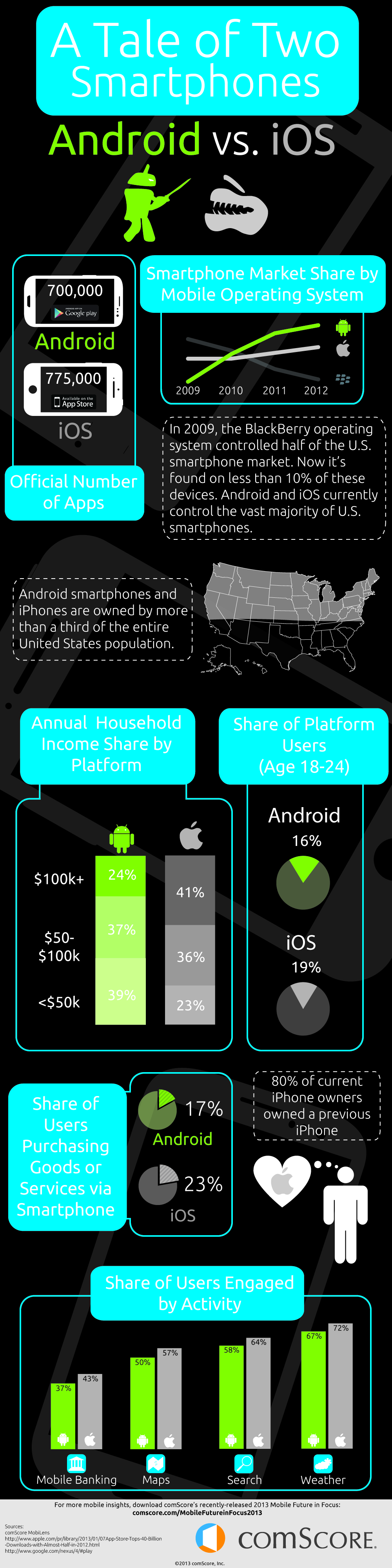
    Developers must make hard choices when choosing what platforms to support. In mobile, popular convention is iPhone first. But does that approach, in the real world of smartphone ownership, really make sense in 2013? Let us take a look at the hard numbers that were recently published by comScore and see what they can tell us.

    This may be a self-perpetuating problem for Apple; according to ComScore, the Google platform simply offers more opportunity because of its larger user base, though that is far from the only consideration for developers. Granted, both mobile operating systems are wildly popular, despite the best efforts of Microsoft to get Windows Phone OS into contention (OK, maybe “best efforts” is going a bit far) — Android and Apple combine for nearly 90 percent of the smartphone market — 53 and 36 percent respectively.

    But that is only half of the puzzle — While Android holds a commanding lead in share, it retains only 48 percent of those users, while Apple holds onto 62 percent. That means that just over 25 out of 100 users stick with Google, while a bit more than 22 look at the world through Apple goggles. Sounds good, but if the trend were to continue then the sides would eventually change. Except that is not the case. You see, while 8 out of 10 current iPhone customers are returning buyers, that current 62 percent number means shrinking to only 6 of 10.

    Benjamin Travis says that “iOS is popular among a slightly younger demographic than Android users, with 18-24 year olds representing 19 percent of all iPhone owners compared to 16 percent of Android owners”. While that may initially sound promising, the news for Apple is not all good here, plus the gap just is not that big and likely could be shrinking.

    The two smartphone bases engage differently with mobile content as well. First of all, comScore finds that the Android platform has a greater number of media users in each category. While iPhone users tend to be generally more engaged with their devices and apps, market share becomes important — shear audience size is hard to beat.

    Travis goes on to point out that “iPhone users show a greater propensity to engage in [M-Commerce] behavior with 23 percent having done so versus 17 percent of Android owners. iPhone owners are also more likely to make purchases on their phones on a regular basis”. This is also an important consideration for those looking to monetize by means other than in-app ads, but that is less than half of the apps on the market.

    comScore also points out that iPhone owners tend to think very highly of their devices and, as a result, they are likely to remain loyal users over time. This is perhaps the red herring. Sixty-two percent of iPhone users would stick with the device versus forty-eight percent for Android.

    There are other considerations not mentioned. The biggest one is a users’ library of purchased apps — once you are invested in a platform it becomes increasingly harder to move on. Regardless of income level nobody wants to purchase the same apps twice. Again, the larger share is likely more important to Android now.

    In the end, while comScore tries to play fair with both sides and avoid controversy, when you read between the lines, the direction is clear. Android’s ever-increasing market share means more potential downloads and, with M-Commerce numbers that are not that far apart, more potential revenue. Google also runs a more open platform, making it easier to gets apps into the market — something Apple developers have sometimes struggled with.