Author: Alan Buckingham

  • Twitter 2.0 rolls out for Windows Phone

    Just yesterday Twitter announced a planned app for the Firefox OS phones when they begin shipping, but the company is bringing that same functionality to Windows Phone, so do not feel left out. Today Microsoft’s Michael Stroh did the honors of making the announcement.

    The update is not much different than what has been promised for the Mozilla mobile OS. Customers will receive four new navigation tabs — Home, Connect, Discover and Me.

    Home, much as you would expect, shows tweets. These can be tapped to expand, at which point it will display in-line photos, video and even web site summaries.

    Connect simply keeps you up-to-date with @ mentions, as well as allowing you to see who has followed or retweeted you, while Discover allows you to observe trends, and find new content, as well as browse categories, find friends, or see suggestions for accounts you may want to follow.

    Finally, Me simply provides access for users to read and respond to direct messages, but according to Stroh “you can also see your lists and favorites or view and update your profile”.

    However, that is not all. Twitter users can also get status updates right on the lock screen, receive better Live Tile support, compose a tweet or search from anywhere in the app, and even use speech recognition to compose messages.

    All of this is available now from the Windows Phone Store. If you have Twitter installed already then you should receive the update automatically. If not, it is a small 2 MB download.

  • HP unleashes ‘augmented reality photos’ for iOS

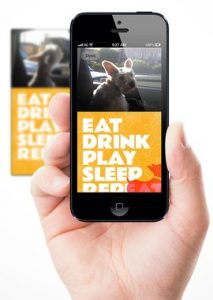
    Today HP announced Live Photo for the iOS platform — an app that claims to bring the user’s photos to life using “augmented reality”. The company claims the app will bring “a new consumer printing experience by embedding short video moments into printed photos”.

    According to Annie Weinberger, a general manager at HP-subsidiary Aurasma, “augmented reality is the new medium for bringing the physical world to digital life and HP Live Photo puts the power of this technology into the hands of everyday consumers”. The free app purports to merge still images and short videos utilizing Aurasma. Once the app has been downloaded from the iTunes App Store the user can choose a video of up to 45-seconds in length and then select an automatically generated still image. From there it is a matter of choosing a template and sharing the new creation. The new photo/video can be shared via email, Facebook or by printing to any AirPrint-enabled printer.

    The app is free and requires iOS 5.1 or newer, but in certain instances can work with iOS 4.2 on some devices. HP promises to bring this technology to other mobile platforms later this year.

  • Microsoft rolling out updates today for various Windows platforms and IE

    Although it’s Tuesday, it’s not “Patch Tuesday”, which means we shouldn’t expect any updates from Microsoft, but the software giant is rolling out patches none-the-less. The updates are across a broad spectrum of platforms too — Windows 7, Windows 8, Windows Server, and even Windows RT are included in this update.

    Curiously, many of the Windows updates are listed as “non-security”. The company generally only pushes out-of-cycle updates when there is a major security flaw that cannot wait for the next month. In the case of today’s patches, many are listed as a fix for “issues in Windows”.

    There are also a few security patches as well. Both Windows Server 2012 and Server 2008 are receiving security patches, while .NET Framework 4 on XP, Server 2003, Vista, Windows 7, Windows Server 2008 R2, Windows Server 2008, Windows Vista, Windows Server 2003, and Windows XP also have security updates coming.

    There are also security-related fixes for Internet Explorer. According to Knowledge Base articles KB2792100 and KB2797052, “A security issue has been identified that could allow an unauthenticated remote attacker to compromise your system and gain control over it”. These updates cover Internet Explorer versions 6 through 10.

    The entire list of updates is quite long. Those with automatic updates turned on should receive the patches today without having to do anything. Otherwise you will need to install them manually via the Windows Update option in Control Panel.

    Photo Credit: zimmytws/Shutterstock

  • When Firefox OS phones arrive, Twitter will be ready

    Smartphones running Firefox OS are slated to start shipping by mid-year. Twitter will be there with them. In a brief announcement, Manuel Deschamps of Twitter stated that “When those devices begin to ship, Twitter for Firefox OS will be available in the Firefox Marketplace”.

    He also assures us that the app will rival that produced for other mobile operating systems. It will contain Home, Connect, Discover and Me tabs, as well as be able to search and compose tweets — that last one is rather important to the whole concept of Twitter.

    In addition, Twitter for Firefox OS will contain a new feature. Deschamps explains that “we’ve also implemented support for a feature unique to Firefox OS: Web Activities. This lets you tweet photos directly out of any app that also supports web activities such as the built-in photos app”.

    He goes on to describe how excited the company is for the new platform and I appreciate his enthusiasm, but remain skeptical about an entry into the mobile OS game this late. We will have to wait and see, and for those of us in the U.S., that will be a long wait —2014 is the target right now.

  • ZTE debuts monster 5.7-inch Grand Memo

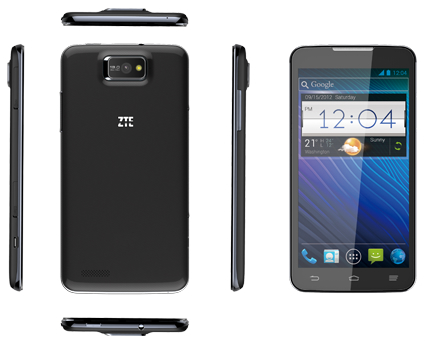
    How big is too big for a phone? I would have said that my 4.65-inch Galaxy Nexus is large enough, but the 5.5-inch Galaxy Note II proves me wrong and must admit after picking one up I think it is usable as my everyday phone. Now ZTE trumps Samsung today at Mobile World Congress by unveiling the Grand Memo — a “phablet” with 5.7-inch screen. Smartphones continue to meld with tablets.

    The new ZTE model debuts with a nice set of specs: Qualcomm Snapdragon 800 processor with quad-core Krait CPU, extremely generous 3200 mAh battery, 5.7-inch 720 x 1280 display, 2GB of RAM, 16GB of storage, WiFi, 4G LTE, Bluetooth 4, a 13-megapixel rear-facing camera, and rather standard 1MP front-facing camera. All of this is packaged in a very thin 8.5 mm case.

    He Shiyou, ZTE EVP and head of the Mobile Devices Division, says that “high-definition screen makes it perfect for media and entertainment, but its uses reach far beyond that”. He adds that ZTE has “really tried to make this device fun for use at home, and practical for use in the office. By combining both of these factors, we have created a well-rounded large-screen handset that is suitable for any situation”.

    If there is one knock on this device — aside from some users potentially balking at the size — it would be Android 4.1, despite the fact version 4.2 of Jelly Bean has been on the market since October of 2012.

    So what do you think of these new “phablets”? Is the screen too big, or is it just what you have been waiting for?

  • Box rolls out ‘enterprise-level’ security features

    IT departments are picky — I know from spending time in one during a previous life. However, Box, which still seems to be less-well known than rivals like Dropbox, is surprisingly more popular among large corporations. In fact, the cloud service boasts customers like computer giant HP. The company has also innovated a lot lately, with such offers as 50 GB of storage free to Android customers. Now Box beefs up its enterprise offering with new security measures.

    Today Whitney Bouck, the general manager of Box Enterprise announces that the cloud service is “rolling out a set of new enterprise-grade security features and product integrations to help our customers protect their vital content”.

    These contain a number of IT-friendly services, starting with control. Admins will now be able to place restrictions on individual users to prevent them from creating and externally sharing files and folders. Conversely, permission to share outside can also be granted.

    Another update involves mobile Box apps, which are available for iOS, Android, Windows Phone and Windows 8 (a modern UI app). This one comes in a couple of parts — device pinning, Samsung Knox security and new login security.

    “Pinning” is simply the ability to allow a user to only use Box on certain devices, Samsung Knox is the company’s new mobile security offering, which Bouck claims “will provide enhanced security at all levels of the Android platform with simple and flexible device management that helps users easily separate their work and personal lives on their mobile device”. And, the login security automatically detects and prevents unexpected user logins.

    Finally, Box announced integration with GoodData. This will provide admins with analytics and dashboards for content management. The company also promises that this will provide information about security risks.

    Some features announced today will be made available immediately, while others will roll out in the near future.

    Photo Credit: Jirsak/Shutterstock

  • HP’s budget Android takes on Amazon and Google tablets

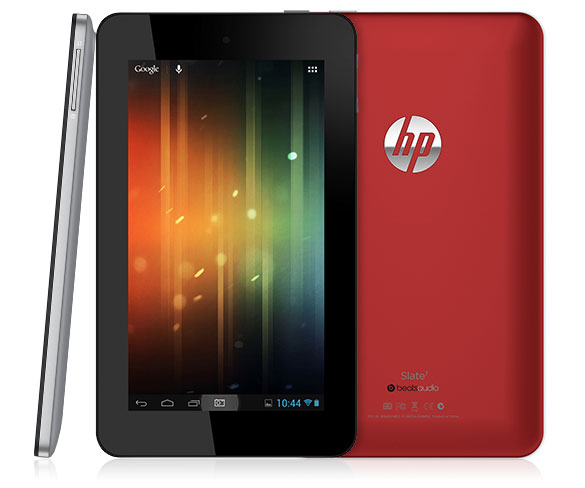
    The death knell for WebOS has sounded. HP promised a lot when purchasing the Palm mobile operating system back in 2010, only to abandon ship. The company is among Google’s newest and most-important partners. Earlier this month, HP unveiled its first Chromebook, which is followed by its first Android tablet, the Slate 7.

    Despite the fact that Mobile World Congress does not technically start until tomorrow, the big announcements have already been rolling out from Barcelona, Spain. HP, not to be left out, unveiled its new seven-inch Android tablet, clearly designed to go head-to-head with Amazon Kindle Fire HD and Google Nexus 7.

    The new device packs Android 4.1 Jelly Bean, meaning buyers get Google Now, but no Photosphere, which requires version 4.2 of the Android operating system. The Slate 7 also packs in a 3-megapixel rear camera, embedded Beats Audio, micro USB port, VGA front camera and a dual-core ARM Cortex-A9 at 1.6 GHz. The Slate 7 also features HP’s ePrint technology. There is nothing about storage capacity included in the announcement.

    Alberto Torres, the HP senior vice president of Mobility Global Business Unit, says the Slate 7 is designed to “address the growing interest in tablets among consumers and businesses alike, the company will offer a range of form factors and leverage an array of operating systems”. HP also produces Windows 8 tablets. 

    As for pricing and availability, the company announced that the Slate 7 will arrive in April and tempts buyers with a $169 price tag — a full $30 below that of the Amazon and Google competitors.

    For now, HP teases potential customers with a product wesite that provides additional information. By the way, the website contradicts the press release by stating “available in May 2013”.

    So, will this tempt you away from a different purchase?

  • Microsoft claims expired SSL Certificate caused Azure outage

    Microsoft’s cloud service, Windows Azure, along with Team Foundation Service, suffered a major outage yesterday that also affected non-enterprise people, as it resulted in problems with the Xbox Live as well. However, according to the Xbox Status page, the Live system, along with Xbox Music and Video, which were also affected, is back up and running.

    Now, as of this morning we have some information on the root cause of the much-publicized problem. Brian Harry, Product Unit Manager for Team Foundation Server, blames the nine-hour outage on “an expired SSL certificate in Windows Azure storage”. Harry goes on to explain that the company stores “source code files, Git repos, work item attachments and more” there and that “the expired certificate prevented access to any of this information, making much of the TFService functionality unavailable”.

    Ironically, this is not the first time the company has been plagued by this problem. Several years ago Team Foundation Services was hit by an expired certificate which it blamed on an operational oversight. Harry promises that the company will be investigating what led to this most recent oversight and went on to state “I apologize to all of our affected customers and hope you’ll give us a chance to learn and continue to deliver you a great service”.

    Photo Credit: Ralf Juergen Kraft/Shutterstock

  • Better hurry! Nexus 4 is free from T-Mobile

    The LG-made, Google-branded Nexus 4 made quite a splash when it debuted, but some of that attention was for the wrong reasons. The phone was almost impossible to grab, even at launch. Since then, supply problems have continued, extending from the T-Mobile online and brick-and-mortar stores to the Google Play Store.

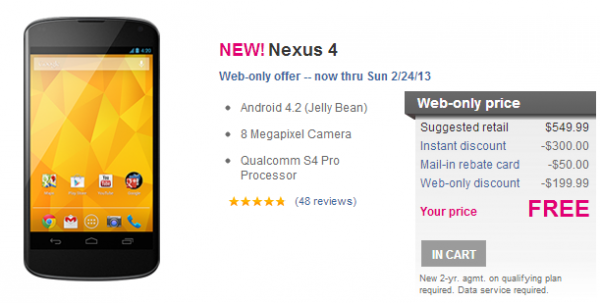
    If you think demand issues were bad before you may not have seen anything yet. Today T-Mobile dropped the price on the Android 4.2 handset all the way to zero.

    But, you better hurry because the deal is only good through February 24th and it is available only through the T-Mobile website or by calling the mobile carrier at 1-877-387-4324.

    By now you likely already know what your are getting with this handset, but I will give a brief overview in case you were not interested until the word “free” caught your attention.

    The phone comes with a 4.7-inch screen, WiFi and Bluetooth, NFC, HSPA+, wireless charging, Snapdragon S4 processor, 8-megapixel camera and a bunch of other cool features.

    Given the recent supply problems, I would recommend acting sooner rather than later if you really want the Nexus 4. Of course, T-Mobile looks to lock you into a two-year contract in exchange for the deal. The alternative is an unlocked version which is currently in-stock from Google Play Store for $299 for 8GB or $349 if you would prefer 16GB of storage.

  • Overhauling a home network, Part 2 — back to FreeNAS afterall

    Let us get a bit geeky. This was not my original intention, but it is how things turned out in the end. First, I believe I misspoke twice in part one of this series — one time was unintentional, the other was apparently my wishful thinking. The first was when I called my recent used server purchase a Dell Optiplex. It is actually a Dell Poweredge. The second involved my new operating system and I’ll get to that in a second.

    To begin with, the server was running Windows Server 2003 and the small business I purchased it from had failed to wipe the data, but did leave it password protected — something a tool like Ophcrack may have been able to breach, though I had no desire to try. The server also contained a CD-ROM drive which I needed to replace with a DVD drive in order to install Windows Server 2012 Essentials. Fortunately I had one laying around — yes, I know that is not normal. You should see our storage room. There are boxes of computer parts and a stack of old towers filling a corner. At least this time the “it will be useful someday” statement worked out for me.
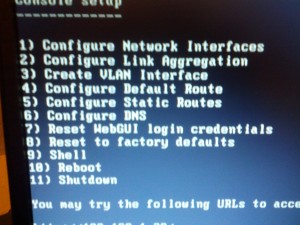
    However, the 32-bit server architecture did not support 2012, meaning I moved on to Home Server — that required 512 MB of RAM, and the server, woefully older than I had thought, only had 256 — an easy upgrade, but expenses and wife-acceptance-factor for this project were mounting up.

    In short, I went back to my old standby — FreeNAS, which my last server ran. The operating system has improved quite a bit over the time since I last installed it. I knew there had been upgrades, but my system was set and working fine — don’t fix what is not broken. In fact, it has moved all the way to version 8.3.

    I will not waste a lot of time here. FreeNAS has more than enough information to help you out and, surprisingly, Engadget did a very lengthy and helpful guide last year. Use those and you should have no problems.

    I will point out a couple of things to pay attention to. First, make sure you change your password, which by default, is set to “password”. You will also be spending a bit of time setting up your drives. If you can, choose ZFS over UFS because of storage restrictions. Remember that the drive on which FreeNAS is installed cannot be used for storage, so do not waste a multi-terabyte drive on a very small operating system.
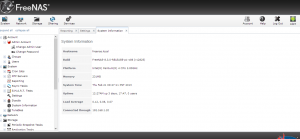
    There are also some plugins that may interest you. Those can be found on the FreeNAS website. In fact, you can even hook up a network printer to the box, but it gets a bit complicated. Once volumes are configured and working then you are ready to start backing up and sharing files.

    Backup and Sharing

    There are a few ways to do this. When I last set up the OS I simply used SyncBack SE on each networked computer in order to backup a copy of all files automatically. There were likely other options, but it worked for me so I did not mess with it.

    Rsync is built right into FreeNAS, but it requires a client app installed on each computer on your home network. As my colleague Joe Wilcox pointed out in the newsroom the other day, and I am paraphrasing here — the simplest solution is usually the best.

    That meant SynBack SE because it recognizes mapped drives. That is big because it means that it can be installed on one PC (the desktop in this case) and used to back up and sync all computers in the home.

    What’s Next?

    In the process of doing all of this I stumbled across an MSDN post from Microsoft’s Emmanuel Bergerat which detailed the over-the-top home server he had recently built. My new setup suddenly looked completely inadequate. Still, despite his statement that one of his requirements was “cheap”, it is all relative. Maybe someday I will do something like that.

    For now my future plans for this box are simply to purchase a four-bay external drive enclosure so that I can begin expanding the space one drive at a time. I also may add a KVM switch between the server and desktop, but that is really not a necessity given that FreeNAS can be shutdown or restarted right from the dashboard on any computer. Heck, there is even a couple of Android apps to control it.

    The Microsoft solutions may be nice and have more features, but the bottom line here is that I simply want my files safely backed up and, for that, FreeNAS and SyncBack SE (both free) will meet my needs perfectly and even provide a few little extras to boot.

    Photo Credits: Norebbo/Shutterstock

  • Google announces support packages for Cloud Platform

    Did you know that Google has real people working there? If you have ever tried to contact the company then you may have concluded otherwise. In fact, it may be more difficult than finding a phone number for Amazon — a task that has resulted in websites dedicated to the adventure. Apparently the search giant would like to change that reputation and today it took the first step.

    Google has announced a new support package for customers of its Cloud Platform services. This is an enterprise service that the company would like to use to compete against Amazon S3 and Windows Azure. In fact the service is doing very well, with some high-profile customers such as Best Buy. But a bit more was needed to boost things over the hump — namely human interaction.

    Today Google announced new customer service options, available in tiers based on what your business requires and, of course what it is willing to pay.

    Brett McCully, of the Google Cloud Platform team, announced the service, calling it “a comprehensive collection of support packages for services on Google Cloud Platform, so you can decide what level best fits your needs”.

    There will be four levels of service — Bronze, Silver Gold and Platinum. These range in price from free to the sky-is-the-limit (meaning Platinum requires you to contact a service rep to inquire) — however gold starts at $400 per month, just so you have an idea.

    Service levels range from “access to online documentation, community forums, and billing support” for the Bronze to “The most comprehensive and personalized support. In addition to Gold, you’ll get direct access to a Technical Account Manager team” for the Platinum subscription.

    The service is now open for sign-ups if you care to take the plunge and see what Google truly offers in the way of customer care. And, if you do, then be sure to let us know how it works out for you.

    Photo Credit: Dudarev Mikhail/Shutterstock

  • Can it possibly be true? Microsoft is cool again?

    Could it be possible that Microsoft has become cool again? A BetaNews poll seemed to indicate Windows 8 was popular and there have been recent reports that the Surface tablet is “cool” to teens. Now there is this — a poll conducted by Reuters indicates that young people may actually think the computer company from Redmond, Wash. is cool again.

    Reuters reports that “just under half of 853 respondents between the ages of 18 and 29 thought Microsoft is cooler now than it was a year or two ago”. If this this is representative of the larger sentiment then it ties in very neatly with recent Apple problems.

    Behind the Revolution

    It is probably not hard to speculate on factors that could be behind this turn-around. After all, the company has changed almost everything over the course of the past year. Logos and websites are more modern looking, Windows Phone 8 has launched, advertising has become more upbeat compared to…well, anything the company used to do since the Rolling Stones and “Start me up”.

    The biggest things of all are likely the continued improvements being made to Xbox and the recent release of the Surface tablets. Tablets are viewed by many as the future and the Surface, along with Windows 8 or RT, has made a splash, thanks in large part to the energetic, and endlessly running TV ads.

    A Bite out of the Apple

    I previously alluded to Apple’s mounting problems — those add up. Stock prices dropping, court dates and a seemingly mounting disgust with the way the company does business. It is certainly not the end-of-times for the company, but it will need an enormous turn-around to get back to where it was only recently.

    As example, my children both at one time wanted Apple products. However, when it came time to buy our daughter a smartphone she decided Android was the way to go. Our son wanted an iPad in the worst way, but now begs daily for Nexus 7. Their friends seem to show similar inclinations of late. For the record, both kids fall under the age of the Reuters survey.

    Of course neither of those things are any better for Microsoft than they are for Apple. But my wife recently chose Windows Phone 8 after mulling the Apple-Google question. Again, not within the survey ages — sorry Hon.

    What Next?

    While this certainly is heartening to Microsoft — 50 percent is a good number, it is not yet all roses. The number does best Twitter results by three percent, but the company still came up somewhat short of the real rivals. Roughly 60 percent of those polled still think Apple is cooler and the number for Google’s Android products is even higher, at 70 percent.

    Microsoft clearly still has work to do. Chief may be getting the Windows Stores — both computer and phone — stocked with apps. The company also better hope that the next Xbox, regardless of what it will be called, makes a big splash. If Microsoft can accomplish these two things then it may truly be cool again — perhaps for the first time since circa 1995.

  • Snapchat for Android adds video, makes sexting easier

    Snapchat is popular app among young people. As the name suggests, it is a mobile chat app that also allows for communication using a device’s front-facing camera, as well as the sharing of photographs and drawings. The big draw here is setting an expiration — up to ten seconds — on the images, or video, sent. SnapChat’s short-sends gives it a bad reputation — as a “sexting” app. That will not change with today’s announcement.

    The company is “thrilled to announce the arrival of video to our Android community”. The update is included in version 2.0 of the app, which just hit the Google Play Store.

    While video is the big addition in this update, there’s more. SnapChat has also “revamped our notification system to give you more informative, exciting, and customizable notifications from your friends”. In addition, a claim of more reliable behavior was made, due to bug fixes that are also included in 2.0.

    Before you get too excited, the announcement comes with a caveat — “Some users will still experience difficulties”. Hopefully those difficulties will not include images and video not expiring, which could result in evidence a few customers may live to regret. However, the company also promises that “We have a ton of great updates on the way”.

  • Please don’t file for divorce — I didn’t mean to nuke my wife’s data

    I do not generally use our desktop computer. I prefer my laptop, but my wife likes that desktop and uses it daily. She also keeps her precious files on it, and I have the folder set to backup to Crashplan automatically, as well as to sync with the home server. However, she also uses a small four gigabyte USB drive for files — I assumed ones that she just wishes to move around with her. I was wrong.


    I am not making excuses for myself. Even if I had known the files were backed up I would not have deleted them — I had no reason to wipe her drive. The truth is that it was in the wrong place at the wrong time and was a victim of my own oversight.

    Here is the story — and take heed because it can happen to all of us at anytime. After complaints from wife and kids that the computer had become slow over time, I decided it was an opportunity to start over fresh. I copied the User folder to an external drive, knowing it was also in the cloud for good measure. I then inserted a CD containing the ISO of a small program known as “Derrick’s Boot and Nuke” or DBAN to most. It is frequently used by businesses to wipe data before getting rid of a drive. Without thinking I booted to DBAN, set each drive to “wipe” and let it run. I failed to notice that the little Kingston USB was one of those drives.

    DBAN works very well. It eradicates all traces of data, rendering the drive so unrecoverable that you need to reformat to just get back a file system and use it again.

    The files contained on that little piece of portable hardware, as it turns out, did not exist in my wife’s backed up documents folder — or anywhere else. Meaning that they now existed nowhere at all. And that I could be facing that same fate.

    I have said many times that one copy of a file is the same as zero, because zero is what you could have at any second. Drives die and, in this case, accidents happen. I backup everything to home server and cloud — three copies for good measure. I will be adding the thumb drive to that routine providing I survive to do so.

    Photo Credit: argus/Shutterstock

  • Today Google made me want Glass

    We all have heard about Google Glass — for sometime now. There’s talk it’s coming (but not when) and that there are unique capabilities (but most details are under wraps). Google Glass is a bit of an enigma, and I have remained largely uninterested in the project. That changed this morning.

    Google makes me want a product I had no idea I was even interested in — I am pretty sure that’s the intention. In fact, Google had me drooling in only two minutes and sixteen seconds — talk about a good sales pitch. And the video did not even require many words to accomplish its task.

    The video Google posted this morning depicts the world as seen through Glass, and it is a glorious place. Simple commands beginning with “Glass” result in photos, videos and information appearing right before your eyes.

    As an example, my son and I love to mountain bike. We race down single-track trails at top speed looking for the toughest obstacles, the biggest logs to hop and the best jumps. We always talk about getting a GoPro camera to capture these memories — or at least as evidence to next of kin about what transpired in our final moments.

    That is, of course, a simple use for a product that will likely cost much more than a handlebar and helmet camera. But Glass will also provide much wider functionality. It will not be a product for a few extreme sports nuts, but sell to a wider audience. And, if Google supports this as the company does Android, then Glass will evolve even more than what you can get a glimpse of in this video.

    The day is certainly drawing near — Google is taking beta testers, though it will cost you to become one. Of course, Glass could be the new Nexus Q, but I have hopes for more. Sign me up….please!

  • Microsoft boasts big Yammer sales growth

    In June of 2012 Microsoft purchased Yammer, a social networking site geared towards enterprise. The service allows employees to collaborate across buildings and geographic locations. Now the company has released its 2012 numbers in an effort to show that the investment paid off.

    The fourth quarter ended on January 31, and Microsoft reports that sales have “nearly tripled year-over-year”. The service has more than seven million users. The numbers bragging continues with the addition of 290 new companies coming on-board with the service, including big names like TGI Fridays, Woolworth and Trek Bicycles. In fact, the announcement says Yammer now has “85 percent of the Fortune 500”.

    “Yammer experienced banner growth in 2012 and grew particularly fast in the fourth quarter. Our momentum is definitely accelerating following the Microsoft acquisition,” states David Sacks, a Yammer co-founder and now a corporate vice president at Microsoft Office Division.

    According to Adam Pisoni, another Yammer co-founder, there is more growth on the way — “the development teams are coming together quickly, and we are leveraging existing technologies such as SkyDrive Pro and Office Web Apps to swiftly deliver greater value for customers”.

    This is all good news for Microsoft after some questioned the investment of 1.2 billion dollars, or at least questioned the timing of it. Now we just have to wait and see if the ceiling for this endeavor can go a bit higher in 2013. Investors will certainly be waiting to know that as well.

    Photo Credit: Oleksiy Mark/Shutterstock

  • If Apple can’t protect itself from malware, how can you trust it to protect you?

    Apple may be perceived as a bastion of security and users generally feel safe from the plagues that us Windows users suffer, but market share plays a large part in that perception. The bigger target gets more attention. Well, the party may be over, folks, because the fruit-logo company has a problem, and it is one that is incredibly familiar to Windows users — Java. The Oracle software platform may be one of the most exploited ones on computers.

    Today Reuters reports that Apple, a company largely known for never admitting error — think “You’re holding it wrong” — released a statement describing “the widest known attacks targeting Apple computers used by corporations”. The same exploit had been used to attack social networking giant Facebook.

    When Apple workers visited a specific website used by software developers, malicious software infected their computers. But not just Apple employees. Mac users in other locations also were vulnerable.

    The problem is this: Malware writers used Java in the past to attack Macs. Remember last year’s Flashback Trojan, which pulled together Macs into a massive botnet? The newest version of OS X, Mountain Lion, doesn’t include Java by default for a reason. The upgrade goes so far as to remove the Java installed by previous version Lion. So why are computers Apple manages running unpatched Java — or at all?

    If Apple can’t protect itself, how can it protect you? Does the arrogant attitude that Macs are invulnerable to viruses (they are not) run so deep inside Apple? As someone responsible for managing IT infrastructure, I ask these questions from experience. Apple should be the model of Mac security. Clearly it is not.

    I question whether Apple should provide Java at all. Java as common means of attack is too common a story.

    Still, to its credit, Apple responded rather quickly, issuing an update which it claims will deliver better security. The update “uninstalls the Apple-provided Java applet plug-in from all web browsers. To use applets on a webpage, click on the region labeled ‘Missing plug-in’ to go download the latest version of the Java applet plug-in from Oracle”.

    There really is no telling, at this point, the extent of the damage beyond Apple. Surely we’ll know more in the days ahead. Meantime, if you own a Mac, now is a good time to patch up, purge Java and install antimalware.

    Photo Credit: Jirsak/Shutterstock

  • Get ready to move from Hotmail to Outlook

    If you use Hotmail then you may already know that you are moving to Outlook.com. You may not want to, but you are — unless you plan to scrap the whole thing and head over to Gmail, Yahoo mail or another service. Microsoft officially launched Outlook overnight, but the service beta debuted six months ago; we reviewed here already.

    So, to help users along in this moving process, the company posted a question and answer page appropriately titled “My Hotmail account was upgraded to Outlook.com”.

    The page is pretty simple — only nine questions and a video. However, there is quite a bit of information included and numerous links to additional details, like settings, POP3, Contacts, existing mail and more.

    Microsoft attempts to address some of the fear and questions that customers will almost certainly have. Things like “Do I have to get a new email address?” and “Why can’t I switch back to Hotmail?” All valid questions that longtime Hotmail users will face in the coming months.

    Give the company some credit for attempting to help its customers here, but killing off services, while a natural process in this industry, is never easy. It almost always results in some unhappy people and, frequently they are the more vocal ones. For instance my recent posts about the death of my beloved Live Mesh — yes I am still bitter. But, I have learned to move on, which is what Hotmail customers will need to do as well.

    Photo Credit: 3Dstock/Shutterstock

  • The Weather Channel will now tell your Android when rain will start and stop

    There are no shortage of weather apps for Android devices, but many of us are already familiar with the Weather Channel, making it a fairly easy choice — I switched to that app a couple of years ago after leaving Weather Bug. Now the TV network has issued a major overhaul of its mobile app for Android.

    The first thing you will notice in the update, which began rolling out late yesterday, is a completely revamped user interface. The Now screen, which opens by default, still shows the temperature and current conditions, but comes with an ad background — which is a bit annoying. Still the additional information is useful. For instance, my Now screen is currently telling me: “Rain likely Tuesday at 11:15 am EST”.

    The menu has moved from the bottom of the screen to the top and now has fewer options. Social, for instance, has gone, replaced by four simple choices — Map, Now, Videos, and Forecast. Above these are icons for Search, Share and Settings.

    Share is a new and much welcome addition because it has been an inclusion in the aforementioned Weather Bug for some time and allows users to share their local conditions, forecast or maps via a number of options, including Facebook, Twitter, cloud services, and a lot more.
    In addition, the forecasts now offer more detail, the app has been optimized for tablets, there is a refresh button, and users can set up favorite locations to take full advantage of weather widgets and notifications.

    All of the updates, with the exception of the ad background on the Now screen, are very welcome in my opinion. New users get walked through a series of tutorial-type screens when the app first launches and you will also need to reset your home location, but after completing these minor tasks I think most will find the updates very rewarding.

    Photo credit: Ralf Juergen Kraft/Shutterstock

  • Internet Explorer partners with ‘The Walking Dead’

    No, I did not say that Internet Explorer is the walking dead. However, Microsoft’s web browser is partnered with the show’s creator, Robert Kirkman, to bring the original comic book series, “Thief of Thieves”, to life on your computer. In other words geek nirvana — a comic book and a computer. This ranks up there with the Lego Android from last week.

    Microsoft’s Steve lake says this will be “an interactive online game based on the comic book series from Robert Kirkman and Skybound, his imprint at Image Comics. The site is a showcase of the new features in Internet Explorer 10, including full multi-touch capabilities and HTML5 support”.

    The irony here runs deep. Conrad Paulson, the main character, goes by the alias Redmond, which is “a happy coincidence as that just happens to be the hometown of Microsoft’s headquarters”.

    The app is located on the web and the link can be opened using any web browser, but using Chrome, or others, will attempt to prompt you to download Internet Explorer 10, via a link at the bottom of the screen. However the game will still play, or at least it did in Chrome when I tested it. But, Microsoft still refers to it as “a showcase of IE10, including HTML5 and full multi-touch support”.

    The new game makes use of some of the newest web technologies to bring all of this together. It also works on touch devices, like the new Surface tablet from Microsoft. The technology is all there — game play is totally up to you.