Author: Mihaita Bamburic

  • Windows Azure SDK 2.0 for .NET is now available

    Microsoft is on an update streak with Windows Azure, introducing significant new features at a steady pace. For the past couple of months we have witnessed an overwhelming number of changes meant to improve the company’s cloud platform, including the Iaas (Infrastructure as a Service) support announced two weeks ago.

    Microsoft’s latest move in this never-ending chess game with its rivals is the Windows Azure SDK (Software Development Kit) 2.0 for .NET which now features improvements for websites, cloud services, storage, service bus and PowerShell automation. Let’s take a look at what’s new.

    Websites

    Users can more easily publish ASP.NET projects from Visual Studio to Windows Azure by clicking on a couple of buttons and following the dedicated wizard. The new SDK also allows the Visual Studio Server Explorer to be used to manage websites that are deployed using Windows Azure and stream website application logs from the cloud straight to Visual Studio.

    Cloud Services

    The new SDK release builds upon the Windows Azure IaaS support by allowing users to deploy cloud services to the virtual machines unveiled alongside the Infrastructure as a Service feature. Microsoft also introduced a new simultaneous update option (available in Deployment Settings), meant to speed up the deployment process and better diagnostics support.

    Storage

    The main improvement here is the ability to make and delete tables designed for the cloud platform and add, delete and edit entities using Visual Studio Server Explorer. Microsoft says that this will make life easier for the user by requiring less time and simplifying the process of building apps with tables.

    Service Bus

    The Windows Azure SDK 2.0 for .NET comes with an updated Service Bus library which features support for Message Browse, which allows the user to view queued messages without any further complications, Message Pump Programming Model and Auto-delete for Idle Messaging Entities, at a certain interval.

    PowerShell

    The Windows Azure PowerShell — the task automation framework for the cloud platform — now features support for PowerShell 3.0. There are “numerous new PowerShell cmdlets” according to Microsoft, designed to “automate Windows Azure Web Sites, Cloud Services, Virtual Machines, as well as application services including Service Bus and the Windows Azure Store”.

    Windows Azure SDK 2.0 for .NET is available to download from the Windows Azure .NET Developer Center.

    Photo Credit: Andreas Weitzmann/Shutterstock

  • Microsoft releases Facebook Beta for Windows Phone 8

    After using the Android and iOS counterparts, Facebook app for Windows Phone 8 feels rudimentary and out of place by comparison. Even though the interface takes some design cues from the operating system, it is not very intuitive, wastes too much screen estate and displays content in a visually unappealing way. The app would be rather nice, except 2010 has long passed.

    Now Microsoft wants you to love the Facebook experience on Windows Phone 8, releasing a beta app that stands up against the Android and iOS alternatives. Gone is the infinite horizontal scrolling, now replaced by tabs that you might actually find useful. Swiping to the right reveals a tab to the left of the screen, containing a link to your profile, favorites, groups, friends, apps, settings, the usual policy information and a log-out button.

    That looks familiar, right? The Facebook Beta app aims to provide an experience that is similar to the one found inside a browser, but does so in a manner that does not confuse the user by displaying too many or not enough details.

    Similarly, swiping to the left reveals a messaging tab on the right side of the screen that displays friends in two categories — “Favorites” and “Others”. Tapping on any friend allows the user to send a message. If you’re coming from Android and iOS, you will feel right at home here.

    The two tabs can also be accessed by tapping on the adjacent buttons from the main top bar, but swiping feels more attractive after using the app for a while. Want to see friend requests, messages and latest notifications? There are three buttons for that, again, look quite similar to the ones found inside the browser. And that is a good thing.

    What I particularly like, even though just a minor design feature, is a little button that pops up at the top of the feed. It informs the user if there are any new stories and even displays a counter to go along with the corresponding message. Tapping on the button or swiping down refreshes the feed, otherwise the app does not self-update the feed.

    Another feature that many users may appreciate: how images are displayed. Instead of showing a tiny preview, the beta Facebook app now allows pics embedded inside a post to take up all the horizontal screen estate. Basically the shots can take advantage of large high-resolution displays.

    Users can even share posts now, a feature not present in the stable version. Facebook Beta also brings support for the Facebook Timeline, which means that everything that is on your wall will be displayed inside the app as well.

    Microsoft wants you to actually use the new Facebook Beta app for Windows Phone 8, even though the company warns that this is not for everyone.

    “Once you’ve put the beta app through its paces, we hope you’ll pass along bug reports, feature requests, and other feedback by going to Settings>About in the app”, Microsoft says. “You can also post a Store review. Your comments and suggestions will inform future releases”.

    I’m going to uninstall the dreadful stable version and commit to using the Facebook Beta app full time on my Nokia Lumia 920. What about you?

    The Facebook Beta app is available to download from the Windows Phone Store.

  • Google Glass is modder-friendly

    Unlike many other Android devices, Google’s Nexus smartphones and tablets do little to spoil the fun for avid modders. The bootloaders are unlockable and root is a just few steps away. It’s no wonder then that the Nexus threads on forums are crawling with custom kernels and green droid distributions and all sorts of apps meant to provide even more functionality than what Google throws in out-of-the-box.

    As a result, the fact that Google Glass comes with a modder-friendly software shouldn’t come as a surprise to any Android enthusiast. The idea is fairly simple — get developers involved in the process of improving the pair of smart glasses. Why? If Android 4.2 is of any indication, the software giant can take some good custom bits and add then into what will be the next Android iteration available for Google Glass.

    Stephen Lau, who is a software engineer and technical lead working at Google’s Project Glass, sums it up nicely: “Not to bring anybody down… but seriously… we intentionally left the device unlocked so you guys could hack it and do crazy fun **** with it. I mean, FFS, you paid $1500 for it… go to town on it. Show me something cool”.

    The developer and enthusiast community provides more relevant feedback than Google can most likely ever get by asking customers. The former group doesn’t wait around for the search giant to release something new and often adds a feature or creates a new app that will be used by users everywhere. Ahead of the curve is where Google Glass aims to be, so this is a step in the right direction.

    Because Google posted the source code for the Google Glass kernel it shouldn’t take long for Android developers to fiddle with it and, judging by what’s out there at the moment for other devices, make Glass run faster, smoother and sip less power from the internal battery.

    What would you like to see being released by Android developers?

  • BlackBerry Q10 now available at Vodafone UK

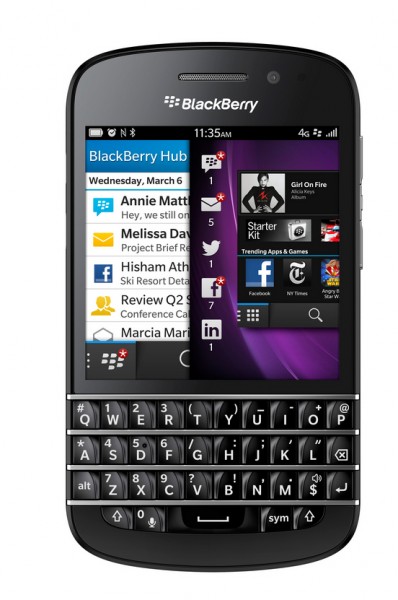
    Four days after the smartphone surfaced at UK retailer Selfridges, the BlackBerry Q10 is now also available through UK mobile operator Vodafone. Die-hard QWERTY fans in Canada are able to purchase the handset starting tomorrow.

    At Vodafone UK, the BlackBerry Q10 is available with no upfront costs alongside two-year contracts, starting at £37 per month. Customers who are willing to shell out £129 upfront can get the smartphone on a two-year plan with less costly £33 monthly payments.

    When purchased with no upfront cost, the two-year plans for the BlackBerry Q10 come with unlimited minutes and texts and 1 GB, 2 GB and 4 GB of cellular data for £37, £42 and £47 monthly payments, respectively.

    The less expensive £33 per month, two-year contract, only provides 600 minutes, unlimited texts and 500 MB of cellular data. If you’re willing to spend £5 more each month you’ll save £129 in upfront costs and get unlimited minutes and double the cellular data quota.

    At Vodafone UK the BlackBerry Q10 is available in either black or white and features a 3.14-inch Super AMOLED display with a resolution of 720 by 720 and 330 ppi (pixels per inch) density; 1.5 GHz dual-core Qualcomm Snapdragon MSM8960 processor; 16 GB of internal storage; microSD card slot.

    Other specs include: 4G LTE connectivity; Bluetooth 4.0; GPS; Wi-Fi 802.11 a/b/g/n; 8 MP back-facing camera and 2 MP front shooter. The device comes in at 119 x 66.8 x 10.35 mm and 139 grams.

  • Samsung Galaxy S4 easier to break than its predecessor and Apple iPhone 5

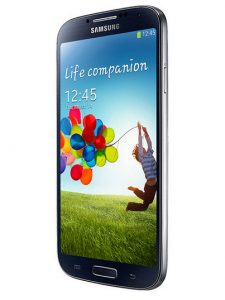
    If you want to buy a Galaxy S4 and are a clumsy person then you might want to invest in an aftermarket case (or rethink your decision). According to SquareTrade, a company that provides protection plans, Samsung’s latest Android flagship smartphone is easy to break, more so than the Galaxy S3 and the Apple iPhone 5.

    SquareTrade pits the three smartphones against each other in eight key areas including front panel protection, grip, water resistance and drops. The Galaxy S4 scored badly in the slide and drop tests, grip-ability and size, giving it the highest breakability mark of seven out of 10 (lowest scores are best).

    By contrast, its older brother, the Galaxy S3, managed to post a breakability score of 6.5 out of 10 while the iPhone 5 took the crown with the lowest mark of the three — five out of 10. So what led SquareTrade to this conclusion?

    The test blames the Galaxy S4’s case, which does not protect the smartphone well enough against drops, the slippery back panel and the size of the case itself, which is too wide for a safe grip “especially” when the device is up against Apple’s narrow iPhone 5.

    SquareTrade also says that the display on the Galaxy S3, which is protected by Gorilla Glass 2, fares better than the panel on the Galaxy S4, which comes with Gorilla Glass 3 — supposedly more durable than its predecessor. The Galaxy S3, however, is not as water resistant as its successor.

    “Due to more breakable surface area” the iPhone 5 lost some points as well, but Apple’s smartphone is easier to hold (no surprise there). SquareTrade also says that the iPhone 5 has a lower friction coefficient which comes out as a rather contradictory statement when the video clearly shows that the handset slid for the shortest distance. It would, logically, be correct to say that it has the highest friction coefficient of the three.

    SquareTrade crowns the iPhone 5 as the winner of this comparison, but your experience may vary depending on many factors such as the height and the angle of the drop, the type of surface on which the device falls, etc.

  • LG unveils the Optimus GK with a 5-inch 1080p display and Android 4.1

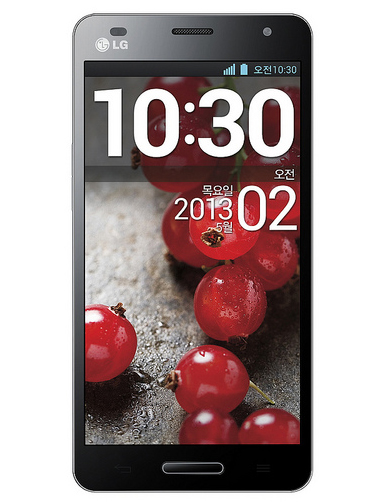
    On Monday, South Korean manufacturer LG announced a new Android flagship smartphone called the Optimus GK. The handset shares its underpinnings with the previously-introduced Optimus G Pro that is designed for the Japanese market.

    The Optimus GK comes with a 5-inch IPS display with a resolution of 1080 by 1920 and a 440 ppi (pixels per inch) density, similar to other devices like the Sony Xperia Z. There is a 1.7 GHz quad-core Qualcomm Snapdragon 600 processor inside, backed by 2GB of RAM and a large 3,100 mAh battery. So far, so good, but what about the rest of the specs?

    The handset also sports 16 GB of internal storage, which is practically mundane these days, alongside a microSD card slot which can extend the storage capacity by a further 64 GB.

    On the back there is a 13 MP camera, while on the front the Optimus GK comes with a 2.1 MP shooter. Although LG makes no mention of this, 1080p video recording is definitely possible using either of the two cameras.

    In terms of connectivity the Optimus GK supports 4G LTE and HSPA+ cellular networks; Wi-Fi 802.11 a/b/g/n; NFC; USB 2.0; Bluetooth 4.0 and the traditional array of sensors.

    The Optimus GK ships with Android 4.1.2 Jelly Bean, which is one software generation behind the latest green droid iteration. Considering that Google I/O is just around the corner and the software giant may release a new version of Android, it’s not unreasonable to assume that the Optimus GK will remain even further behind, unless LG is quick to update the software.

    The Optimus GK measures 139.1 x 69.9 x 9.9 mm and weighs 156 grams. Considering the sheer size of the display and the beefy battery that it packs, the smartphone is actually of a decent size. By contrast, the Samsung Galaxy S4 comes in at 136.6 x 69.8 x 7.9 mm and 130 grams, but sports a significantly smaller 2,600 mAh battery.

    There is no word yet regarding the availability nor the price of the Optimus GK.

  • Microsoft releases updated Weather App for Windows 8

    Little more than a month after the company released significant updates for three of its major Windows 8/RT apps, Microsoft unveiled a new set of features for the Weather app. The latest update is aimed at “meteorologists”, but the enhancements are likely to be felt by casual users as well.

    The weather app now introduces “interactive and dynamically” moving maps, a feature which shows cloud cover, precipitations, radar, satellite views and temperatures for the city or region in which the user resides. The functionality should be familiar to people watching the weather forecast on TV.

    There is another new feature available in the updated app, this one aimed at skiers. Weather can now display the atmospheric conditions at ski resorts located in 31 countries worldwide, a feature that will likely come in handy for those heading to colder mountain climates.

    Microsoft is on the right path of improving its core apps for Windows 8 and Windows RT. Even though we’re not seeing many features thrown in at once, the incremental improvements are useful and appreciated.

    The Weather app is available to download from Windows Store.

    Photo Credit: Ovchynnikov Oleksii/Shutterstock

  • BlackBerry Q10 now available, gets Skype preview

    Even though BlackBerry unveiled the BlackBerry Q10 smartphone in late-January, prospective customers around the world are still waiting to get their hands on the device. But if you live in the UK the handset is available today from Selfridges. The BlackBerry Q10 will also arrive next week, starting May 1, in Canada.

    At Selfridges, the BlackBerry Q10 is available to purchase outright for GBP579.99 which is quite expensive for any smartphone, let alone one with a QWERTY keyboard. For the money you get a 3.1-inch display with a resolution of 720 by 720 and a 330 ppi (pixels per inch) density, 8 MP back-facing camera with 1080p video recording, 16 GB of internal storage and 4G LTE cellular connectivity as the main features.

    For the BlackBerry Q10 the Canadian manufacturer quotes 14.4 hours of standby time and up to 13.5 hours of talk time, both using 3G connectivity. The endurance is decent by today’s standards but not impressive considering the small screen.

    If you do decide to get a BlackBerry Q10 you should be pleased to know that Skype is also available, in preview trim, at launch. The app features the usual suspects like voice and video calling, instant and text messaging support as well as calls to mobile phones and landlines around the globe.

    The app, according to the announcement, is designed with the BlackBerry Q10’s display in mind. That means the interface is optimized for the square look of the panel. Also, Skype contacts are automatically imported to the smartphone’s contact list, which should make it easier to call people, and notifications are displayed under the BlackBerry Hub.

    BlackBerry also has a blog post on Skype’s arrival which reveals an interesting tidbit related to BlackBerry 10.1. “Skype runs on the 10.1 Operating System on the BlackBerry Q10. As this new version of the BlackBerry 10 operating system launches on the BlackBerry Z10 in the coming weeks, BlackBerry Z10 owners will have the ability to download Skype for BlackBerry from BlackBerry World”, says the manufacturer.

    Skype for the Q10 is available to download from BlackBerry World now.

  • Microsoft, Windows Phone 8 hardware must keep up with the times

    This is a question that I never thought I’d ask — Is the hardware leaving Windows Phone 8 behind its fierce competition? In September last year, I asserted that “Windows Phone 8 is the best idea Microsoft has had in phone tech” after analyzing the new hardware requirements imposed by the software giant for its smartphone operating system. But as we all know eight months is a long time in the tech world.

    This is a tough question to answer. After all, in January, BlackBerry unveiled the BlackBerry Z10 with pretty much the same hardware that was available for Windows Phone 8 at launch. Apple’s iPhone 5 is also not far away in terms of specifications. So should Microsoft rest on its laurels and send the engineers on vacation? Well, no. As a smart man once said, “You can never have enough power”. And even Windows Phone needs better hardware, although some die-hard fanboys would beg to differ.

    The Hardware Is Good…

    I’ll concede that Windows Phone 8 performs very well on compatible hardware. The dual-core Qualcomm Snapdragon processors are decently powerful even by today’s standards, but a good processor alone does not make for a great nor popular smartphone today, as we all know.

    My Lumia 920, bar the occasional hiccups likely associated with the branded firmware that I used to have (I now run a developer firmware on it), performs very well when navigating the interface or the installed apps. I have no major complaints concerning lag when scrolling, zooming, installing software or other such activities, but it’s not perfect either.

    … But Good Is Not Good Enough

    I’m quite sure I’ve read that Windows Phone 8 is very fluid with no lag or stutter in a bunch of reviews. That’s not entirely true. I sometimes encounter a slight stutter when navigating the interface or lag when resuming an app, both of which should be entirely eliminated by using beefier hardware.

    When Windows Phone 8 can’t handle the number of suspended apps — because there’s no true multitasking like on Windows — it starts closing the most problematic or first-used ones. Likely due to the same reasons even Internet Explorer comes with a tab number limitation — one can only have a maximum of six opened at the same time.

    If the lag or stutter can be attributed to the processing power, the multitasking issue can be pinned on the amount of RAM. How can Microsoft take care of these problems? It’s simple, just add support for the quad-core Qualcomm Snapdragon processors. Manufacturers could then use a mindbogglingly fast Snapdragon 600 or Snapdragon 800 inside their next Windows Phone handsets.

    Look at Me!

    Yes, I’ve got a gripe with the display as well. Windows Phone 8 devices are limited to having a panel with a maximum resolution of 768 by 1280 — as the Lumia 920 has. But why is that? Well, you can also blame Microsoft’s design principle here. Because when Windows Phone 8 came to market the software giant didn’t give quad-core processors the stamp of approval so it would have been a mistake to allow manufacturers to use 1080p displays, for instance.

    With a higher pixel count the smartphone would need more processing power at its disposal in order to deliver a similar user experience as it does now, otherwise it just bogs down. Basically one limitation creates another. It’s obvious, but that proves Microsoft doesn’t want to look beyond the near future. Shouldn’t now be the time to learn from past mistakes?

    And there’s the other side of the coin — manufacturers can’t innovate or even follow market leaders. The perfect example for this is the phablet market. There, today’s smartphones need 1080p displays in order to deliver the highest visual quality on a large screen. The higher the ppi (pixels per inch) density on a 5.5-inch panel (for example) the better. Windows Phone 8 can’t compete for the phablet crown without a loss in clarity and customer satisfaction.

    Constantly Behind the Curve

    Windows Phone 7, Windows Phone 7.5 and Windows Phone 8 were all designed for the hardware available during the development process, which is a problem if Microsoft wants to release a major software iteration each year.

    Windows Phone 7.5 devices ran on a single-core processor, 512 MB of RAM and a 480 by 800 display resolution at best. Not long afterwards beefier quad-core processors with 1 GB of RAM as well as 720p displays were available.

    Guess what? Microsoft’s operating system didn’t support any of those specs. A similar story can be said about Windows Phone 8. It came with last year’s hardware requirements when we now have quad-core processors with 2GB of RAM and 1080p displays. Of course, it doesn’t support such hardware. So what should be done?

    Microsoft should protect Microsoft from Microsoft. The company’s thinking of limiting Windows Phone 8 to only support the hardware of its time is rendered obsolete by the fast-paced tech world. Develop today, but think of tomorrow as well.

    The best scenario is to bear current hardware in mind but leave room for what’s coming next. Or, if that leaves too much room for error, Microsoft could simply update its operating system more frequently to bump up the maximum supported hardware. It should have done so at launch, actually.

    The Spec War

    Microsoft shouldn’t play the specifications war that is constantly underway in the Android world. But Microsoft can’t ignore better hardware either. With better hardware the company can give Windows Phone manufacturers the opportunity to more clearly differentiate their products or give them a better fighting chance against the competition.

    The company doesn’t need to enforce a ton of stickers on the box touting the hardware that’s inside, but when customers want to buy a smartphone they shouldn’t be able to dismiss Windows Phone handsets based on inferior hardware specifications. Don’t hate the player, hate the game.

    By today’s standards Windows Phone 8 devices are mid-range compared to their Android counterparts. People notice that. Why shoot yourself in the foot if you have the option not to do so? If Microsoft keeps up with similar limitations its smartphone operating system will always be one hardware generation behind. Has it helped so far? I’d say not.

    The Options Matter

    Truth be told, I find it silly that Microsoft can’t provide users with the option to choose what they want. It is the same thinking that got the company into trouble with Windows 8, which even today gets a bad rep for not allowing users to use a simple Start menu on traditional computers. Why not show a sign of change, Microsoft?

    As a Windows Phone 8 user I have to commit to using yesterday’s hardware when I should be able get the best available today. Does it do the operating system any good? No. Does it do consumers any good? No. I just don’t see the point, only excuses.

    Photo Credit:  AlexRoz/Shutterstock

  • Road warriors, Dell XPS 10 is now available with 4G LTE connectivity

    For road warriors looking catch up on the latest events, reply to important business emails, or perform some crucial tasks while traveling, a cellular data connection is a must-have feature for a tablet. The best case scenario — if Wi-Fi is not available or a safe option — is to rely on a smartphone in order to tether, which drains its battery in a couple of hours (at best). Definitely not an option for a lot of people.

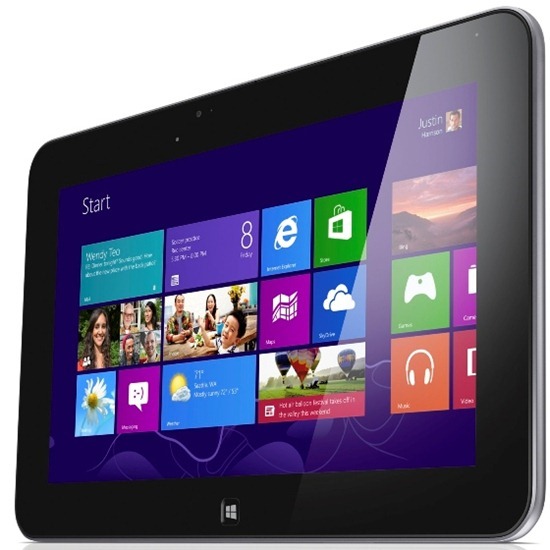
    Luckily, Dell finally gets it. The American company introduces a new cellular data option for the XPS 10 which gives the Windows RT-based tablet the ability to connect to 4G LTE networks. Considering that the device was launched around the same time as Windows 8 and Windows RT, it took Dell quite some time to make cellular data a priority, at least for the XPS 10.

    The XPS 10 with 4G LTE starts at $599.99 for the 64 GB version and runs for $749.99 when buying the tablet with the Dell keyboard dock. You’re looking at pretty much the same hardware specifications as with the base device.

    That means prospective buyers can get a 10.1-inch multitouch display with a resolution of 1366 by 768; 1.5 GHz dual-core Qualcomm Snapdragon S4 processor; one-year warranty; Windows RT; 1.4 lbs and 2.89 lbs for the XPS 10 without the keyboard and with the keyboard attached, respectively.

    Sadly, the device is available with 4G LTE only in the US and only with AT&T. Tough luck for everyone else. And that is a very long list which includes about seven billion people.

  • Pay $180,000 for coffee with Tim Cook or buy a new house?

    If you don’t mind overpaying for a cup of coffee then you must read this story. Charitybuzz lists an auction which gives the highest bidder the opportunity to have coffee with Apple CEO Tim Cook at the fruit-logo company’s headquarters in Cuppertino, California. The proceeds of the auction will be donated by the man himself to the RFK Center for Justice and Human Rights.
    The only thing that’s stopping you from grabbing that cup of coffee with one of the most influential men in tech history is, at least at the moment, a $180,000 bid. Truth be told you have to pay at least $185,000, according to Charitybuzz, in order to outbid the current leader. That’s a lot by most people’s standards (well, unless you’re a billionaire who has a thing for charity). Well at least the terms of the auction are in your favor.

    To simply earn $180,000 one would have to work for a whole year, 22 days per month, eight hours per day and make a tad over $85 per hour. That without paying any tax or spending even a cent on living costs.

    You still have to pay a processing and handling charge after winning the auction — that runs for a minimum of $9.95 according to Charitybuzz — which is kinda amusing considering that the initial estimated winning bid was $50,000. Nonetheless, the auction is valid for two people (and cannot be resold) and you can schedule that coffee meeting with Tim Cook, “at a mutually agreed upon date”, up to one year after the auction closes.

    Charitybuzz also says: “Travel and accommodations are not included. Winning bidder and guest(s) subject to security screening. We expect all winning bidders and their guests to conduct themselves appropriately when attending an experience won at Charitybuzz. Polite manners and respect for the generous donor and adherence to any rules or parameters are a must”.

    So asking why Apple is no longer the innovation leader that it once was is out of the question.

    Truth be told if I had $180,000 I’d get something else. I’m a big car fan and for the money (if I had it) I could get a brand new Porsche 911 GT3 which costs $130,400, slap on a couple of options and still have some spare change left to pay for running costs. Or I could buy a pretty nice vacation house somewhere sunny. The possibilities are not endless, but with a bit of imagination I’m sure I could get plenty, like each and every device Apple sells right now and still have something left.

    But what would you do? If money wasn’t really an issue, would you bid or would you buy something else?

    What would you ask Tim Cook if you could win the auction?

  • Nokia Chat for Windows Phone available in Beta Labs

    Today, through its Beta Labs blog, Finnish maker Nokia announces a new experimental app for the Lumia Windows Phone lineup. Available only in a select number of markets, Nokia Chat for Windows Phone is designed to connect Lumia users with “friends who use Lumia, Asha, S40, and Symbian devices, and those using Yahoo! Messenger on other mobile devices and platforms”.
    Nokia Chat for Windows Phone is available to Lumia users in Australia, Canada, India, Nigeria, South Africa, New Zealand, United Kingdom and United States. The Finnish manufacturer promises to expand availability “to more countries in the near future”. So what does Nokia Chat for Windows Phone bring to the table for us Lumia users?

    With no official Yahoo! Messenger app available on Windows Phone so far, Nokia Chat for Windows Phone allows users of the still popular instant messaging service to connect by using a Nokia account. The app scans your contact list for Yahoo! Messenger handles and you can also manually add them.

    Nokia Chat for Windows Phone supports push notifications, which inform you of incoming messages, live tiles, the ability to share a certain place, such as restaurants or shops, and can also share your location.

    For Windows Phone 8 users, the app can also take advantage of voice dictation, voice commands — example “Chat with Michael Jordan” — as well as lockscreen notifications. The last feature displays a counter informing you of the number of unread messages.

    Nokia Chat for Windows Phone joins other experimental apps designed for Microsoft’s smartphone operating system, such as Lumia Storage Check, Nokia Conference, Place Tag and Play To for WP8. I’ve detailed the four in a previous article dubbed “Empower your Lumia Windows Phone with experimental apps from Nokia Beta Labs“.

    Nokia Chat for Windows Phone is available to download through Nokia Beta Labs.

  • T-Mobile Samsung Galaxy S4 arrives in ‘select stores’ from May 8

    Yesterday we informed you that T-Mobile had announced a change of plan concerning its Samsung Galaxy S4 online availability. Due to an “unexpected delay with inventory deliveries”, the US mobile operator revealed that the smartphone will be available online starting Monday, April 29, instead of yesterday, April 24, as was previously planned.
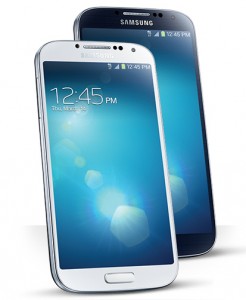
    Because of the delay in inventory deliveries it looks as if T-Mobile customers will also have to wait a tad longer to actually purchase the Galaxy S4 from the mobile operator’s brick and mortar stores.

    Today, on its Twitter account, T-Mobile announced that Samsung’s Android flagship will be available in “select stores” starting May 8 and in “all stores” from May 15. T-Mobile replied to a question asked by a Twitter user concerning the store availability and the full-price of the Galaxy S4.

    For the Galaxy S4, T-Mobile charges $629.99 — customers can pay $149.99 upfront and the rest in 24 $20 monthly payments — which is a bit steep compared to what the mobile operator charges for other high-end smartphones like Apple’s iPhone 5 or HTC’s One. Both the iPhone 5 and the One run for $579.99 at full-price, which is $50 less compared to the Galaxy S4.

  • Nokia unveils the inexpensive Asha 210

    If you were expecting Nokia to unveil a mighty new smartphone today then you will certainly be disappointed. Two days after the company released a teaser which showcased bits of a new device, the Finnish maker simply unveiled another phone in its Asha series, dubbed Asha 210.

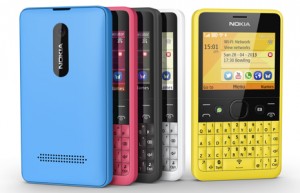
    The highlights of the Asha 210 include a QWERTY keyboard, a 2 MP back-facing camera with a dedicated physical button, WhatsApp button, support for Facebook, Twitter and email accounts, Bluetooth and Wi-Fi, as well as support for dual-SIM in one of its two variants.

    “The Nokia Asha 210 really stands out giving super-social consumers new ways to express their personalities through design, colour and innovations like the world’s first WhatsApp button”, says Nokia’s Timo Toikkanen. “It has been designed to allow people to easily update their social networks, stay in touch with friends and share user created content”.

    “We are focused on delivering the best WhatsApp experience to as many people as possible”, says WhatsApp co-founder Brian Acton. “We are very excited about our partnership with Nokia Asha complementing our strategy of giving people around the world an easy experience when keeping in touch with their friends”.

    The device also comes with Nokia’s Xpress Browser which is designed to reduce cellular data usage by optimizing the content’s size on a website. Nokia says that the Asha 210 offers up to 46 days of standby in the single-SIM model and up to 24 days of standby in the dual-SIM model.

    Nokia says that the Asha 210 is “designed to offer consumers more social experiences at an affordable price”. The company estimates that the handset will be available for roughly $72, once it ships in Q2 2013. Available color choices include black, cyan, magenta, white and yellow.

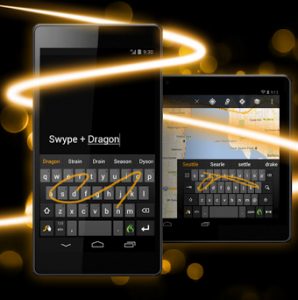
  • Popular keyboard Swype lands on Google Play

    Swype is one of the most appealing and competent third-party keyboards that you can get on Android today, touting more than 250 million users worldwide. The app practically made swipe input popular, a feature which has since been adopted by SwiftKey and even the green droid itself in the second Jelly Bean iteration.
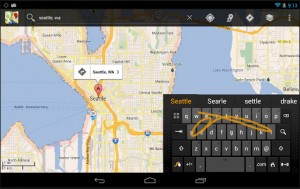
    And today, citing user demand, Nuance Communications — the company behind the third-party keyboard — brought Swype to Google Play. The app is available for practically any device running Android 2.2 Froyo and higher and comes in at 15 MB.

    Swipe is available both in free — trial version — as well as paid trim. Users must purchase the app — which runs for $0.99 or the equivalent in other currencies — in order to use Swype after the 30-day trial period runs out. So what do you get?

    Swipe input is just one Swype’s many attractive traits. The third-party keyboard sports “crowd-sources” and delivers updates for the dictionaries containing “the latest trending words”. That should make you a hip fella on social networks. There’s even support for “an additional dialect supplement for your preferred language”.

    Next word predictions shouldn’t really come as a surprise in this day and age. But, based on typing patterns, Swype tries to learn how you write and guess what you might want to type next. The third-party keyboard can “predict words in commonly used long phrases like ‘Best of the Best’, ‘Nail on the head’, ‘Girl with the Dragon Tattoo’, and ‘Dancing with the Stars’”.

    Users can upload their dictionaries onto the cloud in order to take advantage of the accumulated data across all of their devices or simply perform a backup. Swype also comes with a voice-dictation feature and a “smart editor” which “analyzes an entire sentence, flagging potential errors for a quick fix, and includes suggestions for the most likely alternatives”.
    Other features such as themes and support for both tablet and smartphone keyboard formats are also available. At the moment, Swype supports 60 languages and 20 dialects.

    Swype is available to download from Google Play.

  • Samsung Galaxy S4 available at T-Mobile next week

    If you are a T-Mobile customer waiting to receive the Samsung Galaxy S4 then we have some bad news for you. The US mobile operator has announced that the smartphone’s availability is delayed until next week.
    The Galaxy S4 was supposed to be available starting today, April 24, on T-Mobile’s website. However, according to the carrier, due to “unexpected delay with inventory deliveries” the smartphone’s official sales date is now pushed to next week. “Online availability is expected to begin on Monday, April 29”, says T-Mobile.

    Trying to reassure impatient customers that Monday will likely be the big day, T-Mobile says: “We apologize for any inconvenience and are working with Samsung to deliver the device to T-Mobile customers as soon as possible”.

    The statement, however, indicates that the Galaxy S4 might not be available even on Monday. Hopefully if you have ordered the smartphone you will receive it as soon as possible. We will keep you updated on the progress.

  • Sony releases AOSP project for Xperia Z on GitHub

    It is refreshing to see a big Android manufacturer give something back to the enthusiast and developer community that supports its devices. After the Xperia S AOSP (Android Open Source Project) experiment, which came to life in August last year, Sony announces that the recently-introduced Xperia Z will also get an AOSP makeover through an open-source project available on GitHub.
    “This is a way for us to continue our commitment to support the open Android community. It is also a tool for us to facilitate and verify contributions to AOSP on the MSM8064 Qualcomm Snapdragon S4 Pro platform”, says Sony. “The software will be open for you as a developer to use and contribute to”.

    As Google’s AOSP Technical Lead Jean-Baptiste Quéru told me in mid-November, the Xperia S experiment had some deeper implications which lead the search giant to improve the tools required for Android Open Source Project contributions. It is safe to assume that the same can be said about the Xperia Z AOSP experiment, which can further contribute to paving the way for faster Android updates.

    The AOSP project for the Xperia Z is maintained by the same two senior software engineers who handled the Xperia S experiment — Sony’s Johan Redestig and Björn Andersson. The bits of open-source code are available on the Japanese manufacturer’s GitHubProprietary binaries can also be downloaded, only after accepting the EULA (End-User License Agreement) which details “how the files can be used and what limitations that exist”.

    As you might imagine, the software is not ready for prime time at this point and therefore should not be treated as such. Sony’s distribution is able to boot and delivers “at least partially” working microSD card, Wi-Fi, Bluetooth, GPS, LED and sensors. Also, “it does not include some apps and services that are part of standard phone software”.

    Sony says that the camera and modem also work, but only internally as the company cannot release the proprietary binaries which are required to make both modules operational. The Japanese manufacturer will also release binaries for NFC (Near Field Communication) in the upcoming period, as well as “replace some of the binaries provided […] with source code”.

    Photo credit: Marc Bruxelle/Shutterstock

  • Empower your Lumia Windows Phone with experimental apps from Nokia Beta Labs

    If you own a Lumia Windows Phone and don’t mind fiddling with experimental software then Nokia may have something available for you in the app store, kept away from prying eyes. Through the Beta Labs website, the Finnish manufacturer gives users the ability to grab and test software that is currently under development and not yet available inside Nokia’s exclusive app collection on Windows Phone.
    Beta Labs is not new — in fact it was launched last decade — but it is frequently updated by Nokia with new software iterations and apps designed for its devices. Some of you may have even spotted news stories discussing various experimental apps for Windows Phone, so let’s take a look at what you can (and should) get on your Lumia today to enrich your user experience.

    At the moment there are four major apps available: Lumia Storage Check, Nokia Conference, Place Tag and Play To for WP8. All four are designed with Windows Phone 8 in mind and can be downloaded, after logging in with a Nokia account or registering for a new one, straight on your Lumia smartphone by scanning the adjacent QR code. The QR code contains a link which opens up the app store on the device and allows you to grab the respective app from a trusted source — the Windows Phone app store. Let’s take them one by one.

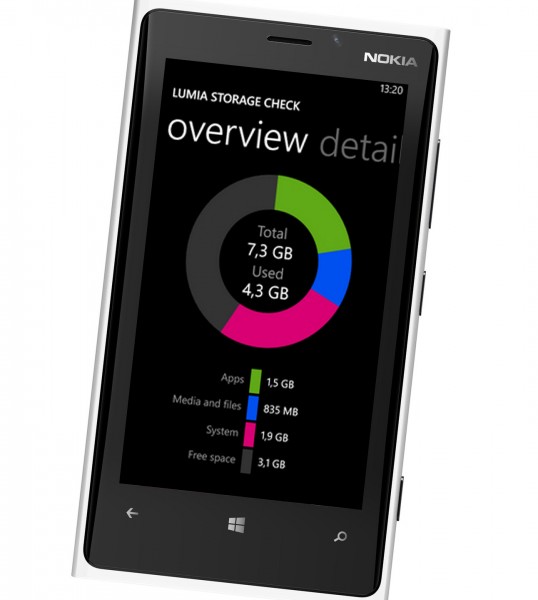
    Lumia Storage Check, which has now reached the second beta milestone, is a new iteration of the app that currently ships on Lumia smartphones (and sports the same name). Compared to the stable version, the Lumia Storage Check in beta trim also provides users with the ability to remove offline maps stored on the device (which can also be done through the settings of the Maps app) and even move the offline maps onto the microSD card to free some internal storage space.

    Even though, based on my own experience, most beta apps are quite stable, the current experimental version of Lumia Storage Check may crash after five to 10 seconds upon launching it, according to Nokia. That was not however the case when I last used the app a couple of days ago. If a new beta is released, you can upgrade and will receive a counter under the Store live tile.

    Nokia Conference is designed to make conference calls a breeze for Lumia users. The app forgoes “switching to the calendar app, remembering the ID/PIN codes, getting the right access number, switching to the phone app, making the call, and entering all the codes”. All that users need to do is tap on a single button or dictate a voice command — “conference join” — in order to join a conference call.

    The company says that Nokia Conference automatically knows which meeting will start or is currently underway, then asks users for confirmation to join and connect them. The app supports conference calls for multiple companies. Users can also manually enter the settings.

    Place Tag is a pretty cool app which is meant to enrich the photography experience on Lumia devices. The app, which can also be used as a camera lens, determines your location and displays nearby POIs (Point of Interest) on the screen, similar to HERE City Lens. Unlike the latter, Place Tag is designed to also shoot pictures and store the POIs from within the camera’s range in the photo, for which users can get a short description straight from the image.

    Play To for WP8 has been released for Lumia users who own DLNA-compatible devices. The app can be used to share multimedia content, such as music, pictures and videos, from a Lumia smartphone via the Wi-Fi network to “that new big screen TV you have or maybe just your Windows laptop and/or desktop or XBox”.

    The app was first seen on Lumia smartphones running Windows Phone 7, and now Nokia wants to bring it to its Windows Phone 8 device lineup as well. According to the Finnish company, both versions share the same functionality so don’t expect any new features just yet.

  • You can now buy Firefox OS developer preview phones

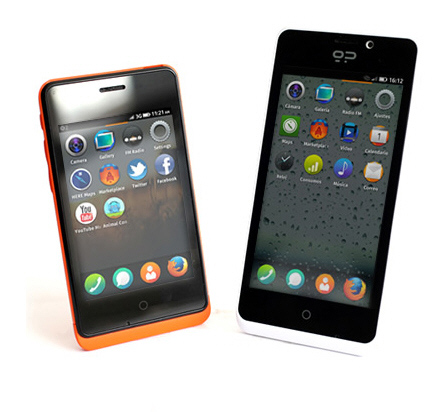
    After releasing a number of important details related to Firefox OS in mid-January, Mozilla revealed two developer preview phones, dubbed Keon and Peak. The devices are meant to provide developers with the opportunity to test and release software designed for Mozilla’s new operating system.
    At the time there was no word on pricing nor availability of either Keon or Peak. Geeksphone, the manufacturer of the two devices, however left us with a “price you could never have imagined” teaser suggesting that we shouldn’t have to  reach too deep within our pockets in order to afford either of the two. And today the moment of truth is upon us as Geeksphone officially introduces Keon and Peak for sale.

    Considering the high upfront cost that new smartphones mostly come with these days, pricing is really surprising and refreshing at the same time. Keon and Peak are available with no contract for $119 and $194, respectively. That’s simply unbelievable value for the money, especially for developers looking to release software onto a new and unproven platform.

    Keon

    Keon, which runs for $119, is the low-end Firefox OS developer preview device and comes with a 3.5-inch HVGA (320 by 480 pixels) multitouch display; 1 GHz Qualcomm Snapdragon S1 7225AB processor, 512 MB RAM; 4 GB internal storage; 3 MP back-facing camera; microSD card slot; Wi-Fi N; Bluetooth 2.1 with EDR; FM Radio; GPS; 1580 mAh battery, HSPA cellular connectivity; microUSB and the usual array of sensors.

    At the time of writing this article Keon is no longer in stock. But for $194, or just $75 more on top of Keon’s price, prospective Firefox OS developers can purchase Peak. Judging by the specs, Peak is the high-end Firefox OS developer preview phone meant to provide the platform with a boost in terms of professional-grade or resource-intensive apps.

    Peak

    Peak is available with a 4.3-inch qHD (540 by 960 pixels) IPS multitouch display; 1.2 GHz dual-core Qualcomm Snapdragon S4 8225 processor; 512 MB RAM; 4 GB internal storage; 8 MP back-facing camera and 2 MP camera on the front; microSD card slot; Wi-Fi N; Bluetooth 2.1 with EDR; FM Radio; GPS; 1800 mAh battery; HSPA cellular connectivity; microUSB and the traditional array of sensors.

    Both Keon and Peak are available to purchase at Geeksphone’s online store.

  • Nokia to announce ‘something new’ on Wednesday

    Teasers are an effective way to get us all worked up over little or no specific details. “Is that a new design?” and “Who is this for?”, accompanied by the obligatory “What is this?”, are the sort of questions we ask ourselves when dealing with them.

    One’s thing’s for certain — no matter the product, from just a picture the company behind it sure gets a huge marketing boost among tech-savvy folks. And today Nokia tries to grab our attention with a teaser of its own. Spoiler alert — it doesn’t appear to be a high-end Lumia smartphone.

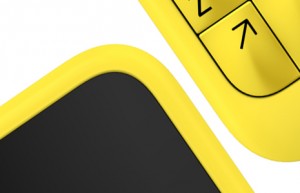
    On its blog, the Finnish manufacturer posted a picture which shows a new handset sporting physical keys. Likely the device runs the company’s low-end smartphone operating system aimed at emerging markets — Nokia Belle — and not Windows Phone 8. Microsoft is not keen on physical keyboard if current smartphones are of any indication.

    “On Wednesday morning at 7 AM GMT we will be announcing something new, followed by a Q&A session with Neil Broadley from our Mobile Phones team and a special guest”, says the Finnish manufacturer.

    From what I can tell, the device features a minimal design with rounded corners. Other than the yellow trim nothing screams outlandish here. Speculation is fun, but as Nokia says “you won’t have to wait long to find out” the details on the new handset.