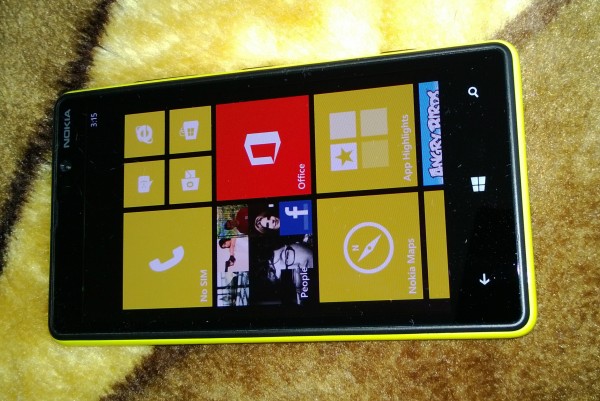
Author: Mihaita Bamburic

  • Why I love Nokia Lumia 920

    I’ll admit it — Nokia was a company I couldn’t care less about a couple of years ago. I disliked the design, the high price and the bulkiness of its high-end smartphones, which then ran Symbian. At the time the Finnish manufacturer had the accelerator pedal mashed to the floor and was heading straight on a highway to oblivion, seemingly unwilling to steer the ship in the right direction. Android and iOS were the future and Symbian was the past. Then Nokia jumped ship to Windows Phone.

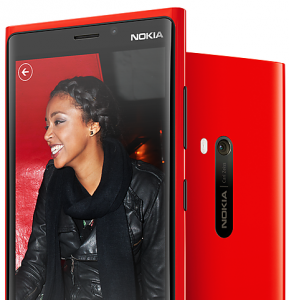
    And that made a difference. As I embraced Windows Phone as my smartphone operating system of choice something happened. Nokia became interesting and appealing to me, so much so that I even bought a Lumia 920 little more than a month ago. And, to be honest, I’d never thought that one day I would own and love a Nokia smartphone. There’s something about the Lumia 920 which feels right and makes the Finnish manufacturer fit perfectly into the Windows Phone picture.

    No review could actually tell me that I’d end up loving the Lumia 920, mostly because no review actually tells me that I’d love any device. I have to experience the Lumia 920 to fully understand it and hold the smartphone in order to bond with it. I want my smartphones to be special, I want to connect with them and feel the emptiness left once they’re not with me. The Lumia 920 ticks all those boxes.

    Some say that it’s too big and too bulky for a smartphone released in 2012 and especially so for one competing with flagships from 2013. At 10.7 mm in thickness and 185 grams the Lumia 920 certainly is not a featherweight, but more like a heavyweight boxer. It’s big, powerful and has a punch that will knock you out. Just like the Lumia 920, the heavyweight boxer has character and as we well know having character also means having a couple of flaws. I just happen not to find them impeding in using the handset.

    I’ve said this before and I will say it again — Nokia really does bring something worthwhile to the Windows Phone table. The Lumia 920 runs Windows Phone 8 and, on top of the operating system and adjacent apps, comes with a very appealing list of exclusive apps. Nokia’s HERE suite, comprised of HERE City Lens, HERE Drive+ Beta, HERE Maps and HERE Transit, is highly attractive when on the road and the other apps such as Nokia Music, Cinemagraph, Panorama and Smart Shoot, among others, make for a very rewarding user experience.

    In a weekend getaway I tested the augmented reality (HERE City Lens), maps (HERE Maps) and navigation (HERE Drive+ Beta) apps to find my way around a new town. It resulted in a very pleasant experience, certainly not one far off from what Google provides on Android or iOS. Dare I say, the HERE suite is even more compelling overall than the search giant’s offerings. I also made great use of the Smart Shoot lens which allows me to take a couple of pictures and select the best one. Sort of like burst shot mode, only with less possible results to choose from.

    Happy Snapper

    I continue to be impressed by the photo and video cameras. The former takes outstanding pictures in low-light conditions and excellent ones outdoors. Sure, there’s room for improvement like delivering more consistent results and better autofocus for outdoor shots (shooting a cityscape troubles the autofocus) but I’m genuinely impressed by what Nokia delivers in its first PureView iteration on Windows Phone. The video camera makes great use of OIS (Optical Image Stabilization) when walking down trails in the woods, producing quality content that doesn’t suffer from the effects of Parkinson’s syndrome.

    Before the Lumia 920 I dismissed wireless charging as being a tad (well, overly) gimmicky. I couldn’t grasp how it can be better than plugging in the USB cable down the bottom of the smartphone, but now I wouldn’t charge the Lumia 920 any other way. It’s very pleasant not to have any sort of cable to look out for when handling the device at night or even searching for one under the desk (I have a very small desk, so I can’t afford to have too much wires hanging around on it).

    I also take great comfort in knowing that it just works — lay the Lumia 920 on top and it charges. It’s a comfort thing and one that I’ve grown to love and appreciate. On the other hand I have yet to appreciate the very sensitive display. I know that the ability to handle the Lumia 920 using gloves is a nice selling point for folks living in very cold climates, but based on my own experience that’s not a feature that is as straightforward in practice as it is in theory.

    The Lumia 920 is a slippery phone, even in the black matte finish that mine has. Using gloves would only add to the concern of dropping it, a fear which I constantly have to live with every day. I love it and I don’t want to witness my smartphone’s sudden death at my own clumsy hands. But hey, if it can at least potentially be used with gloves who am I to complain about having the option to do so? I’m sure some folks will make use of the feature come colder temperatures (again).

    The true measure of any sort of device is the feeling that you get after it is no longer with you. For a couple of days I used a Lumia 820 review unit as my sole smartphone and, to be honest, I longed for the moment I could hold the Lumia 920 again and have it in my pants’ pockets. I missed the feeling of sliding my fingers across its screen. That, I define as a love story.

  • Set up two-step authentication for your Microsoft account on Windows Phone

    Following the lead of a number of high-profile companies like Apple, Dropbox and Google, Microsoft has finally embraced two-step authentication. Two days ago, the company unveiled the feature which, in order to “help keep your account more secure”, enables using security codes or application-specific passwords when accessing Microsoft services. Sadly, for Android and iOS users, Microsoft only offers a Windows Phone app, at this point, to generate security codes.

    The app is called Authenticator and works with both Windows Phone 8 as well as Windows Phone 7.5 (ironically, it was the app that revealed Microsoft’s plans to offer the security feature in the first place). This guide will show you how to enable two-step authentication for your Microsoft account and use Authenticator to generate security codes on your Windows Phone smartphone.

    Install Authenticator

    Before getting down to business, you have to install Authenticator. To do so, head over to the Windows Phone app store on your handset (which is known as Store inside the app list) or use the link provided above in order to find and install the app.

    Set Up Two-Step Authentication

    It is worth noting that after Microsoft enabled two-step authentication for my Outlook.com account, a verify button appeared next to my phone number and alternate email addresses. I have verified my contact information and you should do so as well. Microsoft will send you a security code, on your phone and alternate email addresses, which you must enter when requested in order to verify the contact information.

    After you have completed the aforementioned task, head over to the Security info control panel on your Microsoft account and follow the next steps:

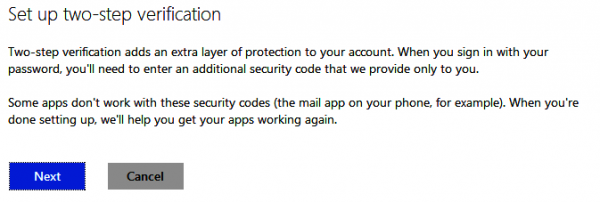
    1. Under Two-step verification, click on “Set up two-step verification”,
    2. Press Next and, finally, click on Done to complete the process.

    Depending on the app or service that you wish to access, you may be required to set up application-specific passwords. This is because security codes are not generally supported. One scenario where you may be required to use an application-specific password is with an email application like Apple’s Mail on iOS.

    You can create application-specific passwords through the App passwords panel inside Security Info.

    Also worth mentioning is that Microsoft doesn’t ask for a security code when using a trusted device. If you wish, you can remove all trusted devices by using the “Remove all the trusted devices associated with my account” option from under Trusted devices in the Security info control panel.

    Configure Authenticator

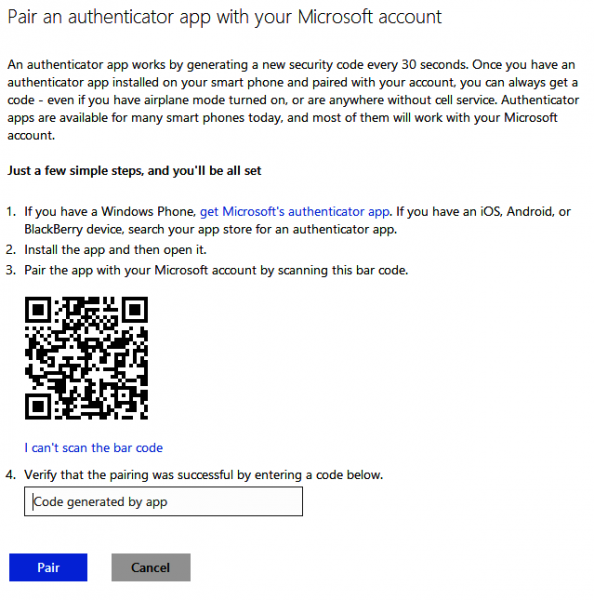
    Now that you have two-step authentication enabled for your Microsoft account you should use Authenticator to generate security codes. To do so, head over to the same Security info control panel and follow the next steps:

    1. Under Authenticator app inside Security info, click on “Set up”,
    2. Open Authenticator on your Windows Phone smartphone,
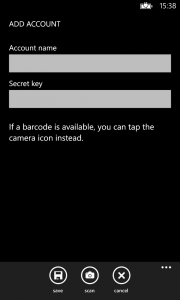
    3. Tap on the “+” icon, then tap on the camera pictogram (both are found on the bottom menu bar),
    4. Hold your device as to recognize the QR code displayed in the browser,
    5. Head over to the browser and enter the security code, that is provided by Authenticator, inside the box,
    6. Click on Pair to finish the process.

    Two-factor authentication is now enabled for your Microsoft account and you can use Authenticator to generate security codes on your Windows Phone smartphone.

    Microsoft says that you can generate security codes for two-step authentication using third-party dedicated apps available on Android, iOS and possibly BlackBerry. Similar steps should be carried out in such cases.

    credit: marekuliasz/Shutterstock

  • Samsung Galaxy S4 coming soon to Verizon

    Unveiled in mid-March, the Samsung Galaxy S4 is one of the most eagerly awaited smartphones to be sold this year. Major mobile operators across the world have already announced pre-order offers, but one big player has yet to reveal any details concerning the Galaxy S4.

    Verizon, one of the largest mobile operators worldwide and second-largest in the US, is expected to sell the Galaxy S4 in the upcoming period but, until Friday, the big red did not disclose any details concerning the date of availability.

    In a Twitter post, Verizon has finally announced that the Galaxy S4 is headed to its network and arrives in May. As you might expect, the smartphone ships with 4G LTE cellular connectivity out-of-the-box and is big red-branded.

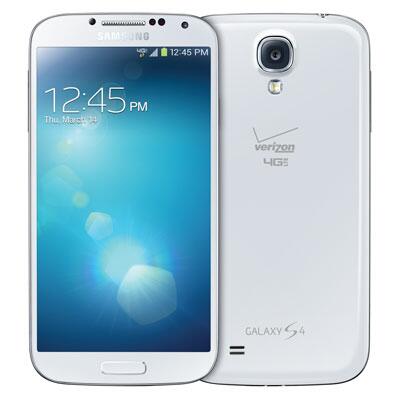
    The US mobile operator has also posted a picture of the Galaxy S4 in white trim, which shows the smartphone carrying the Verizon and 4G LTE logos on the back. There appears to be no other branding other than on the back of the device

    Verizon has also said that it will “soon” reveal more details, likely about pre-orders and the official sales date.

  • Nokia sells an encouraging 5.6 million Lumias

    Have you ever heard the saying “Better late than never”? After a string of modest (and even disappointing) quarters, Nokia’s Windows Phone bet is starting to pay off as Lumia sales finally show noticeable signs of improvement.

    In Q1 2013, the Finnish manufacturer managed to sell a not-so-shabby 5.6 million Lumia smartphones, roughly two-thirds of which are Windows Phone 8-based devices such as the Lumia 920 and Lumia 820. Lo and behold, Lumia sales even surpassed those of the low-end Asha and Symbian smartphone series, with Nokia managing to move just five million of the former and 0.5 million of the latter. Considering the price difference between Windows Phone devices and Asha and Symbian-based ones, that is impressive.

    Windows Phone Rises

    “We have areas where we are making progress, and areas where we are further increasing the focus. For example, people are responding positively to the Lumia portfolio, and our volumes are increasing quarter over quarter”, says Stephen Elop, Nokia’s CEO.

    Quarter over quarter sales of Lumia devices have increased by 27 percent from 4.4 million in Q4 2012, to 5.6 million in Q1 2013. That is impressive considering that this is the first quarter after the Winter shopping season.

    Nokia is positive about the next quarter as well. “In the second quarter 2013, supported by the wider availability of recently announced Lumia products, Nokia expects the sequential growth in Lumia unit volumes to be higher than the 27 percent sequential growth in the first quarter 2013”, says the Finnish manufacturer.

    The “recently announced Lumia products” include the Lumia 720, Lumia 520 and Lumia 620, all of which are designed to expand Nokia’s reach to a wider variety of market segments. The other two Windows Phone 8 devices in its lineup are the Lumia 920 and Lumia 820, which are aimed at the high-end and mid-range smartphone buyer, respectively.

    The average selling price of Lumia devices was EUR182 in Q1 2013, down by 5.2 percent from EUR192 in Q4 2012. The gross margin on Windows Phone 8-based Lumia smartphones is “somewhat above the overall Smart Devices gross margin of 20.7 percent”.

    But Sales of “Smart Devices” are Down

    Sales of smart devices have decreased by 49 percent year over year, from 11.9 million in Q1 2012, to 6.1 million in Q1 2013, and by eight percent quarter over quarter, from 6.6 million in Q4 2012 to 6.1 million in Q1 2013″.

    “The year-on-year decline in our Smart Devices volumes in the first quarter 2013 continued to be driven by the strong momentum of competing smartphone platforms and our portfolio transition from Symbian products to Lumia products. The decline was primarily due to lower Symbian volumes, partially offset by higher Lumia volumes”, says Nokia.

    “On a sequential basis, the decrease in our Smart Devices volumes in the first quarter 2013 was primarily due to lower Symbian volumes, partially offset by higher Lumia volumes as we started shipping the Lumia 620 in significant volumes and broadened the geographical distribution of the Lumia 920 and Lumia 820. On a geographical basis, Lumia volumes increased sequentially in all regions except for North America”, the Finnish manufacturer adds.

    Stock Market Impact

    Yesterday, before Nokia announced the Q1 2013 financial results, stock traded for $3.58 per share at market closing time. At the time of writing this article, in pre-market trading, Nokia’s stock is trading for $3.12 per share, down by 12.29 percent from yesterday, likely due to the lower overall sales of smart devices.

    Photo Credit: suphakit73/Shutterstock

  • Samsung Galaxy S4 available at Sprint for pre-order, ships by April 27

    Two days after AT&T started taking pre-orders for Samsung’s Android flagship,  US mobile operator Sprint has made the Galaxy S4 available for purchasers who wish to get their hands on the smartphone before the official sales day.

    If you pre-order a Galaxy S4 from Sprint, America’s third-largest carrier says that it will do its “best to get it to you by Saturday, April 27”. That’s three days before shipments start on AT&T. But what’s the damage on your credit card? On a two-year contract the Sprint-branded 16 GB Galaxy S4 — available in both Black Mist and White Frost — runs for $249.99, which is $50 more compared to what AT&T asks for the smartphone in the same 16GB storage trim.

    If $249.99 for the 16GB Galaxy S4 is too steep for your taste, the mobile operator offers a solution — albeit one that won’t appeal to everyone. You can “save $100 on this phone when you bring your number to Sprint on a new line of service”.

    “Galaxy S4 is packed with incredible new features that will benefit from unlimited data plans on the Sprint 4G LTE network”, says Fared Adib, Sprint’s senior vice president at Product Development. “Sprint encourages our customers to really use their smartphone to its full potential – from surfing the Web to listening to streaming music or watching YouTube videos – without worry about data caps, throttling or silly overage charges on their monthly bill. I know our customers will enjoy this device as much as I do”.

    According to the results of our BetaNews poll, 20.78 percent of respondents answer they will pre-order the Galaxy S4. A significant 56.36 percent of the voters in the poll say that they will also purchase the smartphone once official sales start, a number not including those who will pre-order the Galaxy S4.

    Only a mere 14.7 percent of respondents answered that they will not purchase the Galaxy S4 and even fewer still, 8.15 percent, are undecided on buying Samsung’s Android flagship.

  • LinkedIn releases revamped Android and iOS apps

    Popular business-oriented social network LinkedIn has unveiled new mobile apps for Android and iOS, touting a “brand new mobile phone experience, completely revamped with the general professional and everyday use case in mind”. This comes a day after LinkedIn updated its Windows Phone 8 app, with major new features.

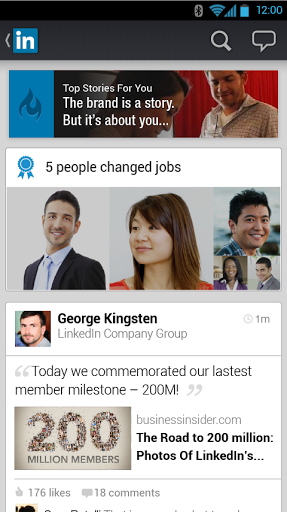
    However, unlike the Windows Phone 8 app which offers a similar user experience as before, LinkedIn for Android and iOS sports an overhauled UI (User Interface) that is both more modern as well as better looking. Gone are the darker colors of before as lighter ones take their place instead.

    “We want to make it easier for our members to quickly discover and engage with the rich professional insights being shared across LinkedIn to help them make smarter decisions from wherever they may be working”, says LinkedIn’s Tomer Cohen. “We’ve designed the new LinkedIn mobile phone app for every professional, with a richer and more engaging stream and more personalization features”.

    LinkedIn for Android and iOS is designed to provide users with “more relevant and timely professional insights” in the stream, which the social network hopes will lead to a higher level of engagement. Users can now directly comment and like on a post on LinkedIn straight from the “vibrant and visual” stream.

    The mobile apps promise a higher level of personalization through the new navigation page which can be triggered by swiping the main homepage to the right. It preloads a number of features which are “handiest on-the-go”.

    LinkedIn has also provided an interesting insight concerning its users’ locations. According to the social network, 64 percent of users reside outside of the US. That is a very important number which explains the expanded language support. LinkedIn for Android now supports Dutch, Norwegian and Turkish while its iOS counterpart also works in Dutch and Norwegian.

    LinkedIn promises that further improvements will be made to personalization options and search further down the road this year. Hopefully, LinkedIn is aware that the best move right now is to also update its apps on BlackBerry 10 and Windows Phone 8 to reflect the aforementioned changes and features.

    LinkedIn for Android is available to download from Google Play.

    LinkedIn 6.0 for iOS is available to download from Apple’s App Store.

  • Traditional authentication is outdated, but what do consumers really want to replace it with?

    Let’s face it — secure online authentication is a chore. Except for a couple of people who enjoy using very complex passwords and/or a password manager, most of us find it difficult to use a secure combination of characters for each and every website where we have an account. Two-factor authentication is also not all that comfortable to manage, requiring use of a secondary means of generating a secure code. Often that’s a token given by the bank, a text message sent by the service provider, or an app.

    Is that modern? Well, it depends on your definition of the word modern. I consider the online authentication today to merely be just a slight evolution from the methods which we have used in the last decade. That’s not to say that is a bad thing, but certainly not where visionary pictures, videos or predictions from not too long ago would have us today. We’re not using flying cars, that’s for sure, nor some wonder authentication method for that matter.

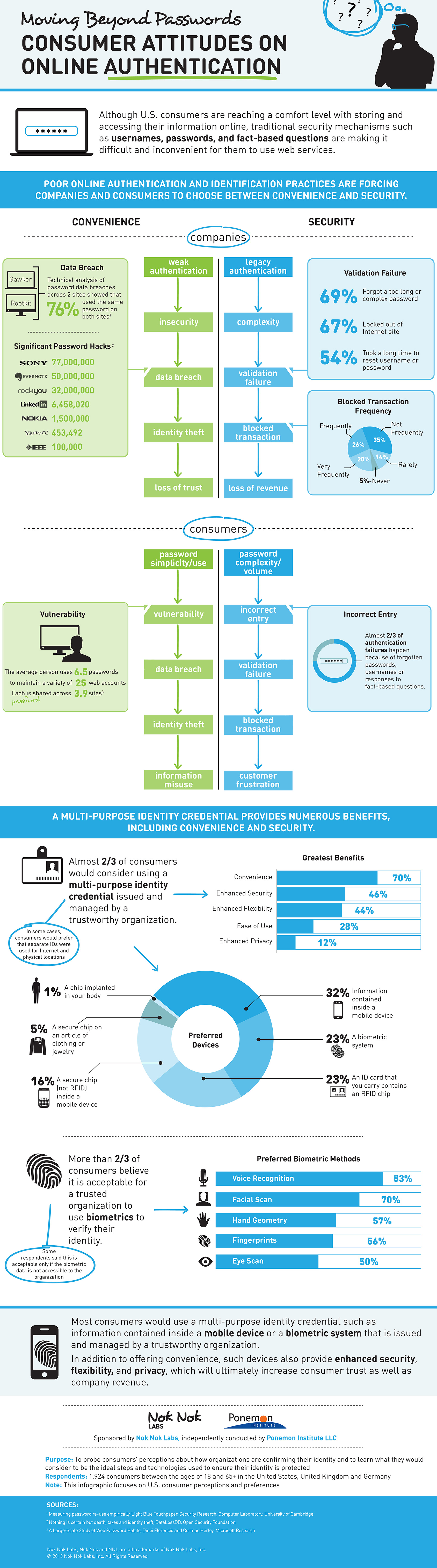
    According to a study carried out by the Ponemon Institute, which surveyed 1,924 consumers in Germany, United Kingdom and United States, two thirds of the respondents would consider using a “multi-purpose identity credential” that is issued and managed by a trustworthy organization in order to authenticate various services.

    The highest number of respondents, 32 percent that is, answered that they would prefer using “information contained inside a mobile device”. A biometric system and an ID card with an RFID chip follow, both favored by 23 percent of the respondents. The least popular method is, wait for it, a chip implanted in one’s body. Unsurprisingly, the last one got a mere 1 percent of the respondents behind it.

    Judging by the other data provided by the study, the answers above shouldn’t come as a big surprise. Only five percent of the respondents haven’t experienced authentication failures during online transactions, while 26 percent, 29 percent and 34 percent of respondents from the US, UK and Germany, respectively have experienced this issue frequently.

    Furthermore, 54 percent, 53 percent and 47 percent of the respondents from the US, UK and Germany, respectively, have said that it takes too long to reset a username or password. The same numbers, and higher, also apply to forgetting too complex or too long passwords and getting locked out of websites due to authentication failures.

    What is interesting though is that consumers don’t want the easy way out either. According to the study, 46 percent, 45 percent and 65 percent of the respondents from the US, UK and Germany have trouble trusting systems or websites that rely on passwords as the sole means of authentication.

    Slightly lower numbers, 38 percent, 37 percent and 46 percent for folks surveyed display a similar distrust towards systems or websites that do not ask the user to change the password on a frequent basis.

    After all is said and done, security is still a very serious problem with potential risks that shouldn’t be taken lightly. From a personal point of view I find it rather difficult to believe that enough consumers are actively searching for various ways in which they can protect their online accounts or other important ones.

    It’s in our nature, as tech-oriented folks, to be aware of the dangers lurking at every corner but for the most part I think the number of people who do something about it, where it matters, is quite low overall. For this reason I believe that new means of authentication and new devices designed to keep our online endeavors safe will not be adopted easily.

    Infographic Credit: Nok Nok Labs

  • Windows Blue leaks (again) — build 9369 arrives with new features

    Little over three weeks after the first Windows Blue leak, another build makes its way onto the interwebs. Windows Blue build 9369 is now available (we will not tell you where, but you can easily find it). But are you really surprised? Every time there’s a new version of Windows in development a leaked build somehow surfaces in the darker corners of the Internet. We can almost say that it’s tradition and just a matter of time before the next one arrives.

    Unlike the previous leak, Windows Blue build 9369 is only available in a 64 bit trim as far as I can tell and, depending on who is behind the leak, comes in at around 3.2 GB or 3.6 GB. There are also no telltale signs that Microsoft will name Windows Blue as Windows 8.1 further down the road, as was previously rumored. What we know, based on actual sources, is that the final name is not Windows Blue.

    The folks over at WinBeta have posted a video of Windows Blue build 9369 on YouTube, which clearly shows that Microsoft has yet to tweak the name. The operating system lists itself as Windows 8 Pro.

    Some of the apparent changes include: an app list button, so that users can go straight to the list of installed software using the mouse, the ability to sort apps based on name, installation date and most used, displaying the search query inside the Charms menu instead of redirecting to a new screen and a Company apps menu inside the System settings window, similar at a first glance to the identically named feature already available on Windows Phone 8.

    The Company apps feature, on Windows Phone 8, is designed to allow businesses to manage Windows Phone 8 smartphones and offer apps, certificates and policies, among others. It is, therefore, safe to assume that Microsoft plans to offer a similar functionality to Windows Blue users as well and narrow the gap between its two operating systems.

    In order to make it easier and smoother for users to manage files, Microsoft also added a file explorer feature, which is available in SkyDrive when using the Modern UI (User Interface). This also means that the software giant plans to further drive folks away from using the desktop and move them onto the Modern UI.

    There are also new options inside Change PC settings, meant to provide a more seamless operation for users sporting a touch-based device such as laptop or tablet.

    The latest Windows Blue build shows the direction Microsoft is heading in. Judging by what we have seen so far, that direction involves making the next operating system more user-friendly for both PC as well as tablet users and further push the Modern UI as the sole and go-to interface for basic use and productivity purposes.

    Photo Credit: Ahturner/Shutterstock

  • LinkedIn for Windows Phone 8 introduces significant new features

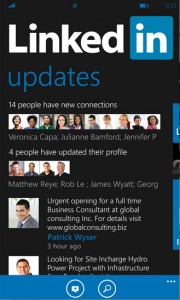
    If you are an avid LinkedIn user on Windows Phone 8 then you will certainly appreciate the latest update. The app has introduced significant improvements over its predecessor, ranging from a new live tile size, to speech recognition and expanded language support.

    New versions of LinkedIn for Windows Phone 8 don’t come often so any major update is likely to be the only one users will see in a while (a minor update for it appeared earlier this week, but without any noticeable new features or changes from the previous version other than, most likely, a couple of bug fixes and general performance enhancements). So what delights does LinkedIn 1.5 have to offer us? Let’s take a look at the changes.

    For the first time LinkedIn users can now take advantage of all three Windows Phone 8 live tile options. Users can resize the tile in wide, medium and small format, with the same support for displaying counters and connection status updates or last messages.

    Windows Phone 8 users are also able to use LinkedIn for lockscreen information. The app displays pictures for LinkedIn today in a decently-sized rectangle. Sadly, no interaction is possible other than to go straight to the story on the business-oriented social network, after tapping on the picture.

    Windows Phone 8’s speech recognition allows apps to take advantage of the feature, using voice commands to perform certain actions or open the app itself. LinkedIn has tapped into this functionality with commands like “LinkedIn: Inbox” and “LinkedIn: New status”. The names are self-explanatory.

    The final new feature introduced by LinkedIn 1.5, and certainly one that non-native English speakers will appreciate, is support for four more languages including Chinese, French, German and Spanish.

    Overall LinkedIn has added some great new features to its Windows Phone 8 app. The latest update also shows that, even though the app may sport a competent functionality, tapping into the Windows Phone 8 feature set can improve the overall experience for users. Certainly, the extra live tile size, lockscreen, speech recognition and extra languages support are very welcome indeed.

    LinkedIn 1.5 is available to download from the Windows Phone Store.

    Photo Credit: Netfalls – Remy Musser/Shutterstock

  • Microsoft announces general availability of IaaS support for Windows Azure

    Microsoft has announced the general availability of Infrastructure as a Service (IaaS) support for Windows Azure. The software giant also unveiled a couple of new features for IaaS meant to beef up the company’s cloud platform. Timing is interesting –Amazon’s AWS (Amazon Web Services) Summit kicks off in New York tomorrow.

    Windows Azure’s IaaS support introduces the Virtual Machine and Virtual Network features, and “is now live in production, backed by an enterprise SLA, supported by Microsoft Support, and is ready to use for production apps”, according to Microsoft’s Scott Guthrie.

    After officially unveiling IaaS support for the cloud platform, Bill Hilf, Microsoft’s general manager of Windows Azure Product Marketing, says that users don’t have to compromise any more. “Customers don’t want to rip and replace their current infrastructure to benefit from the cloud; they want the strengths of their on-premises investments and the flexibility of the cloud. It’s not only about Infrastructure as a Service (IaaS) or Platform as a Service (PaaS), it’s about Infrastructure Services and Platform Services and hybrid scenarios”.

    Virtual Machine and Virtual Networks

    Virtual Machine for Windows Azure is designed to give users the ability to deploy and run VMs (Virtual Machines) using Microsoft’s cloud platform, either by creating them from the image gallery (includes templates) or uploading already existent VMs.

    Windows Azure’s image gallery features templates for a couple of Microsoft products, including Windows Server 2012, Windows Server 2008 R2 and SQL Server among others, and Linux-based ones such as CentOS, SUSE Linux and Ubuntu. The virtualization service used in Windows Azure is, unsurprisingly, Hyper-V which is also available as a built-in feature in Windows Server 2012.

    With Virtual Networks for Windows Azure, the cloud platform’s users can take advantage of a couple of features. Users can create a VPN (Virtual Private Network) with support for stable IP addresses “even across hardware failures”, extend on-premises network to Windows Azure and treat VMs as part of the organization (supported hardware only includes Cisco and Juniper), configure custom DNS servers and deploy VMs into a virtual network.

    Other Changes

    Guthrie also revealed that Windows Azure now supports two new VM size options, atop of the currently available five. The first one is a four-core with 28 GB of RAM configuration (dubbed “A6”) and the second is an eight-core with 56 GB of RAM setup (dubbed “A7”), both of which can be selected from the configuration menu for VMs.

    Other enhancements include an increased default OS partition size (127 GB from the previous 30 GB), the option to modify the name of the Administrator account and the enabling of PowerShell out-of-the-box.

    New Pricing Strategy

    Citing customer request for “low price and good performance”, Hilf touted Microsoft’s commitment to match Amazon’s AWS in price “for commodity services such as compute, storage and bandwidth”. On price reductions, Hilf also says that Virtual Machines and Cloud Services now run for 21 percent to 33 percent less than before, with general availability.

    The 21 percent decrease in price is for Windows Azure Virtual Machines (IaaS) and the 33 percent decrease is for “solutions deployed using our Windows Azure Cloud Services (PaaS) model”. According to Guthrie, the new prices match those of “Amazon’s on-demand VM pricing for both Windows and Linux VMs”.

    Hourly rates for the A7 setup, detailed above, come in at $2.04 per hour for a Windows VM and $1.64 per hour for a Linux VM. For the A6 configuration, prices go down to $1.02 per hour for the Windows VM and $0.82 per hour for the Linux VM. By contrast, the cheapest setup, dubbed ExtraSmall, features a shared number of cores and 768 MB of RAM and runs for $0.02 per hour for both Windows VMs and Linux VMs.

    “We previously quoted prices of 11.5 cents per hour for single core systems (and similar for other core configurations) and then discounted those for the preview (the discounted price was 8 cents for both Windows and Linux). With today’s announcements we are dropping the price on Windows from 11.5 to 9 cents — and the Linux price to 6 cents”, says Guthrie.

    Guthrie also says that users can “take advantage of our 6 Month and 12 Month commitment plans to obtain significant discounts on the standard pay as you go rates. With a commitment plan you commit to spend a certain amount of money each month and in return we give you a discount on any Windows Azure resource you use that money on (and the more money you commit to use the bigger the discount we give)”.

    Photo Credit: Novelo/Shutterstock

  • Microsoft updates Skype for Windows Phone 8, strips away preview label

    Microsoft has updated Skype for Windows Phone 8, dropping the preview label associated with the app. Among the most noteworthy improvements, the stable version of the popular voice, video and text chatting application brings a change in message notifications and a number of bug fixes meant to improve the stability and overall functionality.

    Skype for Windows Phone 8, which is now at version 2.5, introduces a new default setting for message notifications. After Microsoft announced that Messenger will be dropped and replaced with Skype, message notifications for Messenger friends are now enabled straight off the bat, likely to ensure a smooth transition to the new service.

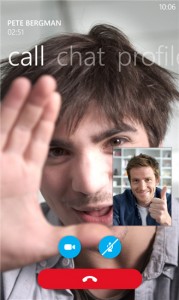
    The latest version of Skype for Windows Phone 8 also fixes a number of bugs related to calling, notifications, stability and video chatting. The app now enables the video call button right after accepting a contact request and message notifications should display contact names correctly at all times.

    Skype is also stable upon starting and signing in using a Microsoft account and received video calls and local video previews are displayed correctly.

    There is also a known issue related to the HTC Windows Phone 8X. The microphone is muted during voice calls for users who have yet to update their smartphone to the latest available software.

    Skype 2.5 is available to download from the Windows Phone Store.

  • Google reveals Glass specs and releases companion app

    Google has changed many aspects of our mundane digital lives including how we search online, use an email service, communicate with folks around the world, and interact with our mobile devices. Now the company even wants to change how we talk about glasses.

    Who could have imagined that in 2013 we would be discussing the hardware specifications of a pair of spectacles? Before Google Glass this was unimaginable, but as the search giant has just released the specs of its specs, things just got real. So what is the search giant’s forthcoming device packing?

    Let’s talk about the display first. Google Glass comes with a high resolution panel which the company says is the “equivalent of a 25 inch high definition screen from eight feet away”.

    The device features a 5 MP camera that is capable of 720p video recording and sports adjustable nosepads and a durable frame that is designed to fit “any face”. There are also “extra nosepads in two sizes”.

    Google Glass comes with 16 GB of internal storage, 12 GB of which are user-accessible and “synced with Google cloud storage”. Presumably that means owners can access and upload files from the cloud using their smart glasses.

    In terms of audio, Google Glass features a “bone conduction transducer”, which basically means that sound is conducted to the inner ear through the bones of the skull. This is certainly not your run of the mill pair of glasses, that’s for certain.

    On the connectivity front, Google Glass packs Wi-Fi 802.11 b/g and Bluetooth. It is worth noting that the former implies speeds of up to 54 Mbps, nowhere near as fast as the chipset inside a modern day smartphone, tablet or laptop, for instance.

    The battery should last around an entire day with typical usage, but Google says that using Hangouts or recording video might sip more power and make the battery life significantly shorter. To top things off, Google Glass comes with a microUSB cable and adjacent charger.

    On the subject of charging Google Glass, the company says: “While there are thousands of Micro USB chargers out there, Glass is designed and tested with the included charger in mind. Use it and preserve long and prosperous Glass use”.

    You might imagine a smart device like this needs some sort of app to control it. And it does. The companion app is called MyGlass and is available to download from Google Play now.

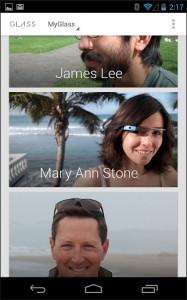
    MyGlass allows users to “configure and manage your Glass device” through a Google Now-like UI (User Interface). Judging by the provided screenshots, the app works with Google+ and Gmail, as well as other Google services.

    Google is testing its sense of humor with the description of MyGlass. The company says: “If you don’t have Glass, then downloading this will be a waste of time. Sorry about that. But if you swipe the screenshots to the right you’ll see there’s a picture of a puppy in pajamas. So not a total waste of time after all”.

  • Samsung Galaxy S4 available at AT&T for pre-order, ships April 30

    Little under three weeks ago, AT&T revealed that it would be offering the Galaxy S4 for pre-order starting April 16. And today Samsung’s latest Android flagship is indeed available at the US mobile operator for those who wish to purchase the smartphone before the official sales start.

    What’s the damage? Similar to its predecessor, on a two-year contract with “qualifying voice and data plans”, the Galaxy S4 in 16 GB storage trim can be pre-ordered for $199.99. Should you choose to go with AT&T’s one-year contract, the same smartphone runs for $449.99, again with “qualifying voice and data plans”.

    AT&T also offers the 16GB Galaxy S4 on a “month to month” plan for $639.99. Available color options, for all plans, include White Frost and Black Mist. AT&T says that the smartphone ships on April 30, presumably the date when sales officially start.

    At the time of writing this article the 32GB Galaxy S4 is not yet available for pre-order. AT&T said this model runs for $249.99 on a two-year contract, $50 more than the 16GB version.

    According to the results of the BetaNews poll, 20.77 percent of respondents say they will pre-order the Galaxy S4. A whopping 56.37 percent of the voters in the poll answered that they will also purchase the smartphone after it is available, a number not including those who will pre-order the Galaxy S4.

    By contrast, only 14.7 percent of respondents answered that they will not purchase the Galaxy S4 and even fewer, 8.15 percent, are on the fence concerning the acquisition.

  • Nokia Lumia 820 review

    If you are in the market for a mid-range Windows Phone 8 device then the Nokia Lumia 820 should definitely make your shortlist. The smartphone is affordable, fast, responsive, looks nice and comes with the Finnish manufacturer’s exclusive collection of enticing apps. Users can even personalize the appearance of the Lumia 820 by switching between different back covers of attractive colors.

    In a number of ways, the Lumia 820 is closer to high-end rather than mid-range Windows Phone 8 devices. The smartphone comes with the same processor as the Lumia 920 (which explains the speed part), features support for wireless charging through optional back plates and sports an AMOLED display where black is really black and not a shade of gray. But, the Lumia 820 is not a scaled down version of the bigger Lumia 920 or any other high-end Windows Phone 8 handset.

    The Specs

    The Lumia 820 comes with a 4.3-inch AMOLED display with ClearBlack technology, resolution of 480 by 800 and 217 pixels per inch density. A 1.5 GHz dual-core Qualcomm Snapdragon S4 processor, 1GB of RAM and a 1650 mAh battery power the smartphone.

    Other specs include 8GB of internal storage; microSD card slot; 8.7 MP back-facing camera with 1080p video recording; 0.3 MP front-facing camera with 480p video recording; USB 2.0; Bluetooth 3.0; Wi-Fi 802.11 a/b/g/n; NFC; 4G LTE; magnetometer and A-GPS as the most noteworthy.

    The Lumia 820 comes in at 123.8 x 68.5 x 9.9 mm and 160 grams.

    Build Quality and Handling

    Similar to other Windows Phone 8 handsets in Nokia’s lineup, the Lumia 820 comes with an all-glass front panel and polycarbonate backside. Like I previously mentioned the back panel is interchangeable, and comes in seven different colors: cyan, purple, red, white and yellow as glossy and gray and black as matte finishes.

    Needless to say, there’s a back panel for (almost) everyone’s taste. If you still aren’t happy enough, Nokia even provides a 3D printing development kit for the Lumia 820, which delivers complete customization albeit at a cost.

    The Lumia 820 that I received for this review comes with the glossy yellow cover. The good part is that the color and the finish mask any imperfections very well, and there is the possibility of replacing the back panel to get rid of all the wear should it occur. Also, the yellow cover really makes the Lumia 820 stand out in a crowd.

    The downside with having a glossy finish on the back, and this holds true for every handset that I have tested, is that the smartphone can get very slippery and is more prone to drops. A matte finish partially solves the problem, albeit Nokia’s respective coatings are still somewhat slippery.

    The back panel on the Lumia 820 flexes under pressure, something that is not immediately noticeable unless a higher pressure is applied. That said, the Lumia 820 is well built and gives the impression that it can withstand a fair amount of abuse. And, being quite small, the Lumia 820 is also easy to handle and use with one hand.

    The weight is not as substantial as the Lumia 920 for instance, although after using Nokia’s flagship for a while nothing really is heavy anymore. At 160 grams, though, the 820 is far from being the lightest smartphone around, which is something to consider for some folks.

    Generally speaking the Lumia 820 does well in the design department. It’s a fairly standard approach with rounded corners, non-tapered edges and significant thickness. But phone lags behind its larger brother, the Lumia 920, or the HTC Windows Phone 8X in this regard.

    The Display

    As I mentioned in the specs, the Lumia 820 comes with a 4.3-inch AMOLED display with a resolution of 480 by 800 and a 217 ppi density. There are two notable downsides here: the resolution and, therefore, the pixel density.

    If you are used to looking at a display with a 720p resolution (720 by 1280) or higher, the panel on the Lumia 820 will look underwhelming by comparison. Text is not as sharp as it should be, easy to spot when looking through the app list or the Settings menu. A similar impression is given when viewing web pages in Internet Explorer.

    But there are good parts to the Lumia 820’s display. Colors pop and appear vibrant, something which is highly noticeable when holding the handset next to the Lumia 920. That is in part due to the AMOLED technology and the software calibration performed by Nokia. All in all, except the low resolution, the display on the Lumia 820 is decent.

    Performance and Battery Life

    Due to the 1.5 GHz dual-core Qualcomm Snapdragon processor and the 1GB of RAM, the Lumia 820 comes with plenty of power. Performance is good across the board, although I have noticed a couple of hiccups here and there likely due to some software glitches.

    Windows Phone 8 is very responsive, fast and fluid, a trait that is common among similar devices. Browsing speeds are also good and double tap to zoom performs great with almost instant text refresh. If you care about such things, the Lumia 820 got a score of 910.9 ms in SunSpider, version 0.9.1. That’s one of the highest scores attainable on a smartphone today.

    What about battery life? During my testing, with brightness set on auto, two email accounts, Facebook, LinkedIn and Twitter syncing in the background, mobile data and Wi-Fi always enabled, some calls and texts and an overall medium use, the battery on the Lumia 820 got me through the day and even into the next one. With light usage, I saw around 30 hours of battery life but I’m certain your experience may vary with a different usage pattern.

    Hardware Extras

    Just like the Lumia 920, the Lumia 820 features support for wireless charging and comes with a display that can be operated using gloves. While the former may require purchasing a new part (the back panel in this case), the latter is available out-of-the-box. You’ll still need gloves, obviously.

    I have doubts when it comes to the benefits of the ultra-sensitive display. Sure it’s nice to be able to use the smartphone with gloves, but you’d have to wear thinner and grippier gloves to operate the display well enough and, obviously, hold the smartphone. To me, that’s just a nice feature that I’ll likely never use as it’s quite difficult to take out the smartphone from inside my pants’ pockets using gloves.

    The wireless charging feature is more useful more of the time. I have a Nokia wireless charging pillow, Fatboy-branded, which I use to top the battery on my Lumia 920. Sadly, I couldn’t test this feature on the Lumia 820 as the back panel doesn’t support wireless charging. That said, it should work just as on any other compatible smartphone — just place it on top and it charges.

    It is worth noting that the 8GB of internal storage runs out pretty quickly when shooting video, snapping pics or installing apps. A microSD card is supported and should be acquired. The Lumia 820 can house microSD cards up to 64GB in size, which should cover even the most demanding users’ needs.

    The Cameras

    The Lumia 820 comes with an 8.7 MP back-facing camera, similar in count to the one on the Lumia 920, but without the Nokia PureView branding. That means no tricked out OIS (Optical Image Stabilization) or impressive low-light performance.

    Pictures are of decent quality, although they do not impress overall. The shots feature a decent level of detail, though not up to par with photos shot with the Lumia 920, for instance. Also, under low-light, the camera makes too much use of flash, which makes pictures look overexposed in the focus area, but underexposed otherwise.

    The video camera also captures decent videos, but like previously mentioned without OIS. That means videos appear slightly shaky when you move. By contrast the Lumia 920 fares better in this regard. The camera also adapts slower than it should to light changes (the Lumia 920 again fares better). Sound is decent overall, but is high-pitched. By contrast the Lumia 920 delivers a more muffled sound.

    For a mid-range device, generally speaking both the photos and videos produced with the Lumia 820 are decent. If you are not a photography enthusiast this smartphone’s back-facing camera should suffice most of the time. About the 0.3 MP front-facing camera, let’s just say that it’s there and leave it at that. The low quality of the latter is to be expected considering the megapixel count.

    It is worth noting that the Lumia 820 review unit that I have comes with Windows Phone version 8.0.10211.204 and firmware version 1232.5957.1308.0001, both latest available at the time of writing this article. Nokia may tweak the camera software in future releases, so your experience can vary depending on the firmware.

    Software Features

    In the software department, the Lumia 820 offers pretty much the same apps and features as the 920. The only apparent difference, and this may boil down to this particular software version, is the more restrictive screen time-out intervals — the Lumia 820 tops at five minutes, while the 920’s display can be kept on until the battery runs out. Otherwise, you’re looking at the same level of software equipment.

    You can read my comparison between the Windows Phone 8X and the Lumia 920 as well as my Lumia 920 first-impressions review for the scoop on some of the most important Nokia-branded apps.

    Needless to say you will not be disappointed by the Nokia collection inside Windows Phone’s app store. There are plenty of useful apps ranging from maps, navigation, photo editing, games, weather, sports, shopping to social networking (Nokia’s Foursquare app for instance).

    Price

    This one is a tough nut to crack.

    In Europe, the Lumia 820 is available at roughly the same price as the Windows Phone 8X, when purchased off-contract. The latter, however, is HTC’s Windows Phone flagship and features better hardware specifications, albeit lesser software prowess. You’ll have to choose which one really matters to you: hardware or software. If the latter is the case then the Lumia 820 is best, otherwise go for the Windows Phone 8X.

    In the United States, for instance, the Lumia 820 can be had with no upfront cost upon signing a two-year contract with AT&T. Verizon, which sells the Lumia 822 — a branded version of the Lumia 820 — also offers the smartphone for free. At this price-point the Lumia 820 and its Lumia 822 sibling offer unbeatable value for the money in the Windows Phone realm.

    But, if you’re on AT&T and plan on staying there for another two years I advise you to pony up for the Lumia 920. It runs for $99.99 on a two-year contract and offers more bang for the buck: bigger and higher resolution screen, better cameras, better build quality and, dare I say, better looks (I know that is subjective).

    The Bottom Line

    Nokia really improves the Windows Phone 8 experience with the Lumia lineup. The added apps bring real value to the mix, something that other manufacturers should pay attention to even in mid-range to low-end market. The Lumia 820 also never once felt underpowered or out of its element. I appreciate the extra dose of excitement brought by the yellow trim and the other colorful back plates, which almost makes me regret getting a Lumia 920 in boring black.

    The Lumia 820 is likely the best mid-range Windows Phone device currently available. The only things that really let it down are the average back-facing camera and low-resolution display, the latter of which is easily noticeable more of the time than the former. If you are willing to put up with these two shortcomings, the Lumia 820 can pretty much do everything that the Lumia 920 does only at a lower price-point.

    Photo Credits: Mihaita Bamburic

  • gMaps for Windows Phone features updates to Driver Mode, Latitude and Street View

    Even though Google has yet to release an official Google Maps app for Windows Phone, third party developers already offer a number of competent alternatives. One of the most popular ones, and my personal favorite, is gMaps which comes with a comprehensive feature set and, bar its name, could even pass as the real deal.
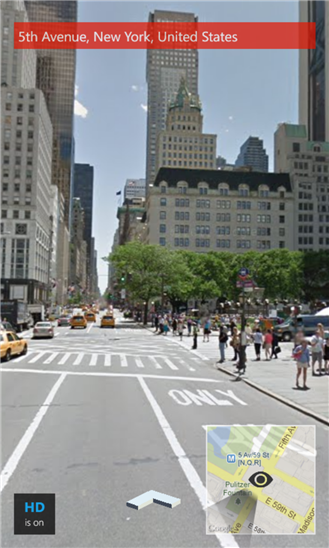
    Today, DreamTeam Mobile, the team of developers behind gMaps, announced a new update to the popular Google Maps client. The app now touts further improvements for Driver Mode, Latitude and Street View. Let’s go through each, one by one, and see what changed.

    Driver Mode

    The gMaps app, which is now at version 2.1, allows users to enable or disable Driver Mode simply by tapping on the location. When the functionality is active gMaps displays a small black car and when it is disabled the app shows a red arrow.

    When enabled, Driver Mode now also positions the location of the user towards the bottom of the screen as to display more of the map ahead. There are also a couple of bug fixes related to this functionality, including clipped objects/route and “proper rotation of the map pushpins and other objects”.

    Latitude

    By contrast, Latitude in gMaps has undergone less noticeable improvements. According to the team of developers, the only change relates to a decrease in mobile data sent by the app to the Latitude backend. This will likely be felt by users when roaming or outside of Wi-Fi coverage.

    Street View

    gMaps now comes with support for “full 360-degree panoramic Street View” and the ability to move around when using the feature, with the help of navigational arrows. The app also provides the option to enable high quality (HQ) tiles, which “makes panoramas just great” according to the developers.

    gMaps is available to download from the Windows Phone Store. The app is free and ad-supported. There is also a paid version which runs for $2.49, but forgoes ads.

  • iPhone 5 goes on sale at T-Mobile

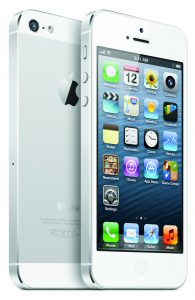
    Little over two weeks ago, with much fanfare, T-Mobile announced that the iPhone 5 officially arrives in its smartphone portfolio. And, today, after a week of pre-orders, the Apple-branded handset finally goes on sale at the fourth-largest US mobile operator.

    T-Mobile is the last of the four major mobile networks in the US to get the iPhone 5, after AT&T, Verizon and Sprint. Also, the iPhone 5 is the first fruit-branded smartphone to officially reach the “un-carrier” — as T-Mobile likes to call itself — little short of six years after the first iteration came to market.

    This is a big moment for the mobile operator and Apple, but more so for T-Mobile which has announced that the iPhone 5, in both color choices — white and black — is available for the lowest upfront cost at any of the four major carriers in the US. Furthermore, unlike other major players, T-Mobile automatically lowers the total monthly fees after the smartphone is paid for, subtracting the cost of the installments.

    When purchased alongside the Simple Choice Plan, the 16 GB iPhone 5 runs prospective customers $99.99 upfront and $20 per month over the course of two years. For the 32 GB and 64 GB versions of the iPhone 5, customers have to shell out $100 and $200 more, respectively, upfront with the monthly fees remaining unchanged.

    T-Mobile also provides a trade-in offer, which eliminates the upfront cost for the iPhone 5 if customers hand over an iPhone 4 or iPhone 4S. They can also get up to $120 in credit, depending on the condition of the device that is traded-in.

    Prospective buyers can purchase the iPhone 5 outright at $579.99, $679.99 and $779.99 for the 16 GB, 32 GB and 64 GB versions, respectively. T-Mobile’s pricing is $70 lower than Apple charges for the iPhone 5, off-contract, in each of the three storage trims.

    T-Mobile also offers the iPhone 4, in white and black, with 8 GB of internal storage for $18 upfront and 18 per month over the course of two years or $450 outright. The iPhone 4S is available as well, in the same traditional color trims, with 16 GB of internal storage for $69 upfront and $20 per month for two years or $549.99 outright.

  • Twitter expands Trends in 160 more locations

    If something really matters on Twitter then it’s on Trends. The little card displayed to the left of the tweets feed in the browser (or inside a tab in the mobile app) shows ten topics that have managed to come out on top as most relevant to worldwide users.
    In order to get even more spooky, Twitter even offers something called “tailored Trends” which delivers a more personal list “based on who you follow and your location”. But if you don’t want to use the feature, you can get trends only for a specific location, an option which Twitter has expanded to include 160 more places worldwide.

    Twitter users are now able to also choose Belgium, Greece, Norway, Poland, Portugal and Ukraine, as well as in excess of 130 new cities worldwide, in countries that are already supported in Trends, to get their dose of trending topics for a certain location.

    Just head over to the Trends card, click on “Change” and choose your preferred location to get started. If you don’t like it, you can always click on “Get tailored Trends” to go back to the standard way of viewing the Trends.

    Photo Credit: Julien Tromeur/Shutterstock

  • Nokia releases new software updates for Lumia 920, 820 and 620

    Nokia has released new software updates for three Windows Phone devices, the Lumia 920, Lumia 820 and Lumia 620. This comes four weeks after the Finnish smartphone maker announced the new firmwares and detailed the included changes.

    The software updates will roll out in stages over “the coming weeks” and feature different improvements and bug fixes depending on the device. The Lumia 920 and Lumia 820 get the “1232.5957.1308.00xx” firmware while the Lumia 620 gets the “1030.6407.1308.00xx” update.

    For the Lumia 920 and Lumia 820 the software update brings improvements for the adjustments of automatic display brightness, a bug fix of intermittent screen blanking during calls and general enhancements for performance and stability. I can confirm that the “1232.5957.1308.00xx” firmware is already available for the Lumia 820, while my Lumia 920 came with it out-of-the-box.

    The new software update for the Lumia 620 touts enhanced touch functionality with “corrections in multi-touch actions”, improved voice quality when using Bluetooth headsets that feature support for echo/noise suppression, improved camera performance “with corrected exposure when flash is used in bright light conditions” and general enhancements for the “system stability, performance and usability”.

  • Samsung announces two Galaxy Mega smartphones in 5.8 and 6.3-inch trim

    Be prepared to invest in some larger pants. Samsung announced two new smartphones today, part of the company’s Android lineup. Both devices bear the Galaxy Mega moniker, but one comes with a fairly generous 6.3-inch display while the other features a smaller 5.8-inch screen.

    There are other differences as well. The Galaxy Mega 6.3 (yes, that’s its real name) comes with a 6.3-inch TFT display with a resolution of 720 by 1280, while the Galaxy Mega 5.8 sports a 5.8-inch TFT screen with a resolution of 540 by 960. Also, the former is powered by a 1.7 GHz dual-core “AP” processor while the latter is powered by a 1.4 GHz dual-core “AP” processor.

    Both feature 1.5 GB of RAM and microSD card slots. The Galaxy Mega 6.3 will ship in 8GB and 16GB storage trims while its smaller brother, the Galaxy Mega 5.8, will only be available in a single version with 8GB of internal storage.

    Also, the Galaxy Mega 6.3 features a large 3,200 mAh battery while the Galaxy Mega 5.8 only has a 2,600 mAh battery to keep it going. The former supports 4G LTE and Wi-Fi 802.11 a/b/g/n/ac while the latter is restricted to the lesser HSPA+ and Wi-Fi 802.11 a/b/g/n speeds. The usual array of sensors is included.

    Both the Galaxy Mega 6.3 and the Galaxy Mega 5.8 come with an 8 MP back-facing camera and a 1.9 MP front-facing shooter. The typical camera features are present, including Beauty Face, Best Photo, Best Face, Drama or Continous shot.

    The Galaxy Mega 6.3 comes in at 167.6 x 88 x 8.0 mm and 199 grams and the Galaxy Mega 5.8 measures 162.6 x 82.4 x 9.0 mm and weighs 182 grams.

    Both smartphones run Android 4.2 Jelly Bean alongside Samsung’s usual add-ons. That means users can take advantage of Google’s Gmail, Maps, Navigation, Talk or YouTube as well as Samsung’s Air View, ChatON, Link, Multi Window, Pop Up Play, S Travel, S Voice or WatchON.

    Samsung says that the Galaxy Mega will be available from May in Europe and Russia, with the devices to be rolled out globally in stages. Pricing is said to be market-dependent.

  • How to set up two-factor authentication for your Google account on Windows Phone

    Enabling two-factor authentication for a Google account is an effective security measure against unauthorized access. It adds an extra layer of protection by requiring users to enter an application-specific password or security code in order to gain access to various Google services. For this second part the company says users will need an Android, BlackBerry or iOS handset. But what about generating security codes on Windows Phone? Surely, there has to be a way.

    And there is. Microsoft has released an app called Authenticator which allows Windows Phone users to generate security codes for two-factor authentication. And, because it “implements industry-standard security code generation”, the app supports Microsoft as well as Google accounts. The only question is: How to set it up for the latter?

    First of all you need Authenticator installed on your Windows Phone handset. To do so, head over to the app store (known as Store in the app list) or follow the link provided above to find and install the app.

    If you have two-factor authentication already enabled you can skip the next part and head straight to “Configure Authenticator”.

    Set Up Two-Factor Authentication

    If you have not enabled two-factor authentication just yet, you can do so by heading to the Security panel in your Google account options. There you have to click on Settings for “2-step verification”, enter your password and follow the next steps:

    1. Click on “Start setup”,
    2. Enter your phone number,
    3. Click on “Send code”,
    4. Enter the security code received via text messaging on your handset,
    5. Click on “Next” to verify and proceed to the next page,
    6. Choose whether to trust the device you are using (default) or not, then click on “Next”,
    7. Finally, click on “Confirm” to complete the process.

    You will receive a prompt asking you whether to create an application-specific password now or later. You should choose the latter at this point, as you can always create one whenever you need it. Finally, press “Ok” to dismiss the last prompt.

    If you have followed every step correctly, you will see a “Setup complete. 2-step verification has been turned on for this account.” message highlighted in yellow, on the upper half of the web page.

    Configure Authenticator

    Now that two-factor authentication is enabled, let’s proceed to setting up Authenticator to generate security codes for your Google account. You have to head over to the Security panel in the Google account options and click on Settings for “2-step verification”. Then follow the next steps:

    1. To the right of “Mobile application”, click on Android, iPhone or BlackBerry. I recommend either of the first two, as both allow you to scan a QR code, which eases the process, whereas the third option does not,
    2. Open Authenticator on your Windows Phone handset,
    3. Tap on the “+” icon then tap on the camera pictogram (both are found on the bottom menu bar),
    4. Hold your device as to recognize the QR code displayed in the browser,
    5. Head to the browser and enter the security code, that is provided by Authenticator, in the “Code” box,
    6. Click on “Verify and save” then press “Ok” to finish.

    You can now use Authenticator to generate security codes for two-step authentication on Windows Phone.

    Photo Credit: Jirsak/Shutterstock